
[ This article was first published in the July, 2011, issue of
Larry’s Final Cut Pro Newsletter. Click here to subscribe. ]
Fiver Löcker asks:
How do I work with proxy media?
Larry replies: This is tricky, because the Help files don’t detail this process. But it is actually very simple.
Proxies are transcoded (converted) copies of your master files. They use ProRes 422 Proxy and are at 1/4 the size of the original. For instance, here the original ProRes 422 file for this Youth Culture clip is 238.3 MB in size.
When it gets transcoded to a Proxy, the size plummets to 19 MB. The quality is not as good, but this can save a lot of space while you are doing the rough cut.

Here’s the overview of working with proxies:
Here are the details.
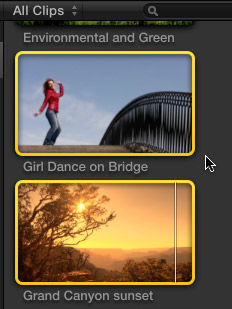
1. Assuming you did not create Proxy media when you first imported your clips, select the clip(s) for which you want to create proxies.
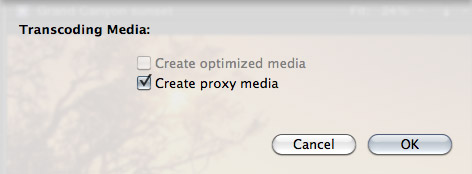
2. Select File > Transcode media. Then, in the resulting dialog window, check Proxy media.
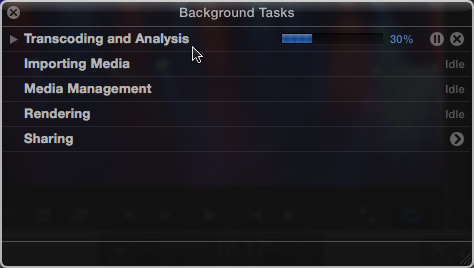
3. Depending upon the number and length of the media you selected, this can take some time, use the Background Task window (Cmd+9) to monitor progress.
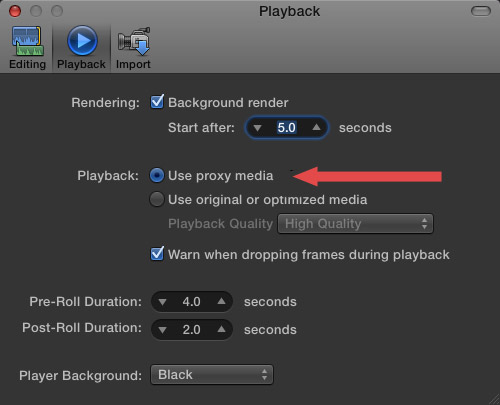
4. Once proxies are created, go to Final Cut Pro > Preferences > Playback (Cmd+,) and change the playback option to “Use Proxy Media.”
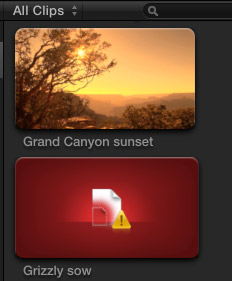
All media that has proxies, will automatically switch and be displayed (top image). Any media that doesn’t have proxies will display the missing media icon (bottom image).
5. To switch back to high-quality images, return to Preferences and change the playback setting to “Use original or optimized media.”
Proxy files are stored in their own folder inside Final Cut Events > [ Event name ] > Transcoded Media > Proxy Media.

2,000 Video Training Titles
Edit smarter with Larry Jordan. Available in our store.
Access over 2,000 on-demand video editing courses. Become a member of our Video Training Library today!
Subscribe to Larry's FREE weekly newsletter and
save 10%
on your first purchase.

91 Responses to FCP X: Working With Proxy Media
← Older Comments Newer Comments →-
 FurryToes says:
November 10, 2012 at 6:52 pm
-
 Edgar Hugo says:
November 18, 2012 at 3:19 pm
-
 Tom Parker says:
November 18, 2012 at 9:07 pm
-
 Peet says:
November 25, 2012 at 10:10 am
-
 Steve Rowland says:
December 16, 2012 at 3:38 pm
-
 Richard says:
January 28, 2013 at 9:42 pm
-
 Ed Kulis says:
January 29, 2013 at 8:03 am
-
 Ed Kulis says:
January 29, 2013 at 8:13 am
-
 Stacey K. Black says:
March 28, 2013 at 9:40 am
-
 Tom Parker says:
March 28, 2013 at 10:06 pm
← Older Comments Newer Comments →Yes, looks like you’re right. I wasn’t aware that you got proxy output when rendering while in proxy mode. And interpreting comments above, I still wasn’t aware of that 😉
It’s not the behavior I would expect and I couldn’t find it documented. But that looks to be the case.
That’s not correct. What you describe will happen only if you export with the actual settings (meaning what you set in the playing preferences). If you change that to Prores 442 you will get just that.
Edgar, that’s incorrect. That only changes the output format. It will output ProRes 422 but will use the lower res proxy footage in the timeline to do it. Try a very sharp HD shot, output to ProRes 422 using both the Proxy and Optimized playback setting. Both will output a 1920 x 1080 image. The proxy footage, when compared side by side, is visibly degraded.
Well, I’ve different experience. On SL with 6G ram I worked quite ok in FCPx 10.0.4. Now I am on ML with same system, same FCPx, however I can see ‘hiccups’. I’ve MacBook white (2009, 2.13Ghz Core 2 Duo). There’s NO new filesystem in ML. Is still HFS as before (even I want create new on diff HDD offered nothing new).
I think my issue is a) only 2 cpus b) ML is simply putting some background load (alltogether ~10% in idle with FF & Adium).
I am considering 10.0.6 as it should support background GPU rendering http://support.apple.com/kb/HT4589
I’m trying to edit a 5 camera shoot in FCPX – -got it all in sync (using Plural Eyes 3) – -but playback is sluggish-
made proxy media, switched playback preferences to “play proxy media” —
but not happening.
all the files are in the FC Events / Transcoded Meda folder – -but somehow the projects are not reading them
I assume I am missing something small — anyone got an idea?
thanks,
steve
If I wanted my original media OFF my laptop, would a USB 3 SSD be fast enough for FCP to read from or would I need a thunderbolt external? I am using 1080i hd footage.
HI Steve,
How much memory do you have. I upgraded from 8 Gig to 24 Gig and it made all the difference. No more sluggish.
Hi Richard,
I’ve found those kind of questions really hard to answer. I’ve found USB 3 to be incredibly fast in some circumstances and showing no improvements in others. It depends on the processing before and after the communications channel.
Unfortunately, sometimes you just need to guess. The more money you can risk the better. So try and find some secondary reason that you’d like USB 3 or Thunderbolt and let that weigh in against the cost. I’m thinking that either would help.
Research and compare the top speeds on the USB 3 and Thunderbolt on the hardware you’re considering or even better if the manufacturer gives a overall speed number for reading and writing.
Hello Larry! I LOVE your articles! Thank you for speaking in terminology that a beginner like me can understand I really appreciate it! I am having an issue that I hope you can help me with.
I have almost 3TB of raw footage. I have it copied onto a few different external drives, to be safe. I am editing a full length movie on a 27″ iMac. I have spread out the projects onto many hard drives so my computer will stop slowing down. So, on my main working drive, I created proxy media within the Event folder, and it took almost 7 full days of processing but it’s finally done. Whew!
NOW, I want to take that proxy media and put in on a smaller drive and take it with me out of the house so I can work on smaller sections of the movie on my laptop while I’m away from home.
I copied all the proxy media onto a smaller disk, named the event the same same, but only copied the proxy media, and when I try to open the project, it prompts me to import media into the event. It is not reading the media. BUT, if I try to re-import it, it asks me if I want to create proxy media…. you see my dilemma? Its already proxy. So it I re-import it from the raw footage on the other, main disk, then I have another 7 days lost. Is that my only option? I feel like there’s a simpler way, I’m just not experienced enough to figure it out on my own right now!
So to be clear: I have all the proxy media copied onto a 2 TB disk. I want to be able to copy different projects onto that disk (or another if I have to) so I can work on them during lunches at my day job. Do I have to lug around my main 8TB disk which houses the original and transcoded proxies?
Any help would be so appreciated! Thank you!
Stacey, I never have this problem. Are you sure you’re correctly replicating the directory structure of the event?