
 This is the third in a series of articles looking at the new Apple Compressor 4.2. In this article I compare compression speeds between a new Mac Pro, iMac and MacBook Pro when compressing video for YouTube and, by extension, the web.
EXECUTIVE SUMMARY
The power of hardware-accelerated compression is brought home in this test. Based on the YouTube presets shipped with Apple Compressor 4.2 – which are typical for many web compression tasks – if you want the fastest video compression get the fastest iMac.
Video compression is surprisingly complex. Different codecs will compress at different speeds on the same hardware. There are some tasks, such as transcoding video files into ProRes where the Mac Pro should be substantially faster. I’ll look at ProRes transcoding in a future article.
However, for tasks where you are compressing video for YouTube, Vimeo, Facebook or other web sites utilizing the H.264 codec, your best option is an iMac.
TEST GEAR
I used three essentially current computers for this series of tests:
I created a series of four test files, all exported as Master files from Final Cut Pro.
During compression all files were scaled to 1280 x 720, using the YouTube HD720 preset shipped with Compressor 4.2 No changes were made to the compression setting for this test. All source media and resulting compressed files were stored locally.
THE RESULTS
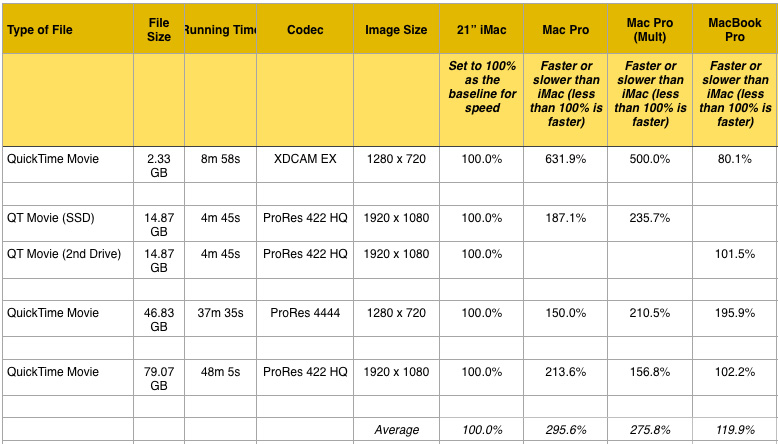
(Click the image to download a PDF with the detailed results.)
For the purposes of comparison, in the table I set the speed of the iMac to equal 100%, then compared the compression speed of the other two computers to it. (The PDF, which you can download here, has all the details, including timing durations, so you can check my math.)
Both the iMac and the MacBook Pro utilize hardware-acceleration when compressing files using the H.264 codec. You can see the benefits in these results. The iMac was almost three times faster than the Mac Pro, while the MacBook Pro matched the speed of the iMac for everything except ProRes 4444 source files.
I was really surprised at how much hardware-acceleration improved compression speed. This does NOT mean that the Mac Pro is not a useful computer. H.264 is a codec that does not fully utilize multi-core computers. Video compression uses significantly different computer resources than video editing.
NOTE: I should point out that every system running Compressor 4.2 was a WHOLE lot faster than the same system running Compressor 4.1.2.
USING MULTIPLE INSTANCES
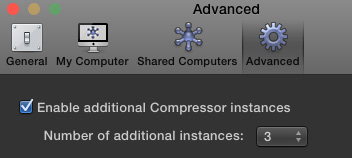
A feature available in the Mac Pro that doesn’t exist in the iMac or MacBook Pro, is the ability to run Compressor in multi-instance mode. This allows multiple “copies” of Compressor to run simultaneously.
NOTE: Multiple instances are turned off by default. You turn them on from the Compressor > Preferences menu. When multiple instances are turned on and Compressor is running, other applications will slow down significantly.
If you are compressing a single file, you won’t see a whole lot of difference by enabling multiple instances. As you can see in the results, Compressor speeds up about 8%. What does benefit is when you are compressing a number of files at the same time. Multiple instances allows Compressor to compress different files at the same time. While I did not specifically time it, enabling multiple instances reduced total compression time for all four files almost in half.
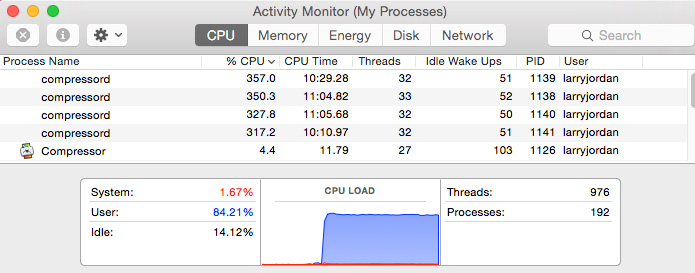
You can see the results of multiple instances in Activity Monitor. CPU load is way up with almost double the processing power applied when the maximum of 3 instances are enabled.
NOTE: The number of available Compressor instances is determined by your computer’s cores and memory. After meeting the minimum system requirement (four cores and 2 GB of memory), you can add one additional instance for every additional four cores and 2 GB of memory. This portion of the Compressor documentation describes this in more detail.
INTERNAL VS EXTERNAL DRIVES
Last week, I discovered that when compressing media using hardware-acceleration on an iMac compression speeds improved almost 15% when storing media on a fast SSD drive – whether internal or external. In the PDF, you’ll see comparisons between media stored on an SSD drive vs. spinning media.
NOTE: In this test, the SSD drive was an Apple Fusion internal drive.
SUMMARY
There are three more tests I’m working on for next week:
However, based on compressing video for YouTube or the web, a current model iMac is about the best it gets. As always, I’m interested in your comments.

2,000 Video Training Titles
Edit smarter with Larry Jordan. Available in our store.
Access over 2,000 on-demand video editing courses. Become a member of our Video Training Library today!
Subscribe to Larry's FREE weekly newsletter and
save 10%
on your first purchase.

14 Responses to Video Compression Hardware Speed Test
← Older Comments-
 Paul Hartel says:
May 11, 2015 at 10:59 am
-
 Paul says:
May 12, 2015 at 5:00 pm
-
 Larry says:
May 12, 2015 at 5:28 pm
-
 Jonathan says:
June 26, 2015 at 12:27 am
← Older CommentsThanks, Larry. Very useful information, especially for those of us anticipating new computer purchases.
Thank you Larry for running this test. Unfortunately it doesn’t demonstrate anything that we didn’t already know, which is that when performing single pass H.264 compression the lack of the encoding hardware in the particular Intel chips used in the late 2013 Mac Pro makes it significantly slower. However, in multipass H.264 encoding, which is what anyone will want to run to get a high-quality visual, the Mac Pro will beat all these other computers by substantial margin. The real question is if this version is improved in speed on the Mac Pro versus the old version performing single pass or multipass encoding. It doesn’t look like that’s the case here, and the Adobe solution is probably is as good or better for Mac Pro users. I will admit though, for quick one off single pass encode, my Mac book Pro is a lot faster. If I have a particularly large program that I need very quickly encode to H.264, in a single pass, and I am under a very tight deadline, I will take the ProRes masterfile on an SSD (rendered on the MacPro) and run it through the single pass hardware encode on the MacBook Pro. It’s just for this one, single particular use case of single pass H.264 where these other computers are faster. Anything else, say rendering 4k out to ProRes, the Mac Pro destroys my MacBook Pro.
Paul:
I disagree with your statement: “in multipass H.264 encoding… the Mac Pro will beat all these other computers by substantial margin.” I’m not seeing that in my current tests. In fact, just the opposite, I haven’t seen any H.264 compression – single or multi-pass – where the Mac Pro beats an iMac using Compressor 4.2.
Yes, the new version is faster – I’m still running tests and will have two more articles in the next newsletter – but how much faster I haven’t yet done the math. So far, for H.264 work, the Mac Pro is not blazing.
Larry
What about doing a test with Compressor 4.0.7? Turning on qmaster even on a single system… I bet it would ‘blaze’. Well on a new MacPro system with the biggest CPU. The base is actually slower than the older MacPros.
Random thought… rendering a H.264 out of Resolve on a system with a nice GPU(s). Resolve used to have an issue on color in h264s but it’s been… resolved I’ve read. I wonder how it would perform. hrm.
I can’t afford Telestream’s products and I need something as fast or faster than Compressor 4.0.X. sigh
Going to the Editors Lounge event today? June 26? ASES workflow stuff.