
 [ Update: On March 21, 2021, I finally upgraded to Big Sur. Here’s what I learned in the process. ]
That’s a good question – but it’s also the wrong question. It is better to ask: “When should I upgrade to Big Sur?”
That answer is trickier.
TAKE THE PRESSURE OFF
The two most important things to keep in mind when deciding when to upgrade to ANY operating system is that there are no “hidden” new features in any Apple or Adobe application that suddenly get turned on when you upgrade.
In other words, everything your NLE does in Catalina, it will do in Big Sur. So you aren’t missing any features by waiting to upgrade.
Second, never upgrade in the middle of a project. Facing a deadline is a terrible time for a significant upgrade. Something always goes wrong, which takes time to fix. Wait until you complete a project – or have time to chase problems – before upgrading.
If you are lucky, everything will work perfectly. And, if not, you’ll have time to figure out what broke and get it fixed.
WILL YOUR APPS WORK?
First, like Catalina, Big Sur is a 64-bit operating system. Any apps that didn’t work in Catalina won’t work in Big Sur. This includes older 32-bit media. (Link)
If you haven’t upgraded to Catalina, here’s how to find out which apps on your system are 32-bit:
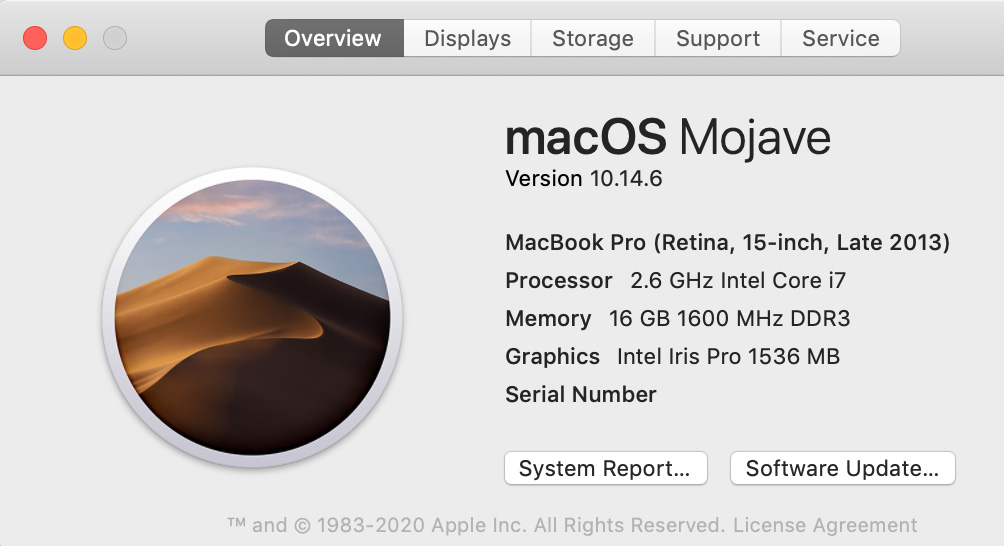
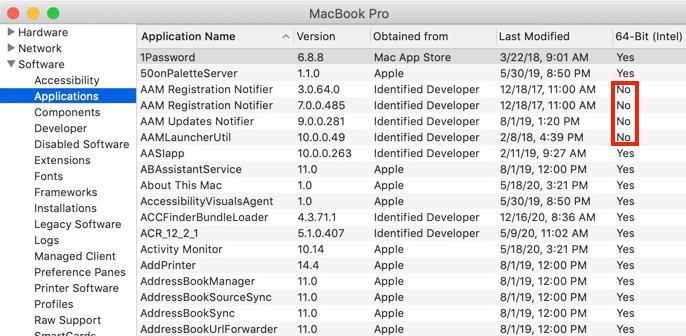
NOTE: This column does not appear in Catalina, because all apps in Catalina must be 64-bit.
9to5 Mac writes: “macOS 11 Big Sur has been widely seen as the least stable of the major new Apple software releases this year during the beta period from June until this fall.”
NOTE: Here’s a link to 9to5’s comprehensive look at upgrading to Big Sur.
Aaron, in the comments, highlights https://isapplesiliconready.com. “This website is more comprehensive and notes which apps work natively on Apple Silicon M1 and which work (or don’t work) using Rosetta 2.” I like the layout of this website – there are more than 700 applications listed.
As well, RoaringApps.com has compiled a crowd-sourced list (Link) of app compatibility. There are many other compatibility resources on the web. If you rely on 3rd-party software for your daily work, be sure to check out what works and what doesn’t. Be careful to type the name of your application carefully – this list is poorly curated.
As well, most audio applications have problems with Big Sur. Sweetwater.com has also compiled a list focused on audio apps. (Link)
WHAT SHOULD YOU UPGRADE
While Big Sur will run on most Macs manufactured from 2015 on, Big Sur is required for all M1 Macs; that is, those running Apple silicon CPUs.
NOTE: Here are Apple specs for supported hardware for Big Sur.
My general feeling is that if you have older hardware, don’t upgrade. Older gear is designed to run on older versions of macOS. You’ll probably get better performance by not upgrading. Also keep in mind that if you upgrade and decide you don’t like the new version on your older system, falling back to an earlier version of the macOS is a major pain.
If you have reasonably current hardware, upgrading makes a lot of sense – it simply becomes a question of “when.”
NOTE: Here are Apple’s instructions on how to upgrade to Big Sur.
WHEN SHOULD YOU UPGRADE
I am a fan of waiting. Clients want us to get their work done – on time and on budget. Reliability is more important that bleeding edge. If you have a system you can spare for testing, upgrade that now. See what works and what doesn’t. However, don’t feel under pressure to immediately rush to upgrade production systems.
That being said, I also want to stay reasonably current because developers are creating new software for the new OS, not upgrading older versions. At some point, the latest versions of software won’t support older operating systems. (Final Cut Pro 7 is a classic example of this. It is a 32-bit application. It will never run on current versions of the macOS.)
SUMMARY
So, should you upgrade? Yes.
When should you upgrade?
Last week, Apple released the 11.1 maintenance update to Big Sur, with a beta release of 11.2 to developers for testing. These maintenance upgrades are significant and needed.
For myself, I plan to upgrade my main production system after the first of the year, when the 11.2 update is released. And I’m keeping two older computers on older versions of the macOS – just in case.

2,000 Video Training Titles
Edit smarter with Larry Jordan. Available in our store.
Access over 2,000 on-demand video editing courses. Become a member of our Video Training Library today!
Subscribe to Larry's FREE weekly newsletter and
save 10%
on your first purchase.

66 Responses to Should You Upgrade to macOS Big Sur?
← Older Comments Newer Comments →-
 David C says:
May 31, 2021 at 11:58 am
-
 Larry says:
May 31, 2021 at 12:32 pm
-
 KenP says:
June 5, 2021 at 9:32 am
-
 Larry says:
June 5, 2021 at 9:54 am
-
 George Green says:
June 14, 2021 at 6:35 pm
-
 Larry says:
June 14, 2021 at 8:16 pm
-
 T Keenan says:
June 17, 2021 at 3:47 am
-
 tre wiff says:
June 20, 2021 at 5:03 am
-
 Larry says:
June 20, 2021 at 8:53 am
-
 Liz says:
July 8, 2021 at 5:45 am
← Older Comments Newer Comments →I have an iMac 27″ 2017 computer and I think that it had 10.14 Mojave. Unfortunately, when I tried to install TurboTax 2020 it said that I needed to upgrade to 11.0, Big Sur, which I did.
I was able to do my taxes, but have since encountered a whole slew of problems that developed over time, since May 17, 2021.
– Had to upgrade Microsoft Office 2011 to 2019
– Microsoft Outlook will not load due to an error.
– Cannot save anything to my computer. I hit save, but nothing is saved.
– Cannot do a Preview.
– When I try to create a New Folder, I cannot name the folder.
– I use Firefox as my browser. I can access most of my normal sites, but 2 I cannot – Washington Post and WTA Tennis. But I can access these 2 using Chrome.
– So far, FCP is working and saving and hope nothing is wrong with this.
– Fortunately, I have a 2018 Macbook Pro with Mojave that I can use to supplement my iMac.
– What to do to resolve these problems?
– I have Time Machine. Can this be used to restore my machine to an earlier time before Big Sur?
– As Chester on “Life of Riley” used to say, “What a revolting development this is.”
David:
Sigh… I’m sorry for all your problems.
The upgrades, from Mojave to Big Sur, are not surprising. There are BIG changes between the two – including a lack of support for 32-bit applications.
However, problems like an inability to save, not able to create new folders and web access are NOT typical. The best option is to contact Apple support and get them to resolve it. They have tools the rest of us don’t have.
Larry
Thanks Larry, you have saved me a lot of grief. Running a 2015 MacBook Air on Mojave and everything works great. Now I know to ignore the constant reminders to upgrade to Big Sur. What a great article this is, supplemented by the comments from people who are in same scenario. Good work and thanks again!
Ken:
Happy to help. Your computer is old enough that I would recommend not upgrading. If you have a smoothly running system, you are able to get your work done, meet deadlines and keep your clients happy, then there is no great need to upgrade until you buy new hardware.
Sometimes, chasing the latest OS with older gear is just too much pain.
Larry
Larry, I own a late 2019 MacBook Pro. Recently I downloaded an update for Big Sur. My system started overheating and eventually stopped working a day after performing the Big Sur update. I brought my laptop to a local Authorized Apple Service Provider. They informed me that my logic board had failed, and recommended that I not use Big Sur in the future because the operating system is not very good. Anyway, the logic board was replaced and my system is working fine with macOS Catalina. Don’t think I will do another update until Monterey comes out later this year. I have benefited greatly from your tutorials and keep up the good work!!
George:
OUCH!!! Big Sur has problems, but it should not cause a motherboard to collapse. I am so sorry!
Take your time with Monterey, as well. You don’t need to be afraid of it, but definitely wait for Apple to update it multiple times before you upgrade. And this time I wish you more success!
Larry
I “upgraded” to Big Sur this week. My main motivation was to try out Apple’s Spatial Audio capabilities in Apple Music. Well, so far I have no problems with applications working or not. I just hate the new look. Apple has gone too far, IMO, in trying to make MacOS and iOS share a similar look and feel. It makes sense to tailor typography, etc., to different screens instead of forcing my 16″ MBP to mimic the look of my tiny iPhone 7.
I have a 2015 Macbook pro with Sierra, can I should I upgrade to Big Sur
Tre:
Your system is supported for the new system, but my bigger question is: “why do you want to upgrade?” If the reasons to upgrade are compelling, go ahead. If not, stay where you are. I have an 2013 MacBook Pro that’s several OS versions behind simply because it does everything I need it to do – there’s no advantage to me in upgrading it.
Also, keep in mind that future OS versions will be optimized for Apple silicon systems. You may want to start budgeting for a new system to run the latest software and keep your current system on Sierra.
Just thoughts – you have the option to upgrade or not.
Larry
I have a MacBook Air ( 13 inch, Early 2015) and the MAIL stopped verifying passwords so I can’t have it on my desktop. It is still running Capitan 10.11.6. ( I never upgraded because I never had a problem) I read that I should update to newer software to try and fix the email problem. What software should I upgrade to if I don’t Big Sur.