
 [ Update: On March 21, 2021, I finally upgraded to Big Sur. Here’s what I learned in the process. ]
That’s a good question – but it’s also the wrong question. It is better to ask: “When should I upgrade to Big Sur?”
That answer is trickier.
TAKE THE PRESSURE OFF
The two most important things to keep in mind when deciding when to upgrade to ANY operating system is that there are no “hidden” new features in any Apple or Adobe application that suddenly get turned on when you upgrade.
In other words, everything your NLE does in Catalina, it will do in Big Sur. So you aren’t missing any features by waiting to upgrade.
Second, never upgrade in the middle of a project. Facing a deadline is a terrible time for a significant upgrade. Something always goes wrong, which takes time to fix. Wait until you complete a project – or have time to chase problems – before upgrading.
If you are lucky, everything will work perfectly. And, if not, you’ll have time to figure out what broke and get it fixed.
WILL YOUR APPS WORK?
First, like Catalina, Big Sur is a 64-bit operating system. Any apps that didn’t work in Catalina won’t work in Big Sur. This includes older 32-bit media. (Link)
If you haven’t upgraded to Catalina, here’s how to find out which apps on your system are 32-bit:
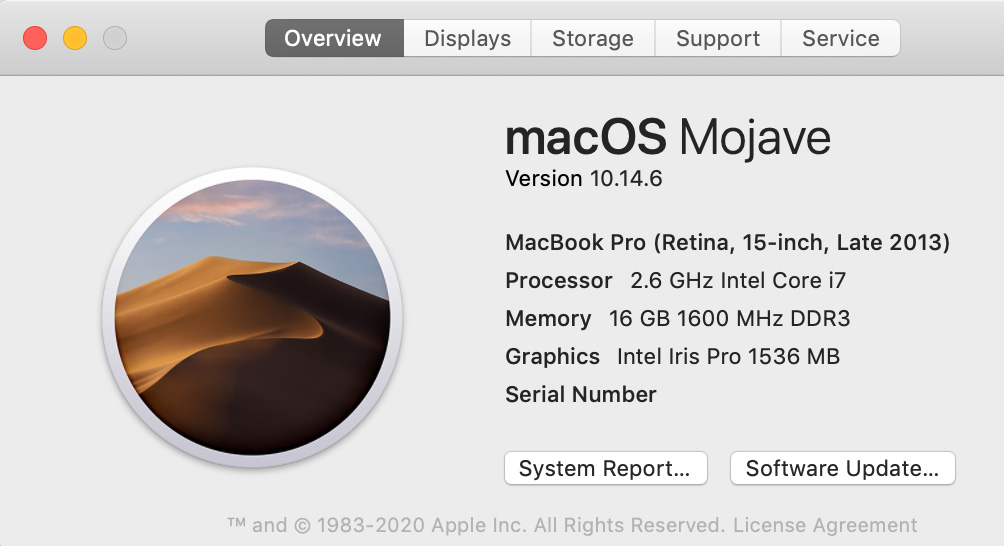
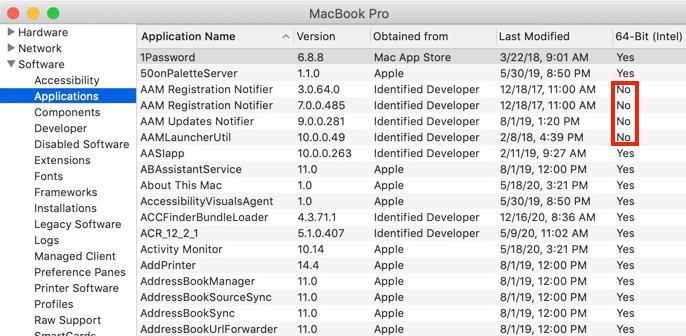
NOTE: This column does not appear in Catalina, because all apps in Catalina must be 64-bit.
9to5 Mac writes: “macOS 11 Big Sur has been widely seen as the least stable of the major new Apple software releases this year during the beta period from June until this fall.”
NOTE: Here’s a link to 9to5’s comprehensive look at upgrading to Big Sur.
Aaron, in the comments, highlights https://isapplesiliconready.com. “This website is more comprehensive and notes which apps work natively on Apple Silicon M1 and which work (or don’t work) using Rosetta 2.” I like the layout of this website – there are more than 700 applications listed.
As well, RoaringApps.com has compiled a crowd-sourced list (Link) of app compatibility. There are many other compatibility resources on the web. If you rely on 3rd-party software for your daily work, be sure to check out what works and what doesn’t. Be careful to type the name of your application carefully – this list is poorly curated.
As well, most audio applications have problems with Big Sur. Sweetwater.com has also compiled a list focused on audio apps. (Link)
WHAT SHOULD YOU UPGRADE
While Big Sur will run on most Macs manufactured from 2015 on, Big Sur is required for all M1 Macs; that is, those running Apple silicon CPUs.
NOTE: Here are Apple specs for supported hardware for Big Sur.
My general feeling is that if you have older hardware, don’t upgrade. Older gear is designed to run on older versions of macOS. You’ll probably get better performance by not upgrading. Also keep in mind that if you upgrade and decide you don’t like the new version on your older system, falling back to an earlier version of the macOS is a major pain.
If you have reasonably current hardware, upgrading makes a lot of sense – it simply becomes a question of “when.”
NOTE: Here are Apple’s instructions on how to upgrade to Big Sur.
WHEN SHOULD YOU UPGRADE
I am a fan of waiting. Clients want us to get their work done – on time and on budget. Reliability is more important that bleeding edge. If you have a system you can spare for testing, upgrade that now. See what works and what doesn’t. However, don’t feel under pressure to immediately rush to upgrade production systems.
That being said, I also want to stay reasonably current because developers are creating new software for the new OS, not upgrading older versions. At some point, the latest versions of software won’t support older operating systems. (Final Cut Pro 7 is a classic example of this. It is a 32-bit application. It will never run on current versions of the macOS.)
SUMMARY
So, should you upgrade? Yes.
When should you upgrade?
Last week, Apple released the 11.1 maintenance update to Big Sur, with a beta release of 11.2 to developers for testing. These maintenance upgrades are significant and needed.
For myself, I plan to upgrade my main production system after the first of the year, when the 11.2 update is released. And I’m keeping two older computers on older versions of the macOS – just in case.

2,000 Video Training Titles
Edit smarter with Larry Jordan. Available in our store.
Access over 2,000 on-demand video editing courses. Become a member of our Video Training Library today!
Subscribe to Larry's FREE weekly newsletter and
save 10%
on your first purchase.

66 Responses to Should You Upgrade to macOS Big Sur?
← Older Comments Newer Comments →-
 Larry says:
July 8, 2021 at 6:03 am
-
 Bob says:
July 9, 2021 at 3:30 pm
-
 Larry says:
July 9, 2021 at 3:40 pm
-
 Pablo says:
July 20, 2021 at 6:34 am
-
 Larry says:
July 20, 2021 at 6:35 am
-
 Pablo says:
July 20, 2021 at 7:45 am
-
 Georg Kluge says:
August 8, 2021 at 12:09 am
-
 Larry says:
August 8, 2021 at 10:01 am
-
 Max says:
August 15, 2021 at 10:15 am
-
 Larry says:
August 15, 2021 at 12:20 pm
← Older Comments Newer Comments →Liz:
If your email USED to work, but doesn’t work now, AND you haven’t upgraded anything, then you should not need to upgrade to get it to work again.
If you’ve upgraded something at which point your email broke, then you may need to upgrade.
Here are some general trouble-shooting tips to try BEFORE you upgrade your OS:
https://larryjordan.com/articles/five-step-trouble-shoot/
If that doesn’t work, contact Apple Support. Don’t upgrade your OS until Apple Support, rather than the Internet, suggests that’s necessary.
Larry
I’m needing to download Parallels and its not compatible with 10.12. It requires 10.13 or higher.
That is my only reason, but I’m not sure the risk is worth the reward as I’m simply needing to bypass Google FPR Verification on a Samsung S20 and I need Windows in order to do so.
Bob:
This is an issue that I have, thankfully, never had to deal with. I have no clue. Perhaps another reader has a suggestion.
Sorry,
Larry
Great article, thanks. I have a 2018 Mac Mini and use it for music production. Am using Logic 10.6.3 / Spitfire Sound Libraries / Toontrack Software / MOTU audio interfaces. Should I upgrade?
Pablo:
Probably not. If everything works smoothly and you are meeting your deadlines, and you don’t need any of the new features in Big Sur. Stay put. Wait for the next version of the macOS.
Larry
Thanks very much!
Thanks for your article and the time you take to answer all these questions!
I hve a MacBook Air form mid 2013 and just updated from High Sierra to Catalina due to security reasons as indicated by the IT department of my employer to work safely from home.
I’m reminded now to update to BigSur and the only reason to do so would be more security and privacy. Would this be a sensible step to do or would you suggest to choose for stability as you elaborated in earlier answers to the community?
thank you very much!
Georg:
With a computer as old as yours, if you don’t need to upgrade, I would recommend you stay with Catalina. While Big Sur will run on your gear, taking full advantage of it would require a newer system.
Larry
Great article and very useful comments Larry.
I am still wondering though…
Apple usually supports the last three versions of Mac OS. With Monterey launch, Mohave will likely be EOL.
That would not take much longer. Shouldn’t one be a little proactive in upgrading before we “have to”? (Happily running a 2014 MacBookPro on Mohave)
Max:
My wife has a saying: “There’s a lot of life left in something after it’s used up.”
You have a seven year old computer. Is it reasonable to expect it to work perfectly with an operating system that wasn’t even designed when your computer was released? Or, more to the point, can you guarantee that every file and program you can access now will also be available running the latest OS?
There is GREAT value in having an older computer running an older version of an operating system able to access legacy files.
I have a 2013 MacBook Pro running Mojave that I am never upgrading, just for the security of accessing older files. Apple has a long record of discontinuing support for applications and data that were once actively supported. Look at MacPaint, ClarisWorks, 32-bit QuickTime media and Final Cut Pro 7 files that can no longer be opened today.
I view retaining an older computer running an older OS as an essential strategy for retaining access to older files. Recently, I’ve needed to access word processing, image and media files from the mid-1990’s. My current iMac can’t. My older laptop can.
Don’t be in a hurry to upgrade – because, once you do, you can’t go back.
Larry