
 [ Update: On March 21, 2021, I finally upgraded to Big Sur. Here’s what I learned in the process. ]
That’s a good question – but it’s also the wrong question. It is better to ask: “When should I upgrade to Big Sur?”
That answer is trickier.
TAKE THE PRESSURE OFF
The two most important things to keep in mind when deciding when to upgrade to ANY operating system is that there are no “hidden” new features in any Apple or Adobe application that suddenly get turned on when you upgrade.
In other words, everything your NLE does in Catalina, it will do in Big Sur. So you aren’t missing any features by waiting to upgrade.
Second, never upgrade in the middle of a project. Facing a deadline is a terrible time for a significant upgrade. Something always goes wrong, which takes time to fix. Wait until you complete a project – or have time to chase problems – before upgrading.
If you are lucky, everything will work perfectly. And, if not, you’ll have time to figure out what broke and get it fixed.
WILL YOUR APPS WORK?
First, like Catalina, Big Sur is a 64-bit operating system. Any apps that didn’t work in Catalina won’t work in Big Sur. This includes older 32-bit media. (Link)
If you haven’t upgraded to Catalina, here’s how to find out which apps on your system are 32-bit:
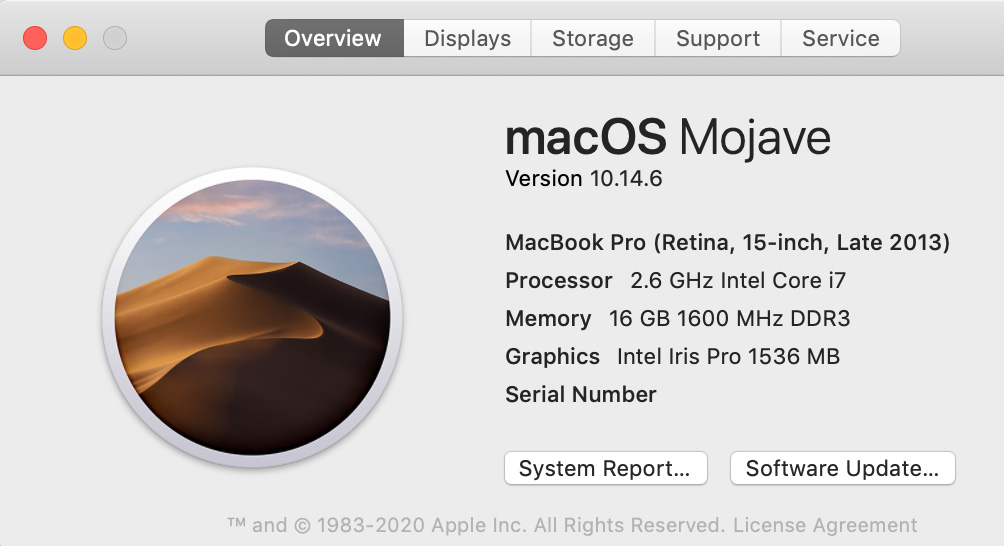
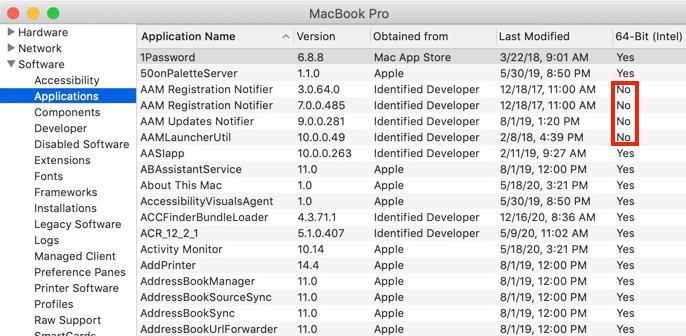
NOTE: This column does not appear in Catalina, because all apps in Catalina must be 64-bit.
9to5 Mac writes: “macOS 11 Big Sur has been widely seen as the least stable of the major new Apple software releases this year during the beta period from June until this fall.”
NOTE: Here’s a link to 9to5’s comprehensive look at upgrading to Big Sur.
Aaron, in the comments, highlights https://isapplesiliconready.com. “This website is more comprehensive and notes which apps work natively on Apple Silicon M1 and which work (or don’t work) using Rosetta 2.” I like the layout of this website – there are more than 700 applications listed.
As well, RoaringApps.com has compiled a crowd-sourced list (Link) of app compatibility. There are many other compatibility resources on the web. If you rely on 3rd-party software for your daily work, be sure to check out what works and what doesn’t. Be careful to type the name of your application carefully – this list is poorly curated.
As well, most audio applications have problems with Big Sur. Sweetwater.com has also compiled a list focused on audio apps. (Link)
WHAT SHOULD YOU UPGRADE
While Big Sur will run on most Macs manufactured from 2015 on, Big Sur is required for all M1 Macs; that is, those running Apple silicon CPUs.
NOTE: Here are Apple specs for supported hardware for Big Sur.
My general feeling is that if you have older hardware, don’t upgrade. Older gear is designed to run on older versions of macOS. You’ll probably get better performance by not upgrading. Also keep in mind that if you upgrade and decide you don’t like the new version on your older system, falling back to an earlier version of the macOS is a major pain.
If you have reasonably current hardware, upgrading makes a lot of sense – it simply becomes a question of “when.”
NOTE: Here are Apple’s instructions on how to upgrade to Big Sur.
WHEN SHOULD YOU UPGRADE
I am a fan of waiting. Clients want us to get their work done – on time and on budget. Reliability is more important that bleeding edge. If you have a system you can spare for testing, upgrade that now. See what works and what doesn’t. However, don’t feel under pressure to immediately rush to upgrade production systems.
That being said, I also want to stay reasonably current because developers are creating new software for the new OS, not upgrading older versions. At some point, the latest versions of software won’t support older operating systems. (Final Cut Pro 7 is a classic example of this. It is a 32-bit application. It will never run on current versions of the macOS.)
SUMMARY
So, should you upgrade? Yes.
When should you upgrade?
Last week, Apple released the 11.1 maintenance update to Big Sur, with a beta release of 11.2 to developers for testing. These maintenance upgrades are significant and needed.
For myself, I plan to upgrade my main production system after the first of the year, when the 11.2 update is released. And I’m keeping two older computers on older versions of the macOS – just in case.

2,000 Video Training Titles
Edit smarter with Larry Jordan. Available in our store.
Access over 2,000 on-demand video editing courses. Become a member of our Video Training Library today!
Subscribe to Larry's FREE weekly newsletter and
save 10%
on your first purchase.

66 Responses to Should You Upgrade to macOS Big Sur?
← Older Comments Newer Comments →-
 Susan Swanson says:
March 17, 2021 at 4:51 am
-
 Larry says:
March 17, 2021 at 7:36 am
-
 Yasir Salah says:
April 28, 2021 at 5:05 am
-
 Nikhil Mehta says:
April 28, 2021 at 9:49 am
-
 Larry says:
April 28, 2021 at 12:59 pm
-
 Larry says:
May 3, 2021 at 12:25 pm
-
 Hugh says:
May 24, 2021 at 6:53 pm
-
 Larry says:
May 24, 2021 at 7:02 pm
-
 Jules Clode says:
May 24, 2021 at 9:16 pm
-
 Larry says:
May 25, 2021 at 7:58 am
← Older Comments Newer Comments →Larry,
I’m kind of in the same boat as the previous writer and I have a specific question. I can’t access ICloud and there are some functions I get this: “This Mac can’t connect to iCloud because of a problem with ‘purgolder65@yahoo.com” When I put in my Apple Id, I get a message that says ‘An unknown problem has occurred.’ Is this related to invitation to update to BigSur on my System link?
Susan:
Contact Apple Support. They are the only ones that can fix iCloud and Apple account problems.
Larry
Hi Larry
I read both articles
“Don’t Lose Access to Older Media in macOS Catalina”. and
“Should You Upgrade to macOS Big Sur?”
My question, I’m on Catalina and planning to buy the new M1/ M2 chip iMac when the ones for pro users are out, when it arrives, I’m sure it will have Big Sur already installed, if I try to migrate my older I Mac’s applications already reside under Catalina, will there be any issue, like I had when migrating from Mojave to Catalina…..? So should I upgrade first before I buy the new iMac to Big Sur to make sure it’s a clean transfer?
Sorry to hear about the mishap on your vacation trip. I hope you are recovering well.
Thanks for all your hard work you are doing for us.
Hey Lary,
Are you aware of dual display problem in Big Sur 11.2?
My cpu usage of Macbook pro 16 2020 goes to 90% and it becomes impossible to operate the machine. however if I choose to use only one monitor either laptops screen or external monitor it works fine.
Nikhil:
macOS 11.2 had many problems. Upgrade to 11.3 and that should fix the display problem.
Larry
Yasir:
I would not upgrade before buying your new system. When the new M1 Mac arrives, you’ll confront two problems: Apps that don’t support Big Sur and Apps that don’t support the M1 chip.
Keep your system working now, without upgrading. Then, when you migrate, you’ll still have a working system you can use while you find and fix any issues with the new gear.
There’s nothing preventing you from running both computers – using different operating systems – at the same time. This means you can get work done while adjusting to the new gear.
Larry
DO NOT install Big Sur – it should never have been released… not only does it delete photos et al, but it does not react to many simple things, e.g. desktop pictures, mail, etc.
Hugh:
I’m sorry you are having problems. This is one of the reasons never to rush into upgrading to new versions of the macOS – too many things can go wrong.
Patience is a virtue.
Larry
Hi Larry
Are you aware of the problem with Big Sur not showing Untitled SD cards to FCPX. If the cards are mounted then FCPX is run it will see the cards but not if you mount the card when FCPX is already running.
If you rename the card it all works fine.
Jules:
Nope,I was not aware. On the other hand, I ALWAYS transfer data from the card to my hard disk before importing into FCP. I’ve always found that works fastest and safest.
Larry