
 I’m getting a lot of reports about error messages when using File > Share.
YOUTUBE EXPORT PROBLEMS
This first surfaced the middle of April with problems when exporting to YouTube.
This article explains that the problem was caused by Google, and how it was resolved.
“BAD FRAME” EXPORT PROBLEMS
Another problem that others are reporting is a project export failing due to a “bad frame.” While I have not seen this personally, it seems to occur when exporting for DVDs or Vimeo.
This is generally caused by either bad media or bad render frames. However, the problem is particularly perplexing, because the Project will render without any errors, but not export.
My first suggestion is to export as a Master File, which tends to minimize this problem. If it continues to occur, the only known workaround is to divide the number of the frame reporting an error by the frame rate of your project to determine its location in the Timeline. Then, replace the clip with the bad frame with another clip.
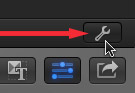
NOTE: To determine the frame rate of a Project, select File > Project Properties and click the small wrench icon that appears in the lower right corner of the Inspector.
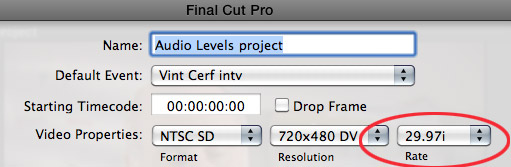
The frame rate is listed in the Rate popup menu.
CHAPTER MARKER EXPORT PROBLEMS
Currently, after upgrading to Final Cut Pro X 10.0.8, I am having problems exporting chapter markers for a project.
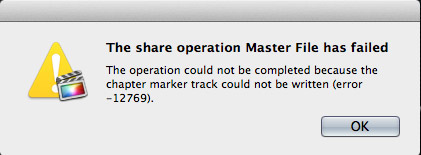
Specifically, at the end of the export, this error message appears and cancels the entire export.
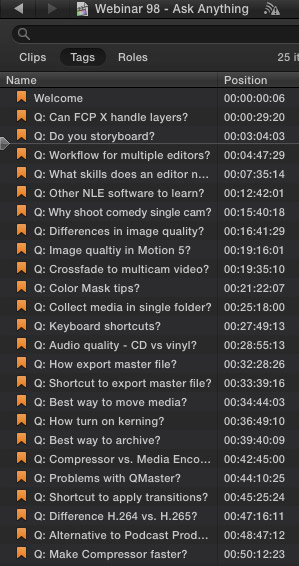
This is a list of the markers I’m using in this project. A general rule of chapter markers is that they cannot be within one second of each other or, in the case of a DVD, exceed 99 markers per project. In this project, there are 25 markers in total. As you can see, all of my markers are a couple of minutes apart.
In this case, all markers were created in 10.0.8. (I mention this because an older Apple support thread described an error when trying to export chapter markers using FCP X 10.0.6 that were created in FCP X 10.0.5. The solution there was to replace all the markers.)
This export error persists even after trashing FCP X preferences and moving marker positions. However, the file will export perfectly when chapter markers are not included in the export.
Hmmm… let’s see if I can track this down.
Apparently this message indicates a corrupt marker. The way to fix this, since there is no indicator in FCP X about which markers are corrupt, is to delete markers, individually, starting with the end of the project. (When deleting a marker, write down the timecode location and title of the marker, because, ultimately, you’ll be creating a new marker at that location.)
Keep deleting markers until the Project exports properly with chapter markers. In my case, deleting five markers, starting from the end of the Project, did the trick. Yes, this is a bit time-consuming, but it has the benefit of solving the problem.
Then, create NEW markers, don’t use Undo, at the locations of the markers you removed. The new markers will not be corrupted and the project should export properly.
TELL APPLE
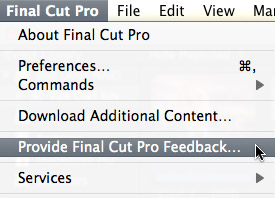
If you are having export problems, be SURE to report them to Apple using the Final Cut Pro > Provide Final Cut Pro Feedback menu option.
Apple has assured me on many occasions this is the best way to report problems, even if they don’t personally respond to your report.

2,000 Video Training Titles
Edit smarter with Larry Jordan. Available in our store.
Access over 2,000 on-demand video editing courses. Become a member of our Video Training Library today!
Subscribe to Larry's FREE weekly newsletter and
save 10%
on your first purchase.

39 Responses to FCP X: Export Problems
← Older Comments-
 AL says:
August 11, 2015 at 6:56 am
-
 Larry Jordan says:
August 11, 2015 at 1:32 pm
-
 caris says:
July 27, 2016 at 11:38 am
-
 Larry says:
July 27, 2016 at 12:00 pm
-
 caris says:
July 27, 2016 at 12:04 pm
-
 Larry says:
July 27, 2016 at 12:54 pm
-
 Edd says:
June 15, 2023 at 9:23 am
-
 Edd says:
June 15, 2023 at 9:29 am
-
 Larry says:
June 15, 2023 at 9:30 am
← Older Comments10.1.2
Everything has been working great , i have made several movies and was able to export no problem. now with one of my movies when i export i’m not getting the entire movie. i’ve tried export Master, make Blu-ray, DVD and Apple Device.
what could i being doing wrong with this one movie?
Thanks
AL
Al:
This is most often caused by having something selected in the Timeline when you export. Be sure nothing is selected and you should be OK.
Export a master file to test the export, before wasting time burning a bad DVD.
Larry
I am having trouble exporting my movie, what ever i click on the share option nothing happens i just click on for example, export file and nothing pops up this is happening on every option in the share menu and in the other selection on the right where you can also share your videos.
Thanks
Carls:
Try trashing your FCP X preferences (restart holding Option and Command). If that doesn’t work, contact Apple Support.
Larry
how do you trash the preferences?
Carls:
Read this: http://larryjordan.com/improving-fcp-x-performance/
Larry
I finally Fixed FCPX Share problem among many others
I Subscribe bought Adobe Premier Pro again which I owned for years. After messing with constantly having issue after issue with FCP then FCPX yes and years of this useless time consuming Apple Product.
All of my drives are APSF 32 GB ram very fast SanDisk SSD 2000 MB per second Content on one drive Render on another,Library on another 12 TB with a lot of Library space being made available This isn’t a plug for Adobe aa snub for Apple
Yes Apple is getting weird, to many Programers trying to improve the program (which used to work)I think they have a problem
Can”t wait for ai to take over that’ll save Apple from buying Healthcare!!
I’m rethinking buying MacBook Pro M2 Max, Maxed out? Why have a super computer if Software doesn’t work?
Edd:
Thanks for your comment.
Larry