
Final Cut Pro X defaults to displaying audio as a single waveform. For stereo audio, this isn’t a problem. But for dual-channel mono clips, or single track mono clips, it is.
Here’s the solution.
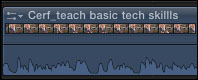
Normally, when a clip is edited to the Timeline, we see only one waveform, regardless of how many channels it has. In this example, my clip has two audio channels, but only one waveform is displayed.
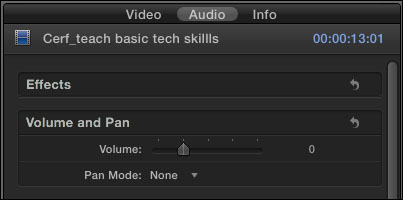
To see the channels, select the clip, go to the Inspector (press Command+4), and click the Audio tab at the top.
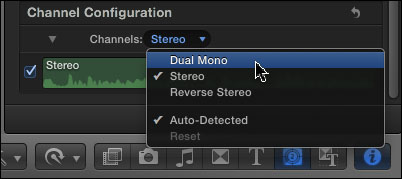
Scroll down to reveal the Channel Configuration option, and click Channels. The default setting in the popup menu is Stereo. Change this to Dual Mono.
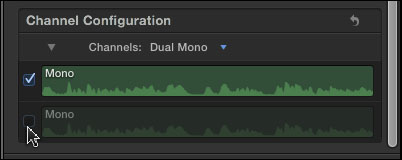
If you only want to hear one channel – just the guest, for example, and not the interviewer – uncheck the channel you don’t want to hear. In this example, I unchecked channel 2. Unchecking a channel completely mutes it in the Timeline, without removing it from the clip.
Adjust the audio level – the black horizontal line at the bottom of the clip – so it sounds the way you want.
However, if you need to adjust levels separately for each channel, or if you want to avoid hearing both channels at the same time, then you have a couple more steps.
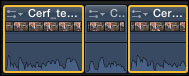
Set the audio level the way you want for the current audio channel. Then, using the razor blade (or typing Command+B), cut the clip where you want to switch between channels.
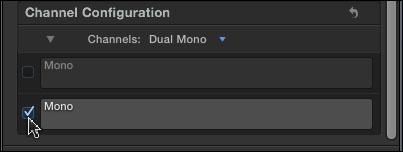
Select all the sections of the clip where you want to hear the opposite channel. Go to the Inspector and check the channel you want to hear and uncheck the one you don’t. (In this example, I am muting the first channel so I can hear the second.)
Now, as you play through the clip, each channel will play for a section. Since the levels for one channel were correct before you started cutting the clip, all you need to do is adjust the levels for the new sections, which won’t affect the levels of the other speaker.
Done.

2,000 Video Training Titles
Edit smarter with Larry Jordan. Available in our store.
Access over 2,000 on-demand video editing courses. Become a member of our Video Training Library today!
Subscribe to Larry's FREE weekly newsletter and
save 10%
on your first purchase.

52 Responses to FCP X: Dual-channel Mono Audio
← Older Comments Newer Comments →-
 Giles says:
December 5, 2012 at 11:45 am
-
 Larry Jordan says:
December 5, 2012 at 11:51 am
-
 Bill Code says:
August 5, 2013 at 9:04 pm
-
 Ilan says:
September 21, 2013 at 9:44 pm
-
 Steve says:
October 18, 2013 at 10:26 am
-
 Larry Jordan says:
October 18, 2013 at 10:44 am
-
 Virginia says:
December 10, 2013 at 12:08 pm
-
 Larry says:
December 10, 2013 at 9:26 pm
-
 Coruway says:
December 12, 2013 at 4:31 am
-
 Raymond says:
March 14, 2014 at 8:53 pm
← Older Comments Newer Comments →Is there a way to actually have your timeline be set to dual mono? I only seem to have the options for Stereo and Surround, which preclude an export with true dual mono sound… Thanks!
Giles:
Not at this point.
Larry
I often need to export two audio tracks (natsot and voiceover). It took me a while to figure out this needs to be done by assigning roles. The problem is it seems to make using compressor presets impossible. I now have to export a file and then put it into compressor afterwards. Has anyone (Larry?) figured this one out? thanks all.
Larry,
I have almost the same scenario, recording two separate mono channels in Zoom Recorder and import in FCPX as a stereo clip.
Unfortunately, changing it to Dual Mono gives me the strangest result: I actually get two similar mono channels, where in each one I can hear both, a reporter and a subjects (while in stereo mode I can here it clearly separated in left and right channel)
Please your suggestions!
Thank you a lot!
Hi Larry,
Any improvements to the problem of Dual Mono workflow?
It has been nearly two years to the day since Christian gave voice to the frustration we have about the Dual Mono (the most common way to shoot) clunky work flow that seems to require a whole set of steps: changing from Stereo to Dual on every clip, then increasing the audio to get the levels back to normal.)
Is there something we are missing?
A certain method of importing to facilitate Dual Mono at the import stage?
or a quicker workflow than stated above?
S
Steve:
To my knowledge, Apple has not changed the audio workflow since this article was written – though Apple DID change the audio workflow since the initial release of FCP X.
However, Apple says they are hard at work on a new upgrade coming soon – so, perhaps things will change with that release.
Larry
We have video clips in which you can hear the music on Youtube on a mobile device but not the voice. Any idea as to how we can fix this?
Virginia:
You are probably out of luck. However, check into audio repair software from Izotope and Zynaptiq.
Larry
Have you seen any improvements, Craig or found any efficient workarounds in recent releases for sound editing in FCP X? Still one of the biggest limitations these days of X. And am still looking for better methods. Seems that setting a custom sound filter with levels could do this, but haven’t found that to work so far.
Hey virginia, a little late, but i was having this problem with viewing in mobile and tablets, and when i switched the problem track from stereo to dual mono, i found that there was one dead track and the live track. If i switched off the dead track, the mono dialogue track would play through.