
 For the fourth time in its history, Apple is making a major shift in processor technology, this time from Intel to the new Apple silicon. In fact, the first three computers using the new Apple M1 chip were released last week.
Which presents media creators with an essential question: What should we do now? Apple has announced and released the first M1 systems. But, Apple is also updating and selling Mac systems with Intel chips. While Apple silicon is still mostly unknown, Intel computers are reliable, high-performance systems and we all know what they can do. The answer revolves around your schedule.
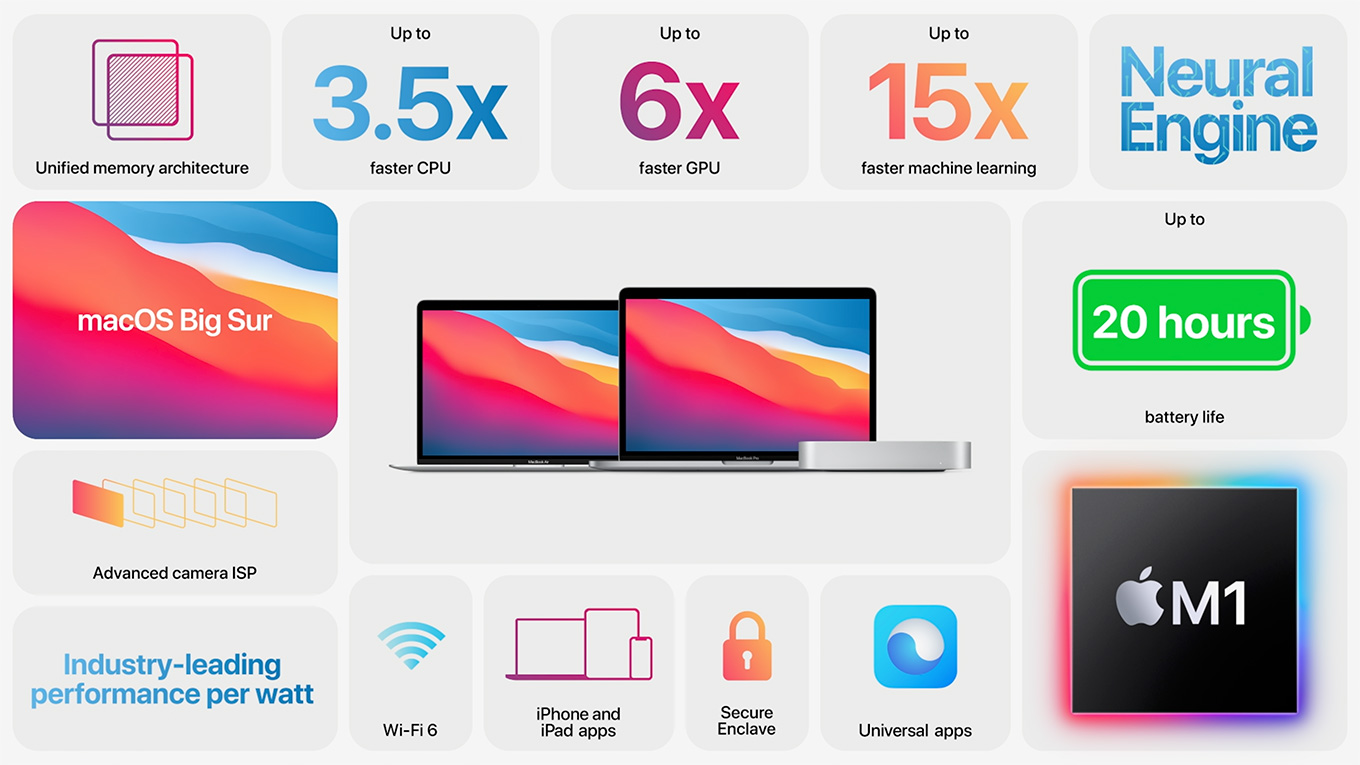
 While many refer to the M1 as a CPU, the M1 is much more than a CPU. It’s actually an SoC (System on a Chip). As such it integrates CPU, GPU, RAM, and a LOT of other controllers, all in one chip. It is, as its name suggests, an entire system in one chip. I’ve spent a lot of time thinking about this transition ever since Apple announced the change at the WWDC conference in June, 2020.
Here’s my core thought: Apple Mac computers will never again be slower than the current M1 chip – and the M1 is already faster than any other laptop on the market and most desktops.
The potential for this new technology is vast. However, this doesn’t mean that media creators need to rush out and buy one of these first three new systems, nor that they should ignore the current Intel systems. But it does mean that we can be very optimistic for the future.
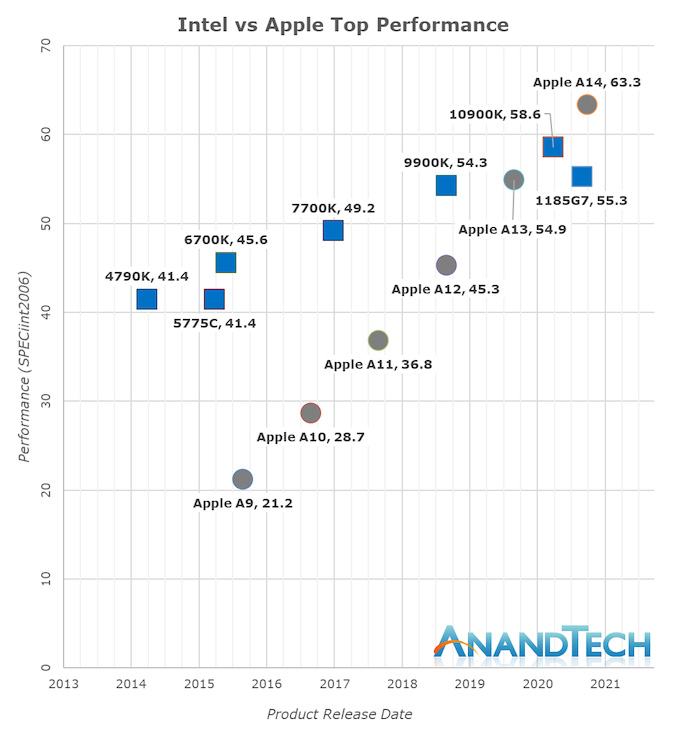
The M1 is based upon the technology Apple developed for its A-series chips for the iPhone. It is instructive looking at how these initial “A” chips improved from one generation to the next. Especially when compared with similar generations of Intel CPUs. The growth in performance of Apple’s chips is striking, as illustrated in this chart from AnandTech.com.
An engineer friend told me recently that the “M1 is a 1st-generation, proof-of-concept chip. There’s only one Thunderbolt bus, only 8 or 16 GB RAM, only up to 2 TB storage. It’s as much a testbed for TSMC’s 5nm fabrication process as anything. As that process settles in and yields rise, I fully expect core count, RAM, Thunderbolt busses, and addressable storage to increase.”
Think about where Apple released this new silicon first: On its low-end, general purpose laptops. Yes, these are popular, but they are popular with folks who have general computing needs. They need to run a variety of apps on a computer that is easily carried, provides extended battery life, and doesn’t break any of the most popular applications.
These are the computers the M1 is optimized for. In fact, Apple prioritized low heat and long battery life over performance. Yet, even when Apple did so, look at the performance these chips can deliver. The new Apple silicon systems are the fastest laptops on the market today, with speeds that equal or exceed most desktop systems.
Imagine what’s possible when the equation is reversed. iMacs and Mac Pro’s are plugged into power all the time, with large enclosures to provide plenty of cooling. With these larger systems, Apple chips can be optimized for performance. While heat is always a constraint in any computer, these larger computers can dissipate heat more easily than a small phone or tiny laptop.
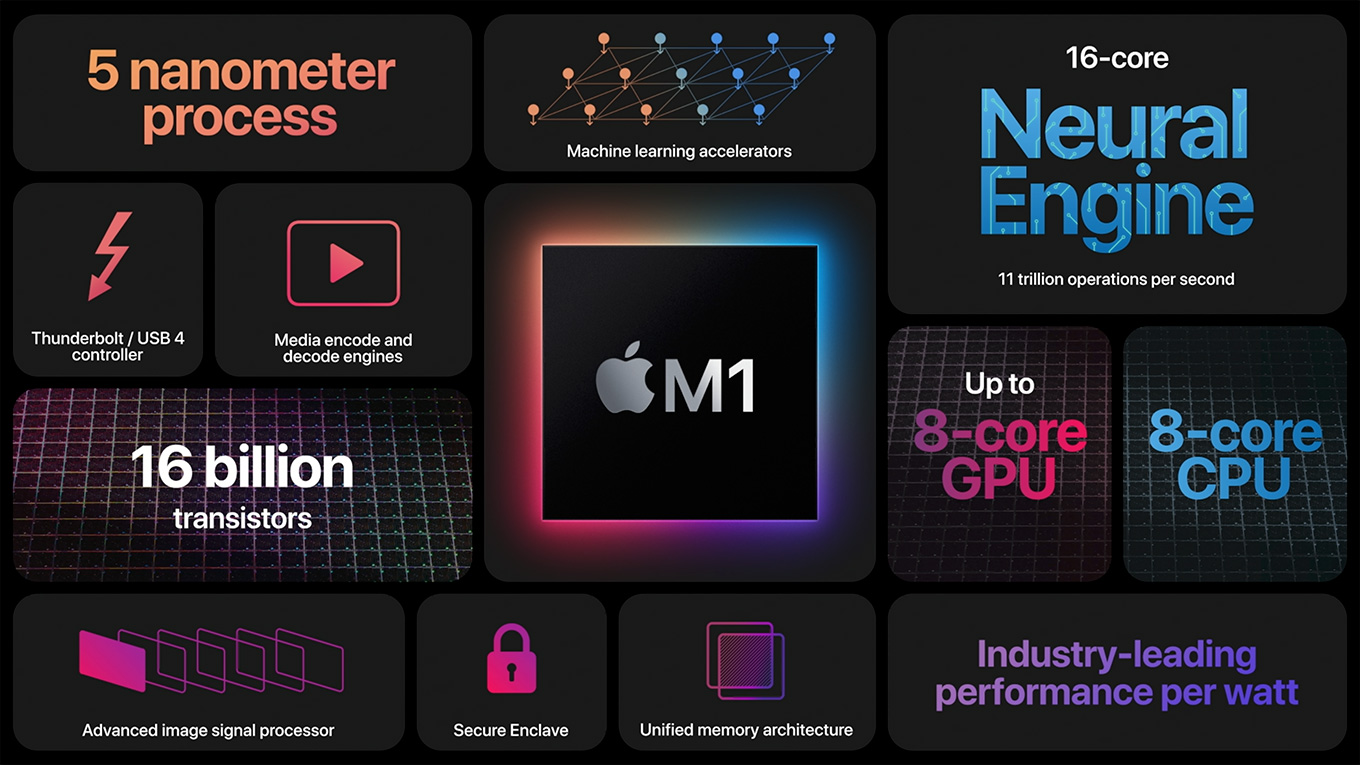
(Click to view larger image.)
EXPANDED OPPORTUNITIES
The new Apple silicon also opens the ability for Macs to run iPhone software natively. Like any library, some titles may not be that great on a desktop. Many leverage the portability or technology of the iPhone and, as such, may be of limited value to laptop or desktop users. Still, there remains a wide variety of software that desktop users could benefit from.
Virtualization to support other operating systems, such as Linux, are already available. While the jury is still out on Windows support, rumors abound on ways to bring Windows to the new Macs. Like any transition, every developer needs to figure out what makes sense for their products. Personally, while Windows may not be available short-term, I’m not worried about access to it for the long-term.
And that’s an important term: “Long-term.” Apple has said it will take two years to accomplish the entire transition. That’s because the complexity of what these chips need to do expands as we start to get into higher performance systems.
WHAT ABOUT OUR CURRENT MACS?
As Apple has shown with the release of Big Sur, support for Intel Macs remains strong. Intel Macs provide exceptional power, full support for running Windows on a Mac as well as a variety of other operating systems, and all the software we’ve come to know and love on our Macs for the last 20 years.
Intel is not going away. But, it is not the future. If you need a computer now, Intel delivers. But, if you want to protect yourself for the future, and you can afford to wait, the future is with the coming generations of Apple silicon. The M1 is the start, but there is much more to come.
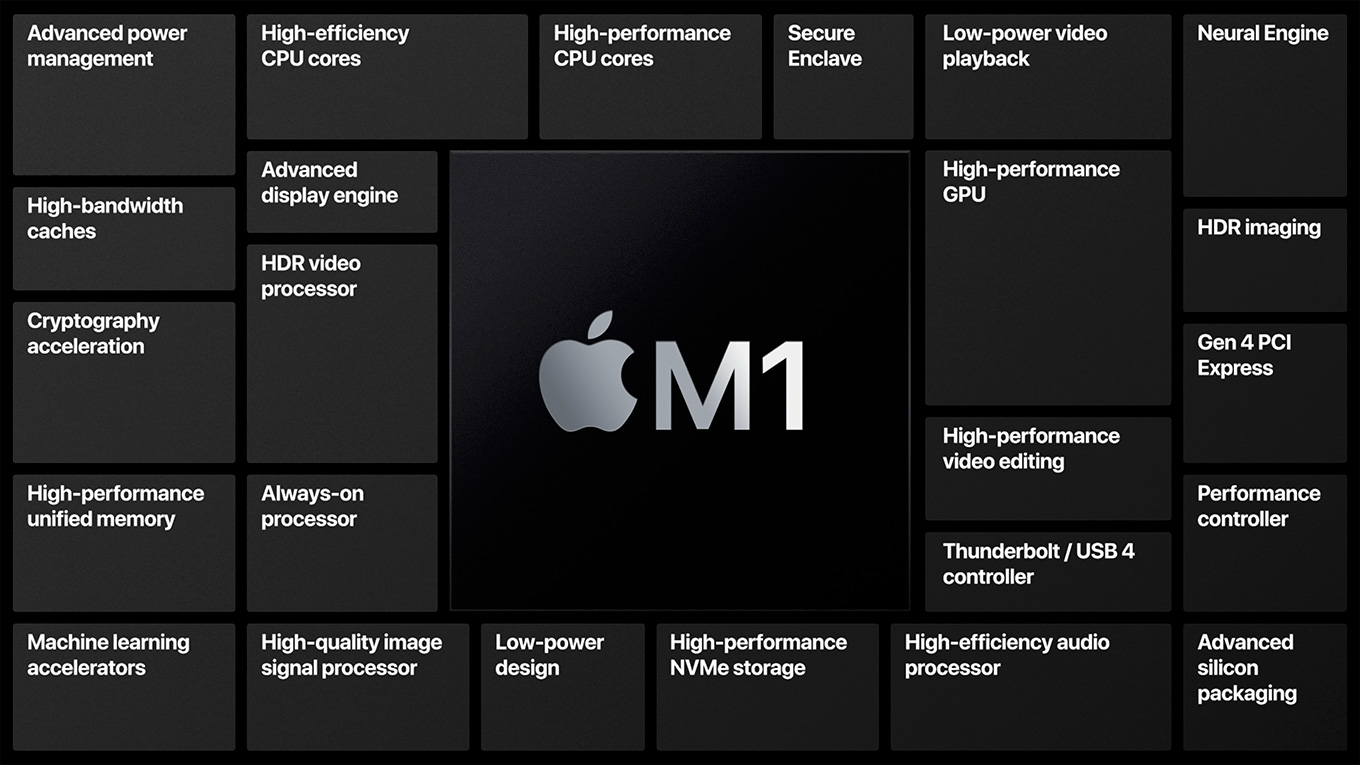
(Click to view larger image.)
It will take a new generation of chips to support the systems media creators need. iMacs and Mac Pros both need access to much more RAM, far more ports, access to more and faster storage, and support for more powerful GPUs. In addition, Mac Pros need access to more cores, vast amounts of RAM, multiple GPUs and lots and lots of connections for external devices.
Apple silicon can, from its design, meet all these challenges, but they can’t do it using the same chip. The M1 will shortly be followed by the M2 and M3; not that Apple has told me their plans, simply that this is the way Apple has ALWAYS behaved. Each chip improves on the ones that went before.
Apple plans for the long-term using hardware to support a unified software vision to create Apple’s view of the technology of the future.
(Click to view larger image.)
SUMMARY
General computer users, especially those needing portability and long battery life, should seriously consider the new MacBook Air and 13″ MacBook Pro. These are amazing systems. The Mac mini is also delivering some amazing performance in a very small package.
Which brings us back to our central question: What should performance-driven media creators do? The answer is: Buy Intel if you need new gear now. But, for those that can wait for Apple to bring out the chips designed to meet the requirements of power users, waiting is a much better option. Apple’s first chip – the M1 – proves that the transition to Apple silicon works and works extremely well. But this first chip was not designed for us. Our time is coming.
It will take a while longer for the systems that most media professionals need to appear. And, naturally, we all want them RIGHT NOW! But, based on what Apple has released so far, the wait will be more than worth it.
As always, share your thoughts in the comments.

2,000 Video Training Titles
Edit smarter with Larry Jordan. Available in our store.
Access over 2,000 on-demand video editing courses. Become a member of our Video Training Library today!
Subscribe to Larry's FREE weekly newsletter and
save 10%
on your first purchase.

26 Responses to Thoughts on the Future for Apple’s M1 Chip
← Older Comments Newer Comments →-
 David says:
November 24, 2020 at 3:37 pm
-
 Larry Jordan says:
November 24, 2020 at 3:45 pm
-
 David says:
November 24, 2020 at 5:16 pm
-
 Larry jordan says:
November 24, 2020 at 5:33 pm
-
 David says:
November 24, 2020 at 8:21 pm
-
 Cindy Kendall says:
December 23, 2020 at 9:05 am
-
 Larry says:
December 23, 2020 at 9:21 am
-
 Kirk says:
January 16, 2021 at 8:57 pm
-
 Larry says:
January 17, 2021 at 8:57 am
-
 AL b says:
January 25, 2021 at 10:53 am
← Older Comments Newer Comments →So definitely no M1 MacBook Pro 16 inch in 3 months or less? Is a 2019 Intel MBP with 16GB and Radeon 5300M 4GB card plenty for FCPX and AE? Thanks SuperLarry, and have a great Thanksgiving!
David:
Apple has not announced the schedule for any new Macs, so the word “definitely” is probably a stretch. However, Apple does not generally announce new gear between Thanksgiving and New Year’s Day. However, there are two instances that I know of where they announced new gear the last week of December.
That being said, in all likelihood, the 16″ MacBook Pro will not have an M1 chip. That chip is designed for “lighter-weight” computers. I expect a whole new chip for both iMacs and the high-end MacBook Pro.
As for a 2019 Intel MacBook Pro editing FCP X and After Effects? Yes, absolutely. What new gear gets you is faster speed, not higher quality. I’m still editing, reasonably happily, on a 2013 MBP. A 2019 would be a screamer.
Larry
Larry Jordan on a 2013 MBP?? Wow, I figured you’d have a 2022 prototype!
Yeah I read the 2021 MBP would be an MX1…
Smile …
ONE of my computers is a 2013 laptop. But not my main computer.
Larry
Must be a HAL 9000…;)
My middle school daughter is getting her first computer, but she has learned on my editing computer and edits 4K DSLR video with 4 tracks on FCP. She also uses Logic Pro and wants to learn After Effects. Finally, she edits 30-track theater and choir performances she’s in for Zoom (and has to do them 8 tracks at a time on my MacBook Pro.
We have all family and friends going in on getting her the M1 MacBook Pro with 16GB. It seems like the speed will be more valuable for these projects than anything. One thunderbolt port for display and one for USB3 hub to external drive seems enough? Of course, we want this to last her as many years as possible. This kid NEEDS a computer for her online schooling first and foremost, and for all the FCP editing I can’t make time for her to do on my MBP (as I’m videographer/editor and am on it!). Nervous to pull the plug and order…any of your advice?…always come to see what you say first. Thank you!
Cindy:
Wow! If your middle-school daughter is editing 30-track Logic projects already, um, just, wow.
For the work you describe, this system will be fine. Even into college it will be fine for most classes. However, if she moves deeper into media and editing, as you have, she may need a more powerful system. Not this year, and not the next, but it is impossible to say this first M1 computer will “future-proof” her.
On the other hand, children – even college students – change their minds frequently on what “they want to be when they grow up.” She may, as well.
All this is to say: Don’t over think this. The M1 MacBook Pro is an amazing machine. It is a good choice – especially as you have it configured. She will love it. Just budget for some external storage. 4K media will totally fill any internal SSD.
Please give her my best.
Larry
Hi Larry,
Always respected your knowledge on video editing and gear.
I’m on a 27” iMac 2015 (1tb fusion, 32gb ram) doing mostly FCPX projects in 4K on a HD timeline – getting into DaVinci 17 right now. Just ordered a 2020 iMac 27 with your suggested configuration – still have to time to cancel my order as I didn’t realize the M1 Mac mini was such a beast (I have. 2014 mini can’t edit on). Would you recommend cancelling my 2020 iMac order to get the higher end mini ?
Thanks
Kirk:
You won’t be disappointed with the iMac’s performance, but…
If you need a system right now, the iMac is a great choice. Fast, powerful, compatible – everything you expect in a Mac.
But it is not the future. The future lies with Apple’s custom silicon. The Mac mini is Apple’s first effort – and it blew the doors open on what can be done with silicon today. The 2020 iMac is a better choice for editing than the Mac mini, but, the Apple silicon iMac will be the system of choice when it ships.
And there’s the rub. Apple won’t be shipping the new iMac for several months now. So you have choices to make:
1. If you need a new system right now, get the 2020 iMac.
2. If you need a new system right now, but don’t have the money, get the Mac mini with 16 GB of RAM and 1 TB of storage. But this will quickly get out-classed by new systems. Also, the Mac mini has no monitor or keyboard, which will increase the price.
3. If you can wait, get the Apple silicon iMac when it ships.
Given your description of what you are doing, any of these systems can meet your needs.
Larry
Just pondering a purchase. I currently run Pr on a 2017 40GB iMac 27″. I have gone into a slump on video production (partially my own doing). I am using my Windows laptop more and more. Thinking of selling the iMac now. It appears the 13″ MBPro M1 is a fine choice and the video editing is crazy good from the videos I’ve seen. Anyone know how it works with 4 camera productions? Have one coming up in mid march. I do mainly straight docs and live performances. Not much FX. Thoughts?