
As I was researching my new Final Cut Pro X book, I discovered this interesting technique that I wanted to share with you.
Many times, editors need to share projects. While Final Cut Pro X does not allow more than one editor to be working in the same project at the same time, there is a way to share the same project between editors. Event References make this possible.
An Event reference is the ability to take a Project and point it to media in a different Event. What you are doing is changing the media that is connected to a Project by changing the Event reference.
A Final Cut Pro X project doesn’t contain media, it just “points” to media, which is stored in your Final Cut Events folder. This media can be stored locally, or on an XSAN server – though not, however, on a standard-issue OS X Server. We can take advantage of this fact when it comes to sharing projects between editors.
For example, let’s say two editors, in two different cities, want to both work on the same project, though not at the same time. To start, the first editor makes a complete copy of both the Project folder (stored in the Final Cut Projects folder) and the Event folder (stored in the Final Cut Events folder).
The first editor sends the second editor both folders, and the second editor starts editing. During this time, the first editor can not be working in the Project. The original Event folder, containing the media, and the Project remain with the first editor, while a copy of the Event folder and Project folder are now also with the second editor. (For those that worry, there is no reduction in image quality when you copy digital image files.)
The second editor can make changes to both the Project and the Event, such as, say, editing clips, adding keywords, changing clip names in the Event Browser, and flagging clips as Favorites using ratings. However, the second editor can not change the media itself, nor add new media.
Then, the second editor sends just the Project folder back to the first editor. (Important note, he needs to send the entire Project folder, not just a single Project file contained inside it.)
If the first editor opens the Project sent by the second editor, all the clips would be offline, because the Project is still linked to the Event folder on the second editor’s system in another city. Instead, the first editor copies the Project folder to her local system in the Final Cut Projects folder. Opening Final Cut Pro X, she selects the Project in the Project Library, without opening it in the Timeline.

With the Project selected, the editor chooses File > Project Properties (or presses Command+J).
Click the wrench icon (just above the Inspector button) to display the Project Properties window.
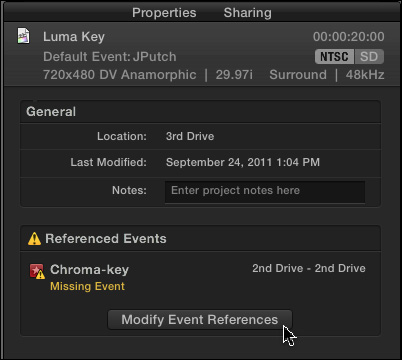
Click the Modify Event Reference button, which opens the Modify Event Reference window.
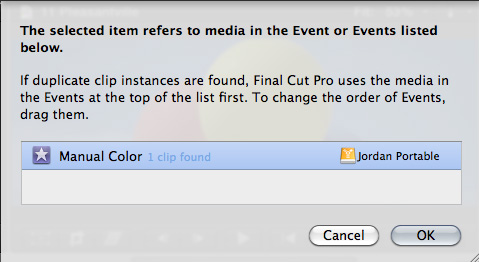
Navigate to the Event folder stored locally on her system and select it. The first editor’s Project now connects to this local media, rather than the media on the second editor’s system.
By changing Event References, both editors can send this Project back and forth for additional work. Keep in mind that once the Project is sent to one editor, the other editor can not work on the Project as there is no way to reconcile the differences between two versions of the same Project.
Both the first and second editor have their copy of the Event folder and media stored locally. Changing Event References allows repointing a Project from one Event folder to another.
This is a very intriguing use of the media management in FCP X because it easily allows changing the Event that is referenced by a Project. It isn’t the same as relinking individual clips, but allows an editor to repoint to all the media in an entire project.

2,000 Video Training Titles
Edit smarter with Larry Jordan. Available in our store.
Access over 2,000 on-demand video editing courses. Become a member of our Video Training Library today!
Subscribe to Larry's FREE weekly newsletter and
save 10%
on your first purchase.

39 Responses to FCP X: Sharing Projects
← Older Comments Newer Comments →-
 Larry Jordan says:
July 10, 2012 at 9:01 pm
-
 Mike says:
July 15, 2012 at 7:32 pm
-
 Larry Jordan says:
July 15, 2012 at 8:11 pm
-
 Mike says:
July 16, 2012 at 6:16 am
-
 Larry Jordan says:
July 16, 2012 at 7:35 am
-
 Huston Crawford says:
November 7, 2012 at 10:56 am
-
 Curry says:
January 28, 2013 at 10:12 am
-
 LGWishart says:
February 15, 2013 at 9:49 am
-
 Larry Jordan says:
February 15, 2013 at 1:09 pm
-
 Oof says:
February 24, 2013 at 12:25 pm
← Older Comments Newer Comments →Matthew:
Remember, you need to duplicate BOTH the project and the media on both systems so that FCP creates the project folder on both systems. At which point, replacing the project folder will work.
You are NOT able to add media to one system and have the second system find that media.
Larry
I’m a little confused about what to do here. I’m a noob trying to figure this out.
I have a huge project I’m working on (over 1 tb) with lots of events and projects. I created duplicate files using fcpx duplicate project and events (i need everything backed up). So i had a back-up of everything. Now, i had to make some changes to the original files (located on hard drive 1), but haven’t done anything to the back-up on external hard drive 2.
Will final cut X update the references to the original HD on the 2nd HD, or do i need to duplicate all of the projects and events again (which would require deleting the old back-ups and creating “new” back-ups).
I’m really confused. It’s like taking from one computer to another, but I’m still not sure how all that is done.
Mike:
To the best of my knowledge, there is no incremental backup facility in FCP X. For that, you’d need to use a third-party utility like SuperDuper.
Larry
maybe i wasn’t good at explaining. In my case, I’m kind of like the scenario above, switching between computers. The first computer has everything on it, and the external (traveling) goes between it and my laptop, and the external has a duplicate copy of the projects. Then i made a few changes to the projects on the main computer, so now the back-up projects are different, but the events are still the same.
Do i need to just erase the back-up (external traveling drive) events/projects (database), and now re-duplicate all the events and projects?
Or does final cut (with the referenced event you talk about above) allow me to just cite the references to the external by simply making a new copy of just the project files?
Mike:
If your media and Events remain the same, you only need to transfer the Project file – as described above – between the two computers.
However, if you are sharing the same external hard drive between the two computers – one for “home” and the other for the “road,” you don’t need to do anything. FCP will recognize all the files on the external disk when it starts up.
Larry
I know this is an older thread, but I am looking for some clarification with something you said Mr. Jordan.
When you say that multi cam will not work over ethernet, but 1 – 3 streams are fine; if I have a three camera setup, can I use a MacMini as storage/import and edit via ethernet on a MBP using multi cam? All 1080 footage from MkII’s and a MKIII.
Thanks for the help.
Wow, that’s so messy keeping some keyword data in Events and some in Projects. Sharing and collaboration features are DESPERATELY Needed in FCPX.
If the event and media is in two locations but changes are made to the event in one place that need to be shared, would passing the “CurrentVersion.fcpevent” file back and forth and replacing it in the event folder work? What about passing things like the “Analysis” folder to another user with the same event. Would that link automatically?
Something tells me that the FCPX foundation is just not built for sharing which scares me because I jumped in with both feet a couple months ago.
Let’s hope they come up with something genius and seamless that makes it all easy again…
I am new to final cut pro X. Just to confirm if one editor sends the files to the other. The second editor does colour correction on clips, and cleans up the audio on the entire project. If the second editor resends the cleaned up files to the first. Will all the work be apparent after it is all reconnected on the first editors system. Thanks for your help!!! Lonnie
As long as both editors have the same media, copying the Project folder will keep all project settings, you will only need to relink the media.
The BEST thing to do is to test this well before your deadline to make sure it works OK.
Larry
What Andre is trying to find out here, together with me is following:
Can fcp-x use a shared network location, without using XSAN, we have a windows-based Storage server on a link-agregated 2GB ethernet connection, so far the workstations will not use any XSAN protocol unless hosted by the OsX server and the OsX server will not continue the XSAN setup unless it physically finds a Fibre optics card. This is where we get stuck. In short, can our edit-stations, running fcp-x use the same data on a non-OsX shared network storage?
Tnx in advance.
Oof