
 Here’s the TL;DR: macOS 13.3 has big problems. If you haven’t upgraded, don’t. If you have upgraded to 13.3, immediately upgrade to 13.3.1. It may not fix your problems but it won’t be worse.
UPDATE: There are initial reports that the 13.3.1 update may not fix FCP’s plug-in verification problem.
MacWorld reported this morning that users are having problems with macOS 13.3 in the following areas:
NOTE: Here’s a link to the full article.
I’m also seeing strange behavior with Apple Mail, where it crashes after sending an email.
Another problem with 13.3, which hits closer to home, is that, after upgrading to 13.3, FCP hangs during launch as it attempts to verify audio units. When this happened to me last week, I solved the problem by deleting all the Accusonus and ERA audio plug-ins from the System and Library folders.
But, the issue is bigger than Accusonus. For example, Andrew sent me this email yesterday:
– – –
I’m running the Izotope “Everything Bundle,” which is up to date and all AU components validate without issue in Logic Pro (v10.7.7). Otherwise I don’t have any legacy or 3rd party AU components, which admittedly could be a source of trouble.
Furthermore, had no problems at all under the previous OS 13.2.1
So… something is clearly broken in the FCP / OS 13.3 combination.
Hopefully enough FCP users make enough noise for Apple to fix it. At a bare minimum they should issue a quick patch where incompatible AUs are quickly flagged instead of hanging indefinitely during startup =/
– – –
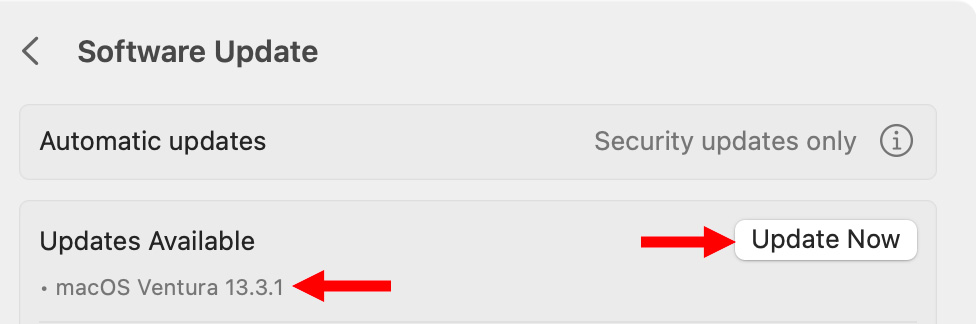
After I wrote this article Apple released the 13.3.1 update. However, I do not have any confirmation that this update fixes the audio unit problem. I contacted Apple for clarification, but so far, they haven’t responded.
Yesterday, I decided to update to 13.3.1 because staying with 13.3 was too big a risk. For now, be cautious upgrading. Let me know your results in the comments.

2,000 Video Training Titles
Edit smarter with Larry Jordan. Available in our store.
Access over 2,000 on-demand video editing courses. Become a member of our Video Training Library today!
Subscribe to Larry's FREE weekly newsletter and
save 10%
on your first purchase.

18 Responses to macOS 13.3 Is a Mess – Either Stay Put or Upgrade to 13.3.1 [u]
← Older Comments-
 Nate says:
April 15, 2023 at 9:36 am
-
 Larry says:
April 15, 2023 at 2:02 pm
-
 BenB says:
April 16, 2023 at 8:16 pm
-
 Larry says:
April 17, 2023 at 4:45 am
-
 Daniel says:
May 3, 2023 at 7:14 am
-
 Larry says:
May 3, 2023 at 7:48 am
-
 Paul Talbot says:
June 2, 2023 at 10:13 am
-
 Larry says:
June 2, 2023 at 10:59 am
← Older CommentsYea, I was pondering a full ecosystem switch to “simplify things” a bit. One vendor, software running on first party platforms, etc. The idea is solid in theory. I wasn’t ready for this, though. I thought I was going crazy u til I searched Twitter and it brought me here!
I was planning on getting a Mac Studio to replace the desktop, but thats not going to happen. I don’t feel like I can trust this stuff, and its still broken so its not like I can be confident that such issues will be properly prioritized and addressed.
Great thing is I caught it before I got on the plane with the MBP as the only computer I had to use next week, LOL. I tend to be an anxious traveler so I’m always going through everything to make sure it works properly several days leading up to departure.
Nate:
Your decision may be a bit hasty. All software has bugs – always has always will. The key is how fast it gets fixed. The Mac Studio is an amazingly powerful system for any software. Whether you run Final Cut, Premiere, or DaVinci Resolve on it, you’ll be stunned at how fast it runs.
That being said, like you, I’m puzzled as to why it’s taking Apple so long to figure out this problem with Final Cut – plug-ins work great in Logic AND in Final Cut running any version of the macOS prior to 13.3. What I don’t know – and I’ve asked – is whether this is an OS bug, or FCP bug.
As soon as it get fixed, I’ll let everyone know.
Larry
Hey Larry! Long time no see!
So, Logic has no issues, but FCPX does, and there are supposed to both use the same AU validator app. What? Something ain’t right with that! How does it work well with one and not the other, but be a macOS issue? Then again, LPX and FCPX have separate teams who don’t really communicate that much, I guess. Maybe FCPX isn’t utilizing the AU validator app all that well, maybe?
I’ve heard it said lately that Apple is making some of its best hardware, but the software is really taking a nose dive. Something to think about.
Plus, this give me spooky DejaVu of FCP7 when development ground to a halt, then it was yanked off the market. It’s that 10 year mark for both legacy FCP and FCPX where the development just starts to lag behind other NLEs. The rest of this year will be interesting…
Ben:
I don’t understand why this problem is happening and have reached out to Apple to learn more.
I also agree that FCP feels like it is in transition.
Larry
Just updated to 13.3.1 on a Mac Studio
Not it crashes with a kernel panic every 5 minutes after boot
Daniel:
OUCH!
Call Apple support immediately!
I’m running 13.3.1 on an M1 Pro MacBook Pro with no crashes. There’s something seriously unbalanced in your system.
larry
I (was) running both Logic and Final Cut professionally on an M1 MacBook Pro until this 13.1 disaster. Final Cut just hangs ‘Validating Audio Units’ so the only logical option was to make the switch to Davinci Resolve. It validates all the Audio Units just fine and now my entire team has switched away from Final Cut. We’ll probably never return as we have dealings to meet and simply deal with the headaches. Especially as this is Apple operating system breaking one of their own (‘pro’) programs! Quite possibly one of the worst Apple updates ever and If other like me are forced to switch away potentially very damaging for the future of Final Cut in the Pro NLE world.
Paul:
Totally agree. This is a mess.
Larry