
With the release of Mac OS X 10.11 (El Capitan), Disk Utility has changed so that it no longer creates RAID 0 or RAID 1 RAIDs. There are also issues with properly monitoring drive health. (Thanks to Larry O’Connor at OWC for bringing this to my attention.)
DEFINITION: A RAID is a collection of separate hard disks that are combined to act as a single drive, providing greater storage and faster speeds. RAIDs are configured into different levels: 0, 1, 10, 5, 6 and 50. (This article describes RAID levels in more detail.) RAIDs can be created using software or hardware. In all cases, a RAID requires at least two separate hard drives; the most popular systems use either 4 drives or eight, all built into a single enclosure.
THE SCOPE OF THE PROBLEM
This problem is significant, but very specific:
What no longer works is the ability to use Disk Utility to create, or re-create, any RAIDs in Mac OS X 10.11 (El Capitan). This means that you will need to use other software to create a RAID.
Also, Disk Utility no longer monitors the health of your hard drives, nor does it allow you to repair permissions.
THE OLD DISK UTILITY

In versions of the Mac OS prior to 10.11, when Disk Utility was started, a RAID option existed in the menu bar at the top.
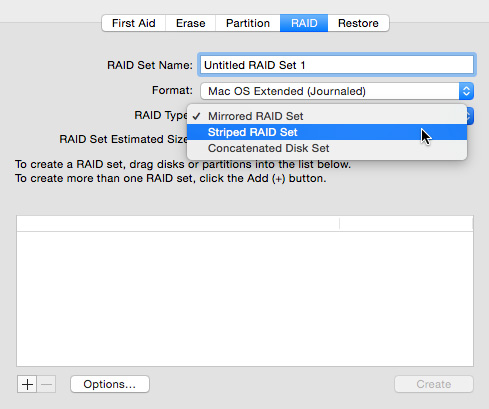
This allowed us to create new RAIDs in one of three formats:
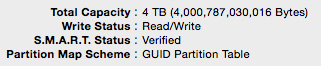
Additionally, the bottom of Disk Utility displayed the SMART status of a drive, which was designed to provide an early warning of drive failure.
These features no longer exist in the latest version of Disk Utility, shipped with El Capitan.
THE NEW DISK UTILITY
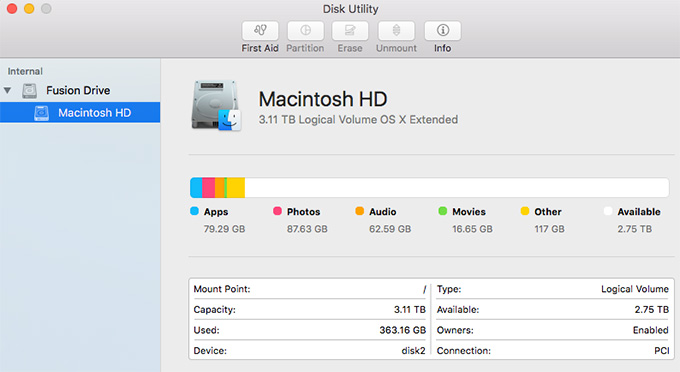
After upgrading to El Capitan, Disk Utility has an entirely different look. The entire RAID submenu is gone, as is the ability to check the SMART status of the drive.
NOTE: According to Larry O’Connor, SMART diagnosis was too far “after the fact,” to actually prevent data loss. Watch his interview, at the bottom, to learn more.
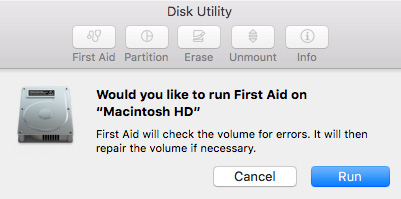
The ability to repair permissions is also gone.
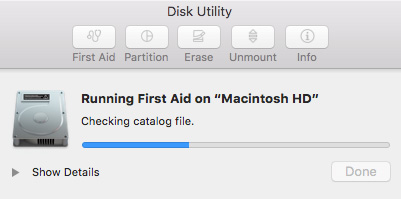
And repairing a hard disk is simplified, as well; though twirling down Show Details does provide more information on the status of First Aid operations.
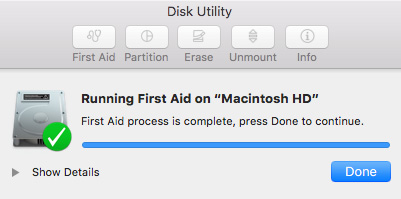
Another new thing I noticed when Disk Repair was running was that all other applications and window actions were paused.
WHAT DOES THIS MEAN?
If you have a hardware RAID, this is not an issue.
If you have a software RAID, or plan to create them in the future, you will need to use other software than Disk Utility to initialize the RAID.
A program that I use personally is SoftRAID – www.softraid.com – developed by SoftRAID. I’ve been using it on multiple systems to create RAIDs, monitor RAIDs and support RAIDs. It has never caused me a problem and I recommend it highly.
TO LEARN MORE
Watch this interview that I did last week with Larry O’Connor, CEO of OWC, discussing this problem in more detail, and outlining additional software options.

2,000 Video Training Titles
Edit smarter with Larry Jordan. Available in our store.
Access over 2,000 on-demand video editing courses. Become a member of our Video Training Library today!
Subscribe to Larry's FREE weekly newsletter and
save 10%
on your first purchase.

23 Responses to Caution: El Capitan May Cause RAID Problems
← Older Comments Newer Comments →-
 Uli Plank says:
April 18, 2016 at 5:10 am
-
 Steve Joseph says:
May 11, 2016 at 11:30 pm
-
 Larry says:
May 12, 2016 at 6:19 am
-
 Dan S says:
July 19, 2016 at 10:21 am
-
 Elliott Landy says:
August 6, 2016 at 9:42 pm
-
 Larry Jordan says:
August 7, 2016 at 9:44 am
-
 Richard Johnson says:
October 4, 2016 at 6:43 am
-
 Nick Papadopoulos says:
October 13, 2016 at 1:03 am
-
 Scott says:
October 27, 2016 at 5:59 am
-
 flatfoot says:
January 16, 2017 at 7:32 am
← Older Comments Newer Comments →You can still generate a RAID by booting into the Recovery partition and using the old Disk Utility there. Don’t know for how long, though…
“or purchase a new hardware raid” – I’m not sure that’s quite the answer, at least not for some users. I recently had to return a ProRaid Dual Enclosure that did not play well with my 2009 Mac Pro even though it was supposed to. It wasn’t until recently reading reviews of even more enclosures I started to even consider El Capitan as an actual culprit.
I also wonder if my architecture is just too old? And what if, just what if external RAID support is something Apple has on their kill list like the optical drive but manufacturer’s just don’t know it yet? Creating a RAID and managing it is not an “average Apple user” flow. Not at all. So I can think of many reasons why one would want to hide it but removing it has to be for a reason and that’s the question I haven’t seen asked yet.
Why did Apple remove the ability to create a RAID and what do they see replacing it currently and in the near future? Don’t be surprised if we later learn that Apple removed this because such a small percentage of users actually use this. “repair disk permissions” – I’ve heard this and defragging are not kind to SSD’s. Is this true? Is that why that was possibly removed?
Steve:
I don’t think Apple is trying to kill support for hardware RAIDS, or any RAIDs for that matter. As file storage needs increase, RAIDs are our only option. Disk Utility runs on older technology, what Apple killed was the ability to create software-based RAIDs using it. There are MANY manufacturers that provide RAIDs – both software and hardware – that work fine with El Capitan.
It is somewhat unreasonable to expect computer hardware that is seven years old will support all the latest OS technology. At some point, you need to either buy new gear or stop upgrading your hardware.
Repair Permissions is still actively supported in Disk Utility – it is built into the “Repair” button. Also, as hard disks increase in storage capacity, defragging is less important. And defragging is not a relevant concept for SSDs because they store data totally different from a traditional spinning media hard disk.
Larry
Did not work for me. The raid button did not show up in recovery mode.
Can I create a concatenated drive (JOBD) with a mac booted into mavericks and then use that drive on an el capitan booted mac? Same quetsion for a Raid (0, 1, etc) drive? Or will El capitan just not read disks made with the old Disk Utility from maveriks?
Elliott:
Yes. If you create the RAID in Mavericks, it will work in El Capitan.
You just can’t create it in El Capitan.
Larry
Many years back, I found the problem of a RAID drive failing and Apple saying nothing. That’s why I wrote my script which uses “diskutil appleraid list” to verify that all of my RAID volumes are online. It runs every 12 hours and sends me email if it finds anything wrong. Has worked fine for many years.
I’ll have to look into softraid now.
It’s still available. Boot in Internet Recovery mode (cmd+alt+r) and the old disk utility is still there with Raid support
Hi guys,
I found this article from Lacie on creating the RAID via terminal in OS X El Capitan. Despite not being able to see a GUI with the info, which was so nice I must admit, I can confirm this does work. Tested and working with two 2008 Mac Pro towers, running 10.11 with a mirrored raid.
http://knowledge.lacie.com/pkb_ArticleView?id=kA030000000iKoI
Hi there,
just use disk utility on the command line. All the functionality ist still there in El Capitan. Still, it’s a shame that they dumbed down the GUI like that.