
With the release of Mac OS X 10.11 (El Capitan), Disk Utility has changed so that it no longer creates RAID 0 or RAID 1 RAIDs. There are also issues with properly monitoring drive health. (Thanks to Larry O’Connor at OWC for bringing this to my attention.)
DEFINITION: A RAID is a collection of separate hard disks that are combined to act as a single drive, providing greater storage and faster speeds. RAIDs are configured into different levels: 0, 1, 10, 5, 6 and 50. (This article describes RAID levels in more detail.) RAIDs can be created using software or hardware. In all cases, a RAID requires at least two separate hard drives; the most popular systems use either 4 drives or eight, all built into a single enclosure.
THE SCOPE OF THE PROBLEM
This problem is significant, but very specific:
What no longer works is the ability to use Disk Utility to create, or re-create, any RAIDs in Mac OS X 10.11 (El Capitan). This means that you will need to use other software to create a RAID.
Also, Disk Utility no longer monitors the health of your hard drives, nor does it allow you to repair permissions.
THE OLD DISK UTILITY

In versions of the Mac OS prior to 10.11, when Disk Utility was started, a RAID option existed in the menu bar at the top.
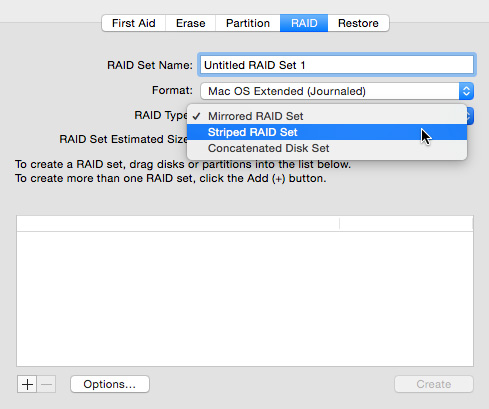
This allowed us to create new RAIDs in one of three formats:
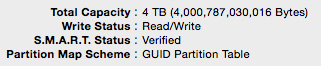
Additionally, the bottom of Disk Utility displayed the SMART status of a drive, which was designed to provide an early warning of drive failure.
These features no longer exist in the latest version of Disk Utility, shipped with El Capitan.
THE NEW DISK UTILITY
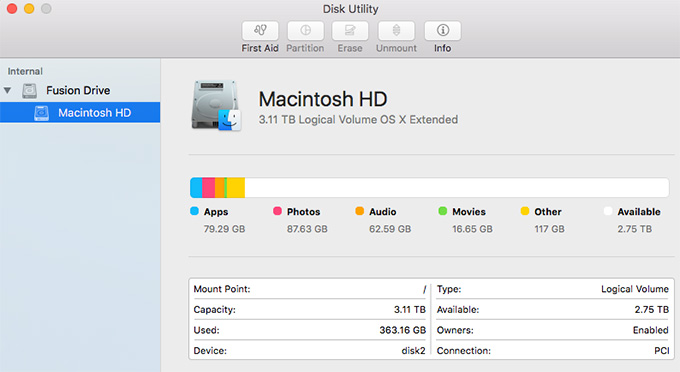
After upgrading to El Capitan, Disk Utility has an entirely different look. The entire RAID submenu is gone, as is the ability to check the SMART status of the drive.
NOTE: According to Larry O’Connor, SMART diagnosis was too far “after the fact,” to actually prevent data loss. Watch his interview, at the bottom, to learn more.
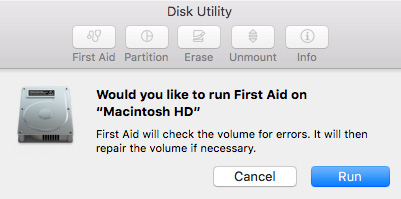
The ability to repair permissions is also gone.
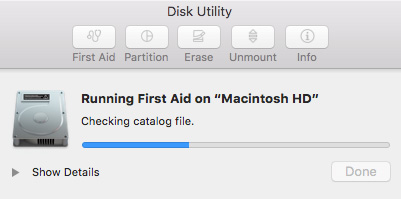
And repairing a hard disk is simplified, as well; though twirling down Show Details does provide more information on the status of First Aid operations.
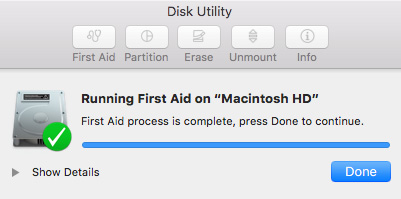
Another new thing I noticed when Disk Repair was running was that all other applications and window actions were paused.
WHAT DOES THIS MEAN?
If you have a hardware RAID, this is not an issue.
If you have a software RAID, or plan to create them in the future, you will need to use other software than Disk Utility to initialize the RAID.
A program that I use personally is SoftRAID – www.softraid.com – developed by SoftRAID. I’ve been using it on multiple systems to create RAIDs, monitor RAIDs and support RAIDs. It has never caused me a problem and I recommend it highly.
TO LEARN MORE
Watch this interview that I did last week with Larry O’Connor, CEO of OWC, discussing this problem in more detail, and outlining additional software options.

2,000 Video Training Titles
Edit smarter with Larry Jordan. Available in our store.
Access over 2,000 on-demand video editing courses. Become a member of our Video Training Library today!
Subscribe to Larry's FREE weekly newsletter and
save 10%
on your first purchase.

23 Responses to Caution: El Capitan May Cause RAID Problems
← Older Comments-
 Larry says:
January 16, 2017 at 10:15 am
-
 shape says:
May 25, 2019 at 11:28 am
-
 Larry says:
May 25, 2019 at 11:59 am
← Older CommentsFlatfoot:
Um, that assuming us mere non-IT mortals have a clue how to use Terminal. Which I don’t.
And I agree, why they took this functionality away puzzles me.
Lary
I haven’t tried to create a RAID in El Capitan or later, but the omission of the RAID tab in Disk Utility could be due to the bug posted here:
https://discussions.apple.com/thread/6700539
“There is a known BUG in 10.8.4 and later for drives over 2.2TB ERASED in the internal bays. It creates a Core Storage Group for them instead of a simple Volume, and they are then useless.
Work-arounds include:
• Erase again in an external enclosure (one modern enough to actually erase a >2.2TG Drive)
• Erase with an older version of Mac OS X, such as 10.6 from the “Full Retail” DVD if your Mac can boot from it [Mac Pro 5,1 requires custom 10.6.4 minimum] or your original “shipped in the box” DVD, if available.
NOTE: One user who simply used “Partition” instead of ERASE escaped this issue entirely.”
Shape:
Thanks for posting this.
Larry