
 I love gear. As anyone who has spent time with me will attest, if something has blinking lights, I’m a fan.
One of the benefits of covering the NAB Show for the Digital Production Buzz is that I get to design and install all the equipment we use in the booth: power, network, audio, computers and software. This annual event gives me a chance to practice what I preach, as well as work with new hardware in the pressure-cooker of live production. Most of this gear I buy, some I borrow and return after the show.
I also obsess over audio quality. It makes no sense to spend this much effort and money creating programming if the shows don’t sound as good as possible. For me, the gold standard in audio is NPR. So, I’m always looking for better ways to get our audio to sound great. On the other hand, we are a podcast, not network radio; our budgets are based on the size of the company credit card. Financial reality always rears its ugly head.
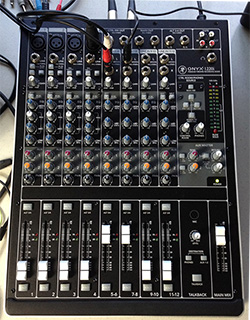
This year, I was really excited to add a new mixer to our equipment list: a Mackie Onyx 1202i. A Mackie 1202 VLZ 12-channel analog mixer has been the heart of our weekly show for the last five years, so I’m a big fan of the brand. I bought this new mixer specifically for our NAB coverage. I also wanted to replace an older Alesis FireBox mixer that still worked, but which Alesis no longer sells.
Mackie’s are legendary for their reliability, functionality and reasonable price. But, ultimately, while we took the new mixer to NAB, we never used it and sent it back as soon as we returned home. We got better results with a simple Alesis FireBox mixer that cost half as much.
The reasons why are not obvious and apply to more than just a single mixer. And that’s why I’m writing this article.
OUR AUDIO WORKFLOW
I wrote about our audio workflow in an earlier article – click here – but the short version is that the mixer sends audio simultaneously in two formats: analog and digital.
Analog audio feeds our live event:
The digital audio, though, is used for all recording and posting. If you listened to the live show, you heard the analog audio stream. If you listened to any posted show or interview, you were listening to the digital recording.
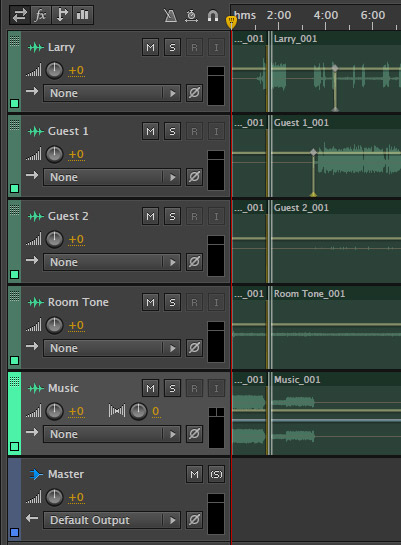
We do this by recording the FireWire output of the mixer on a new MacBook Pro 15″ laptop (using a Thunderbolt to FireWire converter cable) into Adobe Audition. We use up to five simultaneous audio streams from the mixer:
Each stream is recorded to its own track in Audition, so we have independent control over each mic when cleaning up an interview during editing. Because all interviews go to the web, we master final audio levels so that they don’t exceed -3 dB, which works out to about -20 dB LKFS.
NOTE: One of the reasons we don’t master levels to 0 dB, is that MP3 compression is optimized for an audio level of -6 dB, while AAC compression is optimized for an audio level of 0 dB. Because we distribute in both formats, we split the difference.
THE PROBLEM
As I was testing the new Mackie Onyx mixer in the week prior to the show, it met all my needs for an analog mixer. But, when I sent a 0 dB tone to the mixer, and set all mixer levels to 0 dB, when that signal was sent digitally to the computer, the level arrived at -18 dB! Since Audition makes no level adjustments to incoming audio, that level drop had to occur at the mixer.
What makes this significant is that audio levels are logarithmic. For every 6 dB drop in audio gain, we lose 50% of the perceived volume of the audio. So, recording a digital signal at -18 means that we are losing 75% of the audio levels from that signal.
Sure, in a digital environment, we COULD boost the gain back, but all we are doing is the audio equivalent of stretching pixels – inventing audio data that wasn’t recorded in the first place. All this does is make the digital audio sound thin and weak. Worse, because we were recording live on the NAB trade show floor surrounded by trade show noise, raising levels in post-production significantly increased background noise.
The mixer’s analog audio sounded fine, but the digital audio was totally unsatisfactory.
CONTACTING MACKIE SUPPORT
I contacted Mackie Tech Support to figure out what was going on. They knew what the problem was instantly. The short answer, as the support tech explained it, is that analog audio has lots of headroom above 0 dB before distortion becomes objectionable. However, digital audio starts to distort as soon as levels exceed 0 dB. To prevent distortion, Mackie decreased the level of analog signals feeding into digital devices by 18 dB. For this reason, audio levels don’t match between analog and digital audio.
This extra “headroom,” or the distance between a current audio level and the point where distortion starts, means that if an actor suddenly starts yelling, the far louder levels caused by the yells don’t distort the recording
The tech at Mackie sent me this excellent article from “Sound on Sound” magazine that explains the problem in more detail. (Don’t lose this link, we’ll come back to it in a minute!)
ITS THE WRONG SOLUTION
Here’s the problem. The 18 dB drop in levels seeks to prevent excessive dynamic range causing digital distortion. But I don’t record uncontrolled mics.
To me, the best way to get great audio is to spend the money on great mics, great preamps and setting proper levels. Because I am obsessing about audio quality, I have each mic feeding its own Aphex Channel preamp, which provides compression and limiting on each mic. Then, I bring each mic into the mixer at line level with all excess levels fully controlled not to exceed -3 dB
Also, the music and commercials I play during the show are also fully level-controlled not to exceed -3 dB.
In other words, I have no need of digital headroom on the analog output. All that -18 dB level drop is doing is ruining the audio I’ve spent lots and lots of money and effort to sound good.
Remember that “Sound on Sound” article I referenced earlier? The one I was sent by Mackie Tech Support? I want to quote the last two paragraphs:
“It surely doesn’t require a brain the size of a planet to realize that digital systems employed in live recording require a totally different alignment with analogue equipment than those used in post-production applications. So why have so few manufacturers addressed this issue with switchable gain structures or adjustable sensitivities? Most professional converters are adjustable, as are many of the better semi-pro units…
All that would be required is an ‘operating level’ switch to reset the alignment between analogue and digital signal levels from the standard 0dBu = -20 or -18dBFS, to something more like 0dBu = -12 or -10dBFS. Let’s hope some manufacturers read this and take note!”
That article was written in May, 2000. 14 years later, and there’s still no switch on a Mackie mixer, even though the Onyx system is actively touted by Mackie as a “premium” analog and digital mixer. Without the ability to accurately match analog and digital levels, the mixer has only limited value in a digital production environment. And I realized that the only way this situation improves is for me to send the mixer back and write about it. If you agree, share this article with your friends and Mackie.
It can’t be that hard to make great analog audio sound equally great when recorded digitally. Hopefully, one day, Mackie will figure that out.
END NOTE
Oh! During NAB, we went back to the older Alesis FireBox mixer because the analog sound was fine and 0 dB sent digitally out of the Alesis arrived at -4 dB in Audition. 4 DB I can deal with.

2,000 Video Training Titles
Edit smarter with Larry Jordan. Available in our store.
Access over 2,000 on-demand video editing courses. Become a member of our Video Training Library today!
Subscribe to Larry's FREE weekly newsletter and
save 10%
on your first purchase.

25 Responses to Why I Returned A Mackie Mixer
← Older Comments Newer Comments →-
 R Daugherty says:
January 24, 2016 at 3:47 am
-
 Larry says:
January 24, 2016 at 11:28 am
-
 ProDigit says:
September 5, 2016 at 1:48 pm
-
 Larry says:
September 5, 2016 at 2:43 pm
-
 David Glover says:
December 17, 2016 at 8:02 pm
-
 Some Guest says:
February 10, 2017 at 11:44 am
-
 Larry says:
February 10, 2017 at 11:48 am
-
 Greg barthram says:
February 26, 2017 at 11:33 pm
-
 Larry says:
February 27, 2017 at 7:23 am
-
 TK Major says:
December 3, 2017 at 10:59 am
← Older Comments Newer Comments →Why not buy an 8 or 16 input separate analog device to go from your Mackie’s analog outputs to that soundcard, then into your pc, recording the analog signals to separate tracks inside your DAW?
Rick:
I should not have to buy more gear to fix what Mackie screwed up in the first place.
Also, if I did that, why would I need the mixer in the first place? It would be easier to take each mic direct into the computer and mix later.
Mackie is not paying attention to how digital audio is supposed to work and hoping that customers won’t notice.
Larry
hmm…
Why don’t you then adjust the gain to level out?
I always put my dials at 1PM.
ProDigit:
Nothing I could adjust would allow me to see accurate levels on the meters and output levels digitally at greater than -20 dB.
I’ve had similar problems with my Mackie Onyx.
While I’ve ended up correcting things by normalising it in post, it’s very disconcerting (to me, anyway!) to have meters kicking into orange on the Mackie and barely moving on Audition. It gives me no confidence that I’m actually recording anything.
Like you, I’ve decided to sell mine and get something else. A pity, as it’s a very solid, flexible mixer.
Thanks to Ken’s tip above, I’ll be looking at PreSonus.
Cheers,
David
Hi Larry,
your fear of low levels compromising sound quality is unfounded.
First, if you boost the quiet signal, the noise gets boosted exactly equal (and not over-propotional, as you stated in your article). So the SNR stays the same.
Second, with 24bit interfaces the need to record super hot signals has dropped sine there’s plenty of bits to store all the information even when the levels are low. With a gain reduction of -18 db, you lose three bits, still 21 remain, more than enough when we take into account a 16 bit recording has a dynamic range of 96db.
Conclusion: Relax 🙂
Some Guest:
Thanks for the feedback.
Larry
Learn the difference between dbfs and du! There’s nothing wrong with that desk. Every desk will behave the same!
Greg:
Perhaps. However, two other digital mixers from other vendors did not display this problem.
Larry
It is considered by many as a ‘best practice’ to calibrate one’s analog mixer to something like 18 dB below digital 0 dB so as to maximize signal-to-noise ratio in the mixer but deliver a safe margin of headroom.
The author apparently did not do his homework before spending his money.
24 bit digital audio has a theoretical SNR of over 140 dB.
The approach employed by Mackie has been widely adopted and makes very good sense.