
 Last week in my newsletter I wrote: “I’m currently writing a review of some asset management software. I’d like to include whatever system you use in my write up. There are many systems designed for enterprises – but with all the industry consolidation I’m curious what’s available for smaller shops.”
I got a variety of answers, so I collected them into this article.
Bruce Hamilton
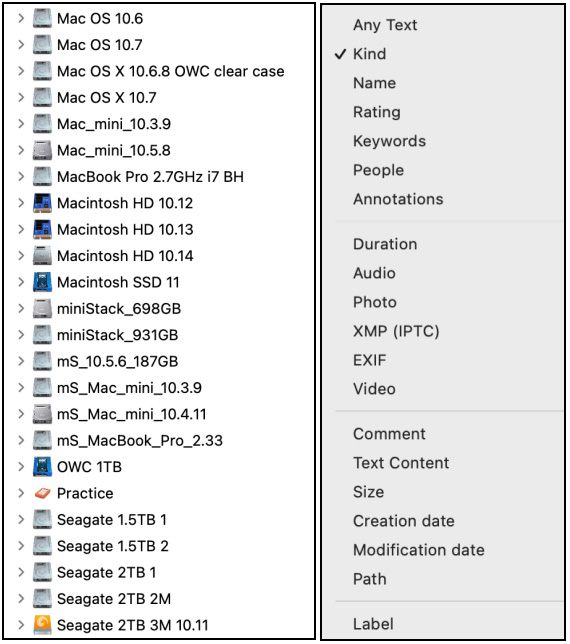
We have been using NeoFinder to catalogue all of our hard drives, computer, CD, DVDs – pretty much any storage device. It has a very fast and powerful search. We currently have 87 drives, computers, etc ranging in size from 500GB to 16TB. For example we use NeoFinder to find old videos from 20+ years when we don’t know the exact names but remember some part of the name. You should check this software if you don’t already know about it. We recommend it highly.
In order for NeoFinder to do its magic it needs to initially read the entire disk or device. To keep the individual drive database up to date NeoFinder needs to reread the entire disk again but this time the cataloguing is much faster since it only needs to catalogue the changes. Drives should be updated before they taken offline so their catalogue actually reflects the contents. Each drive or device is a separate listing in NeoFinder. The search dialogue is quite flexible and multiple searches criteria are possible. Many of our drives are offline so these old drives are easily and quickly searchable. We don’t know how we would ever find our files without NeoFinder.
Lasse Oglaend
I have previously found Kyno very interesting. Then, the company was sold and I got worried it would be shortlived. (Something you do not want with DAM systems…)
Killer features:
Michael Murray
I run a small team of video producers inside a university and finding a an affordable and manageable system that a small team can use effectively has been a years-long search.
We currently rely on Kyno to do our front line management of assets. While this is not an enterprise level MAM it is affordable and quite easy to use to find and keep track of all the raw content we produce on a daily basis. Because we use shared storage any meta data that any producers adds to an asset is available to others on the system.
Asset management is an area that we all know has value but is often hard to carve out the time to feed the systems that I usually see. Kyno fits as a low overhead low cost MAM alternative.
Kevin Flanagan
We’ve started using Asset Panda (https://www.assetpanda.com) here at Penn Medicine. It might be a bit much for a smaller shop but I like it so far. I especially like that I can check things in and out on my phone and we’re not tied to one specific computer.
Dave Wooten
At INSP, we use eMam from Empress for asset management, through the Premiere panel. It is supported by a XenData LTO robot using LTO-6. We will have to migrate soon and I’m not looking forward to that!
Stephen Bergson
Like you, I’ve tried a lot of different asset management systems and even set up my own on some projects because no off-the-peg ones have done everything I’ve wanted from them. I’ve been using Kyno for a few years, which I know you’ve reviewed previously but I also work with PhotoMechanic which works surprisingly well with video and I’ve experimented with software like Cinematica as well as Filemaker templates. All have strengths and quite a few snags.
Let me know if you’d like to know more on everyday use with any or all of them. It’s an important area, often overlooked by NLE software developers.
Larry adds: Please describe how you are tracking your own media in the Comments below.

2,000 Video Training Titles
Edit smarter with Larry Jordan. Available in our store.
Access over 2,000 on-demand video editing courses. Become a member of our Video Training Library today!
Subscribe to Larry's FREE weekly newsletter and
save 10%
on your first purchase.

17 Responses to Video Editors Tell How They Manage Media
← Older Comments-
 Larry says:
September 2, 2022 at 4:55 am
-
 François Houle says:
October 11, 2022 at 6:55 am
-
 Larry says:
October 11, 2022 at 7:00 am
-
 Eric says:
December 30, 2022 at 9:33 am
-
 Larry says:
December 30, 2022 at 10:06 am
-
 susan cingari says:
December 17, 2023 at 7:24 pm
-
 Larry Jordan says:
December 17, 2023 at 7:40 pm
← Older CommentsDave:
Thanks for writing! Since its acquisition, CatDV has become very quiet. It is good to know you are doing well. And Archiware is a product I respect a lot.
Larry
Hello all,
At work, I manage a large video collection. At first, you need to ask yourself what you want to do with the original file? You might want to make a master copy, then a working file, then a backup file. The working file might be converted. You might also need to develop you own naming convention to have a unique file number to avoir duplication names. I use different softwares to accomplish that. We are still looking for a good solution…
A good MAM solution should have a customize workflow option. Something like CatDv Server, Cantemo or else. It’s all depends of the User Workflow. I would say first establish first your different users workflow, then find a solution matching your needs. There is no one size fit all for Media Asset Management.
François:
Thanks for your comments.
Larry
We had CatDV for years and looked into upgrading it, but they’ve switched to a subscription based model and their pricing is fairly enterprise, as an FYI for folks researching.
Eric:
I suspect this change was because CatDV was acquired by a company (Quantum) that focuses on enterprises.
Larry
is there an update on this
Susan:
Nope. Mostly because the basic workflow for editing hasn’t changed in a long time.
Larry