

If you are using Apple Compressor 4.1 or later to burn DVDs, here are two tips that can make your life a lot easier.
Q. If someone uses Compressor to burn a DVD, then quits the application, can they go back later and burn a second DVD without recompressing the original source file?
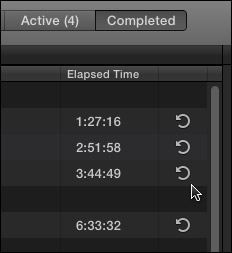
A. When you launch Compressor again, go to the Completed tab, and click Reuse (the curved arrow to the right of the job listing). Provided the M2V and AC3 files remain in the same location on the disk to which they were originally encoded, and you don’t change the settings from the job, Compressor will recognize that it doesn’t need to re-encode the files, and go straight to burning the disc.
Q. Can Compressor create a DVD disk image that could be used to burn multiple discs?
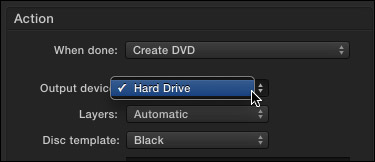
A. You have two options:

2,000 Video Training Titles
Edit smarter with Larry Jordan. Available in our store.
Access over 2,000 on-demand video editing courses. Become a member of our Video Training Library today!
Subscribe to Larry's FREE weekly newsletter and
save 10%
on your first purchase.

14 Responses to Two Quick DVD Burning Tips
← Older Comments-
 Irvine says:
January 27, 2017 at 12:26 am
-
 Larry says:
January 27, 2017 at 8:44 am
-
 Helen Nelsen says:
April 9, 2019 at 3:11 pm
-
 Larry says:
April 9, 2019 at 6:17 pm
← Older Commentshey Larry thanx so much for the info greatly helps.i have a 106min project trying to create a dvd it seems to get stuck on creating disc
Irvine:
There are two potential issues here:
1. You are using older software – DVD Studio Pro – on an operating system that is too new. It won’t work on OS X 10.11 or later.
2. You may be using a version of Compressor that does not do well burning DVDs (version 4.3.0 has problems)
If either of those is true and you can’t use anything else, try using Roxio Toast to burn your DVD.
Larry
Hi Larry,
My client just wants simple conference event videos with fade in and fade out that I edited…”first play” is just the track. When I Share the File to DVD and then to Hard Drive, I erased the title because I do NOT want a menu. Also selected Play Video and not Menu. BUT, the img files created by FCP X for each video end with a clunky menu page that has original file name and unnamed Chapters with Chapter Lengths on the screen. Is it possible to omit that? Also, is there a way to tell FCP X to replay from beginning once reach the end?…or is this too much to ask? THANK YOU…for all the years of help you’ve given me without knowing it :).
Helen:
Truthfully, I don’t know – I’ve never used FCP X to create a DVD, I find it too limited.
My best suggestion is to contact Apple Support, then, be patient until they find someone who knows what a DVD actually is.
Larry