
As I was researching my new Final Cut Pro X book, I discovered this interesting technique that I wanted to share with you.
Many times, editors need to share projects. While Final Cut Pro X does not allow more than one editor to be working in the same project at the same time, there is a way to share the same project between editors. Event References make this possible.
An Event reference is the ability to take a Project and point it to media in a different Event. What you are doing is changing the media that is connected to a Project by changing the Event reference.
A Final Cut Pro X project doesn’t contain media, it just “points” to media, which is stored in your Final Cut Events folder. This media can be stored locally, or on an XSAN server – though not, however, on a standard-issue OS X Server. We can take advantage of this fact when it comes to sharing projects between editors.
For example, let’s say two editors, in two different cities, want to both work on the same project, though not at the same time. To start, the first editor makes a complete copy of both the Project folder (stored in the Final Cut Projects folder) and the Event folder (stored in the Final Cut Events folder).
The first editor sends the second editor both folders, and the second editor starts editing. During this time, the first editor can not be working in the Project. The original Event folder, containing the media, and the Project remain with the first editor, while a copy of the Event folder and Project folder are now also with the second editor. (For those that worry, there is no reduction in image quality when you copy digital image files.)
The second editor can make changes to both the Project and the Event, such as, say, editing clips, adding keywords, changing clip names in the Event Browser, and flagging clips as Favorites using ratings. However, the second editor can not change the media itself, nor add new media.
Then, the second editor sends just the Project folder back to the first editor. (Important note, he needs to send the entire Project folder, not just a single Project file contained inside it.)
If the first editor opens the Project sent by the second editor, all the clips would be offline, because the Project is still linked to the Event folder on the second editor’s system in another city. Instead, the first editor copies the Project folder to her local system in the Final Cut Projects folder. Opening Final Cut Pro X, she selects the Project in the Project Library, without opening it in the Timeline.
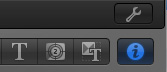
With the Project selected, the editor chooses File > Project Properties (or presses Command+J).
Click the wrench icon (just above the Inspector button) to display the Project Properties window.
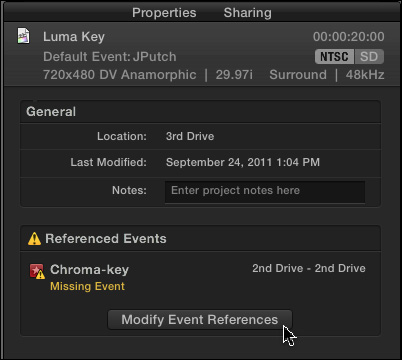
Click the Modify Event Reference button, which opens the Modify Event Reference window.
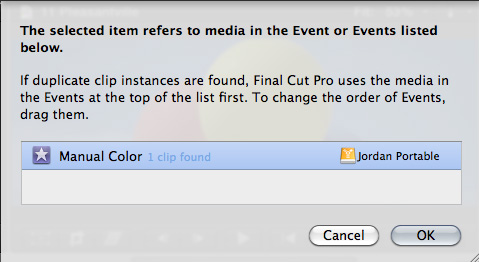
Navigate to the Event folder stored locally on her system and select it. The first editor’s Project now connects to this local media, rather than the media on the second editor’s system.
By changing Event References, both editors can send this Project back and forth for additional work. Keep in mind that once the Project is sent to one editor, the other editor can not work on the Project as there is no way to reconcile the differences between two versions of the same Project.
Both the first and second editor have their copy of the Event folder and media stored locally. Changing Event References allows repointing a Project from one Event folder to another.
This is a very intriguing use of the media management in FCP X because it easily allows changing the Event that is referenced by a Project. It isn’t the same as relinking individual clips, but allows an editor to repoint to all the media in an entire project.

2,000 Video Training Titles
Edit smarter with Larry Jordan. Available in our store.
Access over 2,000 on-demand video editing courses. Become a member of our Video Training Library today!
Subscribe to Larry's FREE weekly newsletter and
save 10%
on your first purchase.

39 Responses to FCP X: Sharing Projects
Newer Comments →-
 Tangier Clarke says:
November 14, 2011 at 11:10 am
-
 Larry Jordan says:
November 14, 2011 at 5:00 pm
-
 Tangier Clarke says:
November 14, 2011 at 5:16 pm
-
 RIch says:
November 17, 2011 at 6:10 am
-
 Dustin Hoye says:
January 18, 2012 at 5:58 pm
-
 Balthazar says:
January 29, 2012 at 2:49 pm
-
 Larry Jordan says:
January 29, 2012 at 2:56 pm
-
 Balthazar says:
January 29, 2012 at 3:15 pm
-
 Larry Jordan says:
January 29, 2012 at 3:31 pm
-
 Luke says:
May 29, 2012 at 1:08 pm
Newer Comments →Thanks for the article Larry. Some things that weren’t clear – are keywords, flagging, etc stored with the project or with the event?
The article infers that it’s stored with the project and would move with the project folder. If that weren’t the case, then the first editor would never see the meta information when getting the project back from the second editor.
Just want to be sure.
Ratings and keywords are stored in the Event database. Metadata elements are placed in the media file during import. However, metadata that is added after import, or custom metadata fields, are not stored in the media file but in the Event database.
Larry
OK, that’s what I thought. So the 1st editor would never get to see any modifications such as keywords, flagging, etc. when sending the project back. Those are exclusive to each editor which is unfortunate; that is unless they move the event folder as well between each other.
That pretty much tells me we cant use final cut X in our studio…we pass projects all the time with final cut 7and its very easy…in x its just a big workaround …not worth the hassle…unless you have an xsan…another way for apple to sell you something
YES you can share keyword collections, metadata, etc. in FCP X. Just duplicate the event to your traveling drive from inside FCP X. Or , I have copied events in Finder and still can see keyword collections, etc. when viewing on a separate second drive.. you just can’t have those events open at the same time as the originals, or FCP X will see them as competing and throw an error on startup. Benefit to using FCPX dup method is having access to both events simultaneously (but is a slower process), benefit to Finder method is speed and the knowledge nothing can touch those backups, so long as they are outside of the root drive folder.
So, does this event folder also contain all the media files relating to the event? If so, if two editors want to share a project, and do not want to send all the media files back and forth every time, is it possible to only send a database file or something with the keywords and metadata, while the raw media is stored locally on each machine? Is there something like an “event file” in that event folder? Or would that be cumbersome? Do you understand what I mean?
Balthazar:
Yes, the Event folder contains all their media, but not render files, which are stored in the Project folder.
What both editors would need is a copy of the Event folder containing their media. Assuming they don’t import new media, this folder only needs to be copied once.
Then, they only need to share the project folder. Once an editor gets an updated project, they reconnect to it as this article relates.
Larry
Thanks. I see. But if one editor makes changes to the keywords, flagging etc that is stored in the event database, and then sends the project back to the other editor, the other editor will not see the changes, right?
My understanding is that modified keywords, and custom keywords are stored in the project folder, not the Event folder. The Event folder contains keywords that are added during import.
Larry
Hi Larry
Does it work the other way?
I have a clip in the event that i’ve used several times in a project (its an interview)
I’ve then added 2 audio channels to this clip in the event browser.
How can I get its instances in the project to update with these extra audio channels automatically ?
Luke