
 ( Please read my disclosure on product reviews here. )
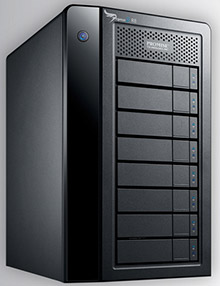
Recently, the folks at Promise Technology sent me an 8-bay Pegasus2 Thunderbolt RAID to evaluate.
NOTE: This is due to my meeting Elaine Kwok, product marketing manager for Promise, at the recent Storage Visions 2014 conference. You can hear her audio interview here.
As I was researching and testing this unit, I realized that this article needs to be part technical review and part a discussion on our expectations on storage technology today.
EXECUTIVE SUMMARY
The Promise Pegasus2 Thunderbolt RAID is fast, easy to setup, fast, easy to use, fast, provides a ton of storage space, fast, and runs like any other Macintosh hard disk. Oh, and did I mention that it is fast? It is.
It provides massive storage, excellent speeds, all at a reasonable price. It isn’t as fast as an all-SSD unit, but it costs far less and holds far more.
WHAT I WAS SENT
Promise sent me their latest Pegasus2 8-bay RAID, containing eight 3 TB drives configured as a RAID 5. It formatted to 21 TB of usable space. All the drives were installed prior to shipping. It has a retail price of around $3,500, including all drives.
NOTE: Here’s an article that describes what RAID 5 means.
In the box are seven Quick Start Guides in fourteen languages. New users should quickly skim this because of an important note on synchronization. Connecting the drive is trivial: Plug in two cables – power and Thunderbolt – turn on your computer and the Pegasus, and get to work.
The Pegasus arrived formatted, but not synced. What syncing does is build the parity data between all the drives so that if a drive dies, you don’t lose all your data. While the drive is useable immediately out of the box, you don’t get access to its full performance until syncing is complete. For a drive this size, syncing took 10 hours, 42 minutes and 33 seconds. (Um, why, yes, I did time it.)
IMPORTANT NOTE: Before doing any work requiring maximum performance, wait until syncing is complete. The best advice is to plug the unit in and let it do its thing overnight. In the morning both you and it will be ready to work.
I ran these tests based upon the factory default settings. You can improve performance a bit more by turning on “Forced Read Ahead,” which is disabled by default. However, this requires working with Terminal and the Unix command line interface. Promise can provide instructions.
This unit comes configured as a RAID 5. You can also configure it using Disk Utility as a RAID 0. This will be faster than RAID 5, and store more, but in the event one drive dies, you lose all your data. I happily use smaller RAID 0’s in my editing. But for something this big, I want the security of knowing my data is safe in the event of a drive crash.
WHAT MAKES THIS SPECIAL
 The Pegasus2 is the first RAID that supports Thunderbolt 2, the new communications protocol that was released with the new Mac Pro. This new protocol supports data transfer rates up to 2.2 GB/second.
NOTE: That preceding paragraph is a completely true statement, but it leads to some wildly incorrect conclusions. I’ll explain further in the next section.
Thunderbolt 2 is fully compatible with Thunderbolt 1 devices. As you’ll see below, the Pegasus works perfectly – though not at the same speeds – with both iMacs and Mac Pros, and operating systems 10.8.5 and 10.9.1. In other words, you can use this unit on any Mac with a Thunderbolt connection.
THE PROMISE RAID UTILITY
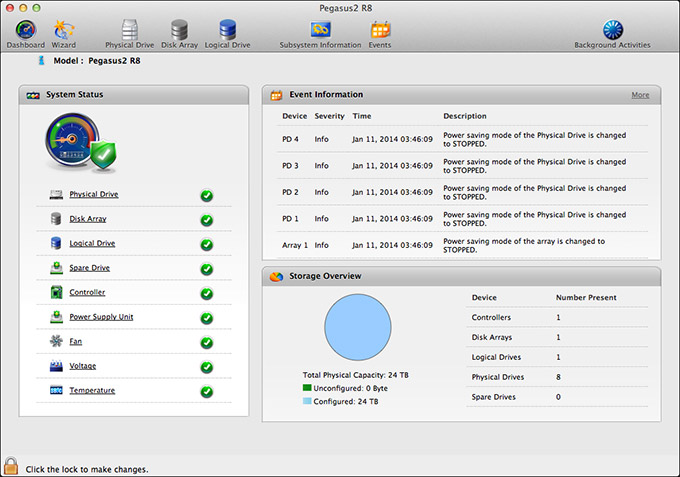
Shipped on the Pegasus RAID is a utility that allows you to configure and monitor your RAID. I found this utility cleanly designed, simple to navigate and with access to the controls that I needed to configure and monitor the unit.
My only wish for this was that it would allow us to turn on Forced Read Ahead and avoid a trip to the Terminal.
THE THUNDERBOLT TRAP
Thunderbolt 1 supports data transfer speeds (also called “bandwidth,” or “data transfer rate”) of up to 1.1 GB/second. Thunderbolt 2 supports data transfer speeds of up to 2.2 GB/second. EXCEPT… that is the speed of the connection between the two devices. Actual device speeds are less, sometimes FAR less, than the protocol will support.
In the “olde days” of USB 2 and FireWire, both of which are communications protocols between hard disks and computers, the protocol was slower than the hard disk. So the protocol determined how fast your storage could transfer data.
Now, with Thunderbolt, the protocol is FAR faster than a hard disk. This means that the speed of your storage is determined by the speed of the hard disk, NOT the protocol.
Here’s the secret formula: For every hard disk in your storage device, the data transfer rate is about 120 MB/second. There is some variation between drives, but this number is a good place to start.
Solid State Drives (SSD) will transfer data faster that spinning hard disks, but even an SSD drive is slower than the protocol itself.
NOTE: The Pegasus2 only uses spinning hard disks, driven by a hardware RAID controller, without any SSD acceleration. Hardware RAID controllers are MUCH faster than software RAID controllers. (Drobo, for example, uses a software RAID controller.)
Here are some speed examples:
In other words, the Thunderbolt protocol is screaming fast. But the speed of your storage is determined by the number of drives contained in it.
NOTE: For comparison of how much speed you need, a single ProRes 422 clip in HD requires about 18 MB/second for playback. AVCHD files require about 3 MB/second. So if you are doing single-camera editing, ANY Thunderbolt device will be fast enough for editing. The challenge comes in editing multicam footage, or higher resolutions than 1080p HD.
The advantage to the Pegasus2 supporting Thunderbolt 2 is that, while the RAID won’t take advantage of the speed of this protocol, any Thunderbolt 2 devices (think monitors) that are connected into the Pegasus will get the full benefit of the Thunderbolt 2 protocol.
MAC PRO PERFORMANCE TESTING
I decided to do four types of performance testing:
All speeds were measured using the Blackmagic Design Disk Speed Test utility.
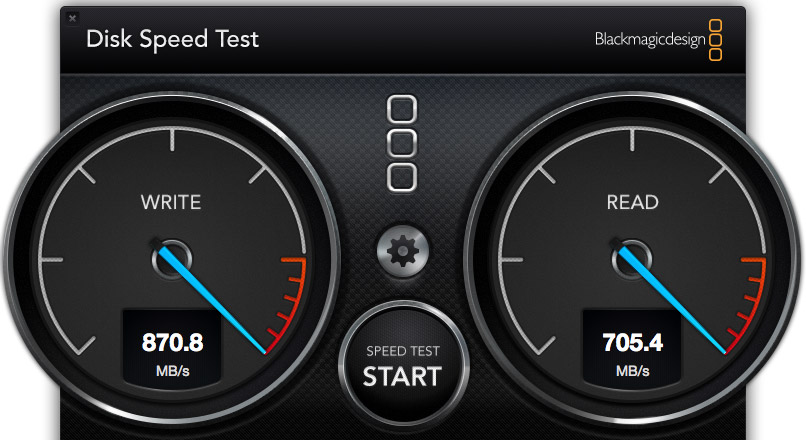
The Pegasus2, when directly attached to the Mac Pro, generated these results. Write speed shows how fast the unit records information (think importing, rendering and exporting), while the Read speed shows how fast it plays back information (think editing).
These speeds are the fastest of any RAID I’ve measured to date.
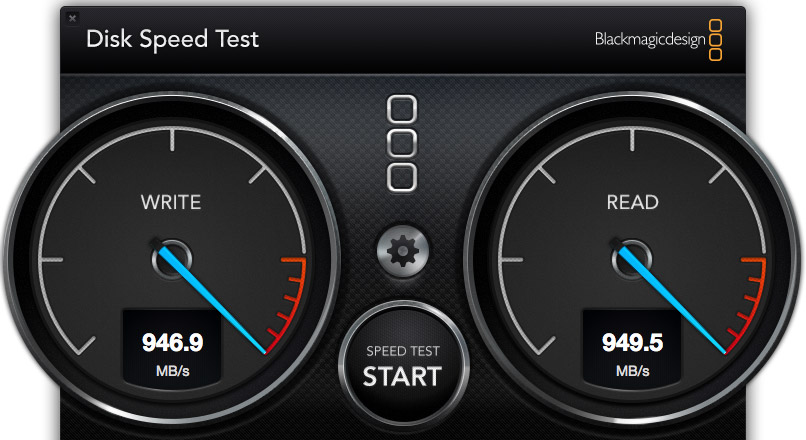
However, compare the speed of the Pegasus to the internal SSD drive of the Mac Pro. WOW! Much faster. Obviously, we should only use the internal Mac Pro drive for all of our editing.
Wrong. Really, really wrong!
First, the internal Mac Pro drive only holds 256 GB of data. Just one season of my 2 Reel Guys web series has more than 2 TB of data, which far exceeds the size of any SSD drive affordable by mere mortals. Or, more recently, my FCP X training created 8 TB of master video files! SSDs can’t handle media files of this size.
Second, as I discovered later in my testing, performance drops when background processes run, in fact, it often fell 30 – 50%. This means that we can’t count on consistent performance from the internal drive, because it is serving the needs of the operating system, all active applications, and all background processes. What may be fast enough one second is too slow a second later because some process is now running in the background.
Third, it is easy to add more external storage. Expanding the internal SSD is not simple.
Fourth, it is easy to move external storage from one computer to the next by simply unplugging the cable.
The internal drive is useful and has some advantages for certain specialized edits, but external media storage is essential for any except the smallest projects.
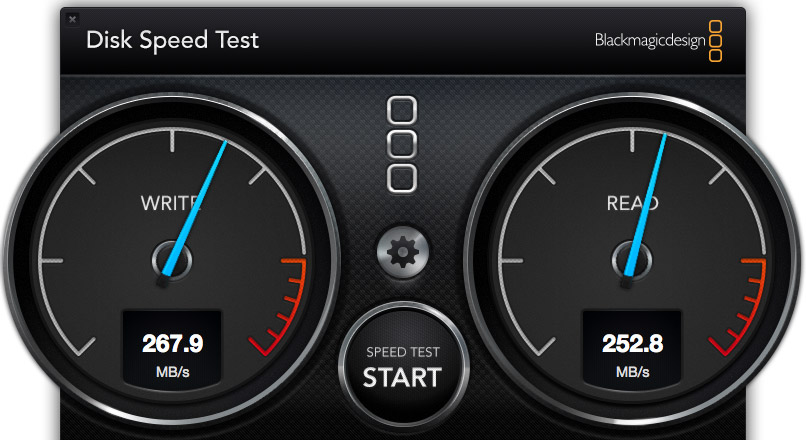
I also wanted to test whether there was any loss in speed when connecting a second RAID to the Promise. These are the results when connecting a G-Technology 2-drive RAID 0 directly to the Mac Pro.
NOTE: The G-Tech, too, is a Thunderbolt device, but its speeds are less because it only contains two drives. Hence my earlier discussion about the protocol not determining the speed of your storage.
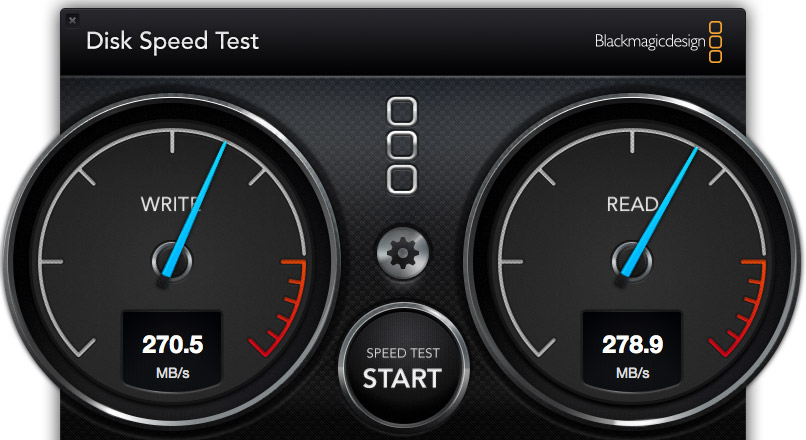
These are the results when connecting the G-Tech RAID as part of a three-drive chain. The RAID was at the end of the chain. It was faster, in fact. So there does not appear to be any significant speed loss when daisy-chaining devices. Essentially, the G-Tech transferred data at the same speed, regardless of whether it was attached directly to the Mac Pro, or as part of a storage chain.
NOTE: Another weird fact is that test results vary. Hard disk speed is a factor of how empty it is – empty is faster, how big the files are – bigger files transfer faster, and the size of the data blocks being transferred at one time – bigger blocks transfer faster.
iMAC PERFORMANCE TESTING
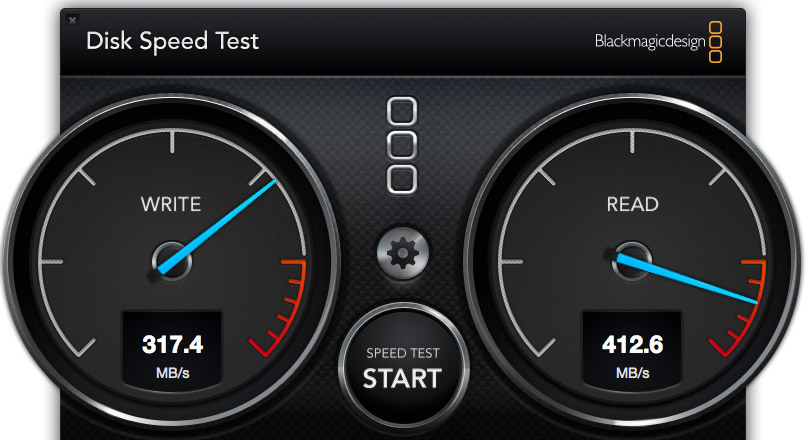
Here’s the speed of the iMac’s internal Fusion drive, running under Mac OS X 10.8.5, in a dual-boot configuration. Notice that it is about 1/3 the speed of the Mac Pro, even though the iMac is accelerated with an internal SSD drive.
NOTE: It was when running this test that I saw the 35% drop in performance when a background process started running.
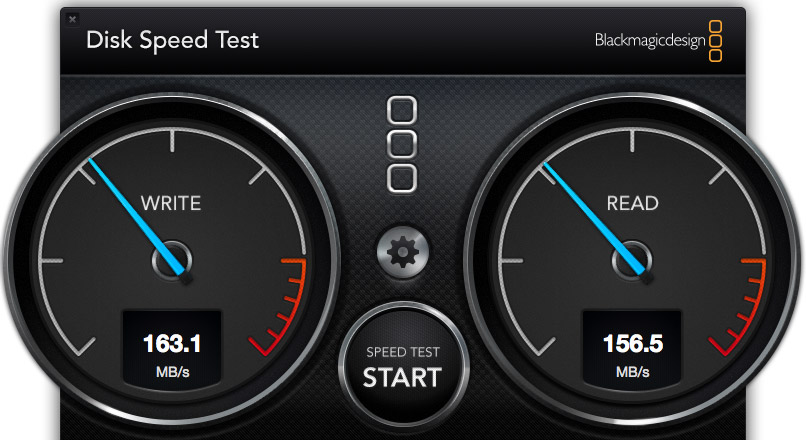
To further complicate matters, this speed test shows the same iMac, running under Mac OS X 10.9.1, and accessing its internal drive. The speeds are 50% slower than when running 10.8.5. This is probably because the dual boot drive doesn’t have enough free space. Using the internal drives is easy, but is no guarantee that we will get consistent performance.
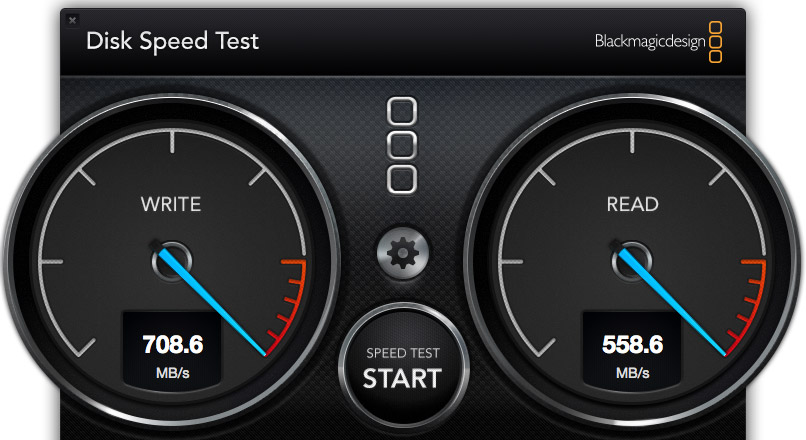
Here’s the speed of the Pegasus direct connected to the iMac running 10.8.5. Not as fast as when connected to the Mac Pro, but still pretty darn quick.
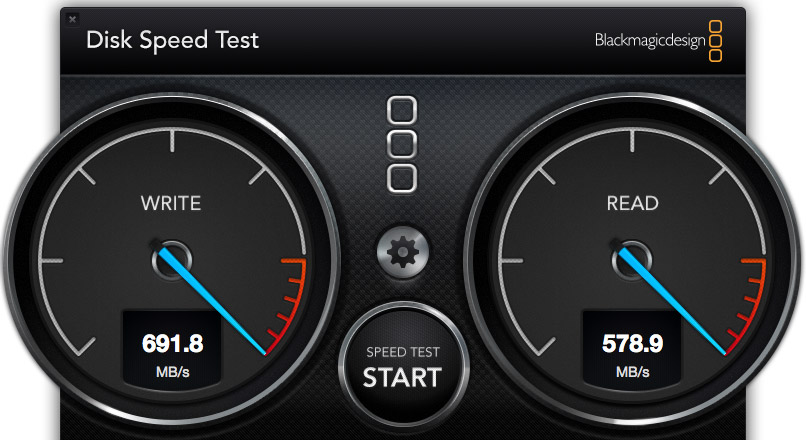
Here’s the speed of the Pegasus direct connected to the iMac, running 10.9.1. Essentially, while the speed of the Pegasus is not as fast as the Mac Pro, the speeds are pretty much the same for both 10.8.x and 10.9.x.
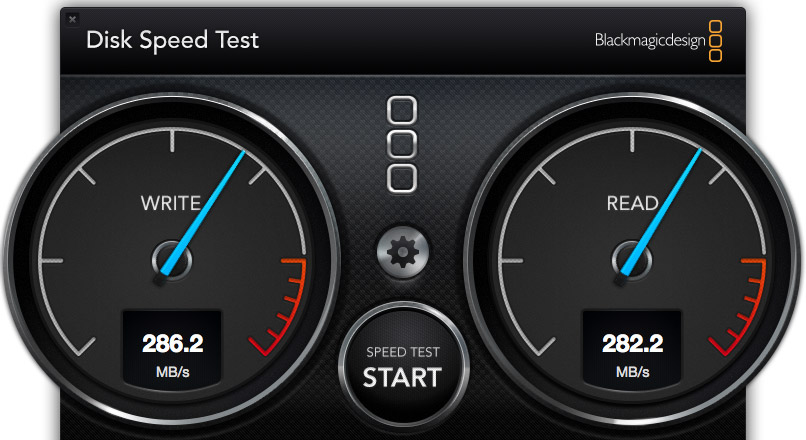
Here’s the speed of the G-Tech when connected to the iMac. In this case, it is about 10% faster on the iMac than on the Mac Pro. (The speeds were the same regardless of operating system, and regardless of whether the unit was directly connected or looped through the Pegasus.)
REAL-WORLD TESTS
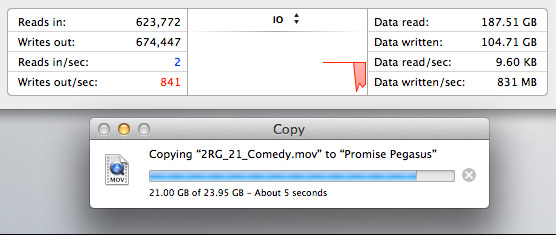
The Pegasus copied a 23 GB file from the Mac Pro’s internal drive to the Pegasus at more than 800 MB/second. I ALWAYS want file transfers to go faster, but these are excellent numbers.
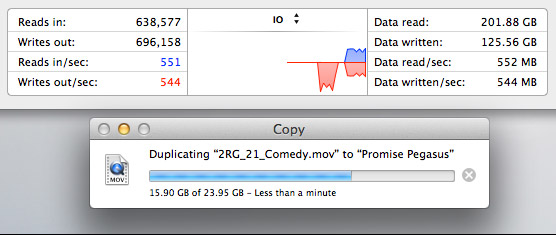
The Pegasus duplicated a 23 GB file stored on the Pegasus back onto the Pegasus at about 550 MB/second. This is slower because the file needs to be read from the RAID, then written back to the RAID all at the same time.
MULTICAM EDITING
Multicam editing taxes your computer and storage systems more than any other form of editing.
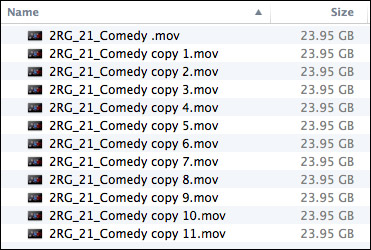
So, to test this, I created 12 versions of a 12 minute 2 Reel Guys episode.
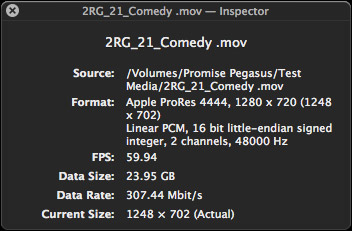
Each movie was 23 GB in size, using the ProRes 4444 codec with a 720p image size and 59.94 frame rate. (ProRes 4444 is both the highest quality and largest file size of all the ProRes codecs.)
Upon importing into Final Cut Pro X v10.1, the software immediately started creating audio waveforms and transcoding the media into proxy files (at my request). Just as a test, I tried doing multicam editing while those background processes were running. Didn’t work, I got dropped frames immediately. It took the system about fifteen minutes to finish all its prep work.
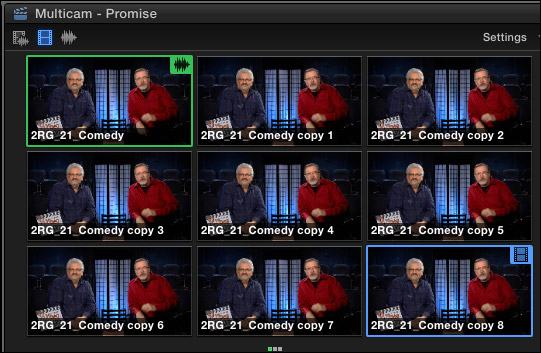
Once the background processing was done, FCP X could play and edit a nine-camera multicam clip with image quality set to Better Quality with no dropped frames. Wow. Just, wow…
NOTE: I did get dropped frames when trying to play 12 clips, however.
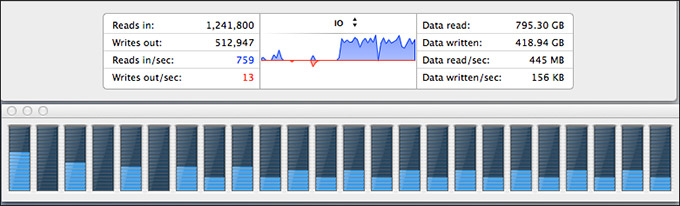
As you can see, playing all nine streams did not tax the storage system….
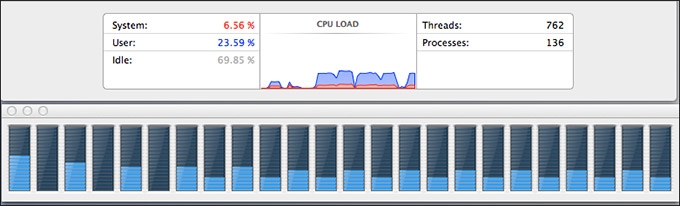
… or the CPUs.
However, my STRONG recommendation for multicam editing is to edit using proxy files. For example, the Mac Pro edited all twelve proxy streams without breaking a sweat. Based on what I saw, I would expect the Mac Pro, combined with a Pegasus RAID to easily, easily edit 24 streams of multicam video with horsepower to spare.
MISC. OPERATIONAL NOTES
The Pegasus follows the computer in terms of sleep. If the computer goes to sleep, so does Pegasus. It can take up to 20 seconds for it to wake back up after going to sleep. It the computer doesn’t go to sleep, the Pegasus stays awake, too.
The Pegasus took longer to mount to the desktop than the G-Technology drives. G-Tech was ready in about five seconds. The Pegasus was ready in about 15.
The RAID management tool shipped with the Pegasus is very nicely done.
CONCLUSIONS
The Pegasus2 is a very fast RAID, easy to setup and as easy to use as any other Macintosh hard disk.
It runs on any Mac that has a Thunderbolt connection, with the added advantage of supporting the new Thunderbolt 2 protocol. It runs the fastest on a Mac Pro, but, for most editing projects, the Promise has speed to burn for any editing project on any Mac.
Apple has long supported these devices for any intensive media application, and, now, after working with one myself, I can agree.
The Promise Pegasus2 Thunderbolt RAID is an amazing tool at a very reasonable price.
Learn more at www.promise.com.

2,000 Video Training Titles
Edit smarter with Larry Jordan. Available in our store.
Access over 2,000 on-demand video editing courses. Become a member of our Video Training Library today!
Subscribe to Larry's FREE weekly newsletter and
save 10%
on your first purchase.

142 Responses to Product Review: Promise Pegasus2 RAID
← Older Comments Newer Comments →-
 Fabrizio Rizzo says:
January 29, 2014 at 5:16 pm
-
 Al B. says:
January 29, 2014 at 5:37 pm
-
 Fabrizio Rizzo says:
January 30, 2014 at 5:01 pm
-
 Fabrizio Rizzo says:
January 30, 2014 at 5:31 pm
-
 Fabrizio Rizzo says:
January 30, 2014 at 5:37 pm
-
 Barry Wul says:
February 13, 2014 at 12:32 pm
-
 Barry Wul says:
February 13, 2014 at 12:33 pm
-
 Blair Thornton says:
February 13, 2014 at 12:40 pm
-
 Victor says:
February 13, 2014 at 1:16 pm
-
 Josh says:
February 18, 2014 at 8:35 pm
← Older Comments Newer Comments →Thanks Larry.
Interesting side-effect now that the Pegasus2 R8 is hooked up – My Drobo 5D is continuously disconnecting and reconnecting every few minutes. Devices before and after the Drobo appear to remain mounted stabily.
A bit of explanation of my array connectivity first:
I have the P2R8 connected to a Mac Pro on TB port 0 with nothing else in TB Port 1 (nothing else directly connected on TB Bus 1)
I’ve used the 10m optical TB cable purchased from the Apple Store.
The P2R8 is humming along initializing itself and mounted happily. The promise utility says everything’s just fine – and it seems to be.
Connected to the P2R8, I have a Drobo 5D (backup / archive array) and a Seagate TB 3.5″ Desktop drive adapter with 3TB single drive after that. Both using the standard electrical TB cables from Apple.
The chain looks like this:
Mac Pro -> Optical 10m TB cable -> P2R8 -> Black Apple 2m cable -> Drobo 5D -> White Apple 2m cable -> Seagate 3TB w/ TBolt Desktop Adapter.
The Seagate has 2 HFS+ volumes: one for CarbonCopyCloner use to backup the internal boot volume, and a time machine volume.
The Drobo 5D has a single large 20+ TB HFS+ volume
The P2R8 has the default single 28 TB HFS+ volume.
The OS tells me that the Drobo volume has been dismounted without being ejected and attempting to access the volume fails until it eventually disappears from Finder, then later it shows back up but I still can’t access it when it does. It keeps doing this ever few minutes. Doesn’t happen to any of the other volumes.
It did NOT happen prior to connecting the 10m optical cable and the P2R8 array.
Any ideas?
I’m going to power down all but the Pegasus2, then disconnect everything from the optical cable and reconnect just the Drobo to the optical cable and see if isolating to just the cable reproduces the problem.
If not, I’ll add the seagate drive on the end (without inserting the Pegasus2 into the chain.)
If that works and remains stable, then I’ll add the Pegasus2 in between the optical cable and the Drobo (as the “first device”) and test again.
If all three scenarios fail (or just the first one) then I’ll bring everything back upstairs to the edit suite and try the same 3 tests again using just the short 2m electrical TB cables.
If it was just the cable, I’d expect all of the volumes to exhibit the same issues.
Betting it’s a problem with the Drobo in combination with the optical cable.
Can’t help but wonder if it’s something weird about channel allocations / Mac Pro EFI firmware issues with TB 2 and TB1 drives on same chain, or a mutant variant of the WD disk issues with Mavericks.
Any ideas would be greatly appreciated.
I’m not looking forward to trying to manage a 3-way support case with Apple, Drobo, and Promise.
-Fabrizio
The best thing you can do is isolate this first. Once you know where the problem is coming from, you can deal with the appropriate tech support. It seems you are on the right track. If you can isolate it, you likely won’t be dealing with all three companies.
It seems the move of the Drobo 5D (power down, move, reconnect, power-up) may have caused a hardware fault of some type. Even disconnected from all interfaces, the Drobo 5D will now randomly reboot – even when left alone “disconnected”.
I won’t hijack this thread any further with Drobo issues unless there comes conclusive proof that something relevant to the Pegasus 2 comes to light – related to Mavericks, the optical TB cable, or “inserting” the Pegasus2 into the chain had anything to do with it. It does NOT appear to be the case at this time, but the investigation continues.
-Fabrizio
Now that the P2R8 is fully sync’d and ready for action, BM disk test with ForcedReadAhead enabled with a RAID-5 logical volume is showing 816.1 & 795.7 MB/s (read , write respectively).
My system wasn’t perfectly idle during this test though. In fact, an 11-TB data merge between old firewire arrays is in progress. 56% after 18.5 hours, yeesh! Can’t wait to move this data once and for all to the Pegasus2…
I did observe the oscillation of the I/O performance during the test. Informally, i’d say I was able to observe 30-50%-ish swings as the OS dealt with the the other massive copy threads running in the background. I think I saw it slow down to the low 300 MB/s range at one point.
Thanks for a great article and helping us understand how this all really works.
Much appreciated Larry!
-Fabrizio
One more question: Is there any benefit to enabling the adaptive write back cache option?
After receiving a new Pegasus2 2/24 RAID DOA due to a defective Drive (Preinstalled by Promise Technology) and pathetic customer service / support from Promise Technology; I’d caution others from seeking any technology solution from Promise and searching elsewhere.
After my RAID reported errors almost immediately after installation (on a new MacPro 2013) I immediately contacted technical support. (First, I had to register the unit online; which automatically assigned a warranty expiration date based upon the date the unit shipped from their warehouse to the authorized reseller, not based upon the sales / ship date to me.) Regardless of the detailed information I provided regarding the multiple bad sector detections and subsequent designation of the drive as being bad (by the promise RAID management software) Tech support would not even begin cooperating until I generated a specific HTML based report via their software & uploaded it to Promise’s Tech Support.
They did immediately (upon receipt of the report) acknowledge that the drive I reported as being DOA was indeed dead. In order to receive a warranty replacement I was informed that I could either return the defective drive; after which I would be shipped a replacement or I could provide a credit card # for them to place a hold of about $250.00 (on a drive that can be purchased on Amazon for $109 with free 2-day shipping) and that they would only provide complimentary GROUND shipping. If I wanted Next Day or 2-Day shipping; it would be at my expense. Considering that this was a defective unit shipped from Promise; I was astounded by the lack of support on a $3,500.00 piece of hardware. I provided the Credit Card # and finally received the replacement drive, only to discover that I was expected to pay the return freight on the defective drive.
This was bad enough; but part of my dissatisfaction is rooted in the fact that such a high-end RAID system was equipped (once again by Promise Technology) with consumer grade Segate Baracuda Drives. Considering the premium price they charge on storage size; one would think that they would at least use the higher grade Enterprise Grade drives from Seagate. In fact; at the time that tech support authorized the drive replacement, I asked if it would be a problem if I simply installed a 3TB Western Digital Red drive that I had on-hand as a spare for a separate RAID system. I was informed that the WD Red was not on their list of approved drives; and would not be supported. I later downloaded Promise Technology’s complete list of approved drives for the Pegasus2 system and discovered that only 2 drives (in 3 TB capacity) were on the approved list; both of which were lower-tier consumer grade models. There is no indication that they ever tested any higher quality drives or what system requirements of the Promise2 RAID would limit full compatibility with any other drive; just a failure to reference any other models. My personal opinion / interpretation is that they leave the higher quality (higher priced) drives off of their list as a convenient excuse as to why they do not provide better drives in the first place. It seems counter-intuitive to produce an ultra high-speed storage system aimed largely towards video editing, then supply that system with anything other than enterprise level hard drives. Based upon this experience, I will NEVER purchase another product produced by Promise Technology. I have purchased products from a number of other manufacturers over the years and have never had such a poor experience with any other companies tech support staff.
Minor Correction, the system was a Pegasus2 8/24, not 2/24
Barry, I feel for you.
My thoughts are the same as yours, this unit is for professionals and should NOT ship with consumer level drives but Enterprise drives. It has made me hesitant to purchase.
Barry
The RMA process you described is the norm.
Product registration and providing a subsystem
Report is a must. The subsystem report contains
An X-ray of the unit. This info is used for diagnosing and troubleshooting
Purpose as well as warranty purposes.
With regard to warranty validation. It sounds
You overlooked the statement in the CRM (customer relationship manager)
User interface. We honor warranty two ways:
-manufacturing date based off chassis serial number
Or
-customer provide invoice
The above is very standard practice.
Regarding supported drives these units come integrated
So off the shelf drives ate not supported.
What was overlooked was (I will personally
Look into this) our DOA policy.
If the unit has been in your possession
Less than 30 days we will make the exemption
And cover an advanced replacement and also
A call tag for the return of the defective part.
You will be contacted shortly.
Please note that a failed disk out of the box is
Not normal. It’s plausible the unit may have been
Mishandled in shipping.
In any case I apologize for the inconvenience.
Give us the opportunity to make this right.
The support manager will reach out to you shortly.
Victor Pacheco
I was going to purchase the R8 with 3TB modules until I learned the modules are Seagate hard drives, which are terrible and have the highest failure rate.
Backblaze, a cloud data backup provider, recently published their experience with different brands of hard drives. Results indicate Seagate Barracuda hard drives have approximately a 10% annual failure rate. This is terrible and unacceptable if the R8 will be used for archiving critical data.
Two questions for Promise Technology: Why did they choose to include/ship Seagate Barracuda hard drives in the Pegasus2? Is it possible to purchase Pegasus2 spare hard drive modules with Toshiba hard drives instead?
NOTE: Toshiba DT01ACA300 3TB hard drives are compatible with the R8.