
 ( Please read my disclosure on product reviews here. )
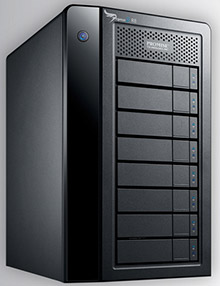
Recently, the folks at Promise Technology sent me an 8-bay Pegasus2 Thunderbolt RAID to evaluate.
NOTE: This is due to my meeting Elaine Kwok, product marketing manager for Promise, at the recent Storage Visions 2014 conference. You can hear her audio interview here.
As I was researching and testing this unit, I realized that this article needs to be part technical review and part a discussion on our expectations on storage technology today.
EXECUTIVE SUMMARY
The Promise Pegasus2 Thunderbolt RAID is fast, easy to setup, fast, easy to use, fast, provides a ton of storage space, fast, and runs like any other Macintosh hard disk. Oh, and did I mention that it is fast? It is.
It provides massive storage, excellent speeds, all at a reasonable price. It isn’t as fast as an all-SSD unit, but it costs far less and holds far more.
WHAT I WAS SENT
Promise sent me their latest Pegasus2 8-bay RAID, containing eight 3 TB drives configured as a RAID 5. It formatted to 21 TB of usable space. All the drives were installed prior to shipping. It has a retail price of around $3,500, including all drives.
NOTE: Here’s an article that describes what RAID 5 means.
In the box are seven Quick Start Guides in fourteen languages. New users should quickly skim this because of an important note on synchronization. Connecting the drive is trivial: Plug in two cables – power and Thunderbolt – turn on your computer and the Pegasus, and get to work.
The Pegasus arrived formatted, but not synced. What syncing does is build the parity data between all the drives so that if a drive dies, you don’t lose all your data. While the drive is useable immediately out of the box, you don’t get access to its full performance until syncing is complete. For a drive this size, syncing took 10 hours, 42 minutes and 33 seconds. (Um, why, yes, I did time it.)
IMPORTANT NOTE: Before doing any work requiring maximum performance, wait until syncing is complete. The best advice is to plug the unit in and let it do its thing overnight. In the morning both you and it will be ready to work.
I ran these tests based upon the factory default settings. You can improve performance a bit more by turning on “Forced Read Ahead,” which is disabled by default. However, this requires working with Terminal and the Unix command line interface. Promise can provide instructions.
This unit comes configured as a RAID 5. You can also configure it using Disk Utility as a RAID 0. This will be faster than RAID 5, and store more, but in the event one drive dies, you lose all your data. I happily use smaller RAID 0’s in my editing. But for something this big, I want the security of knowing my data is safe in the event of a drive crash.
WHAT MAKES THIS SPECIAL
 The Pegasus2 is the first RAID that supports Thunderbolt 2, the new communications protocol that was released with the new Mac Pro. This new protocol supports data transfer rates up to 2.2 GB/second.
NOTE: That preceding paragraph is a completely true statement, but it leads to some wildly incorrect conclusions. I’ll explain further in the next section.
Thunderbolt 2 is fully compatible with Thunderbolt 1 devices. As you’ll see below, the Pegasus works perfectly – though not at the same speeds – with both iMacs and Mac Pros, and operating systems 10.8.5 and 10.9.1. In other words, you can use this unit on any Mac with a Thunderbolt connection.
THE PROMISE RAID UTILITY
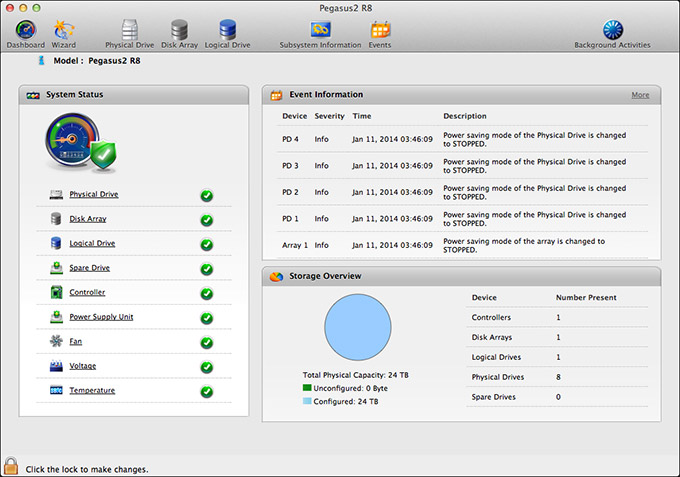
Shipped on the Pegasus RAID is a utility that allows you to configure and monitor your RAID. I found this utility cleanly designed, simple to navigate and with access to the controls that I needed to configure and monitor the unit.
My only wish for this was that it would allow us to turn on Forced Read Ahead and avoid a trip to the Terminal.
THE THUNDERBOLT TRAP
Thunderbolt 1 supports data transfer speeds (also called “bandwidth,” or “data transfer rate”) of up to 1.1 GB/second. Thunderbolt 2 supports data transfer speeds of up to 2.2 GB/second. EXCEPT… that is the speed of the connection between the two devices. Actual device speeds are less, sometimes FAR less, than the protocol will support.
In the “olde days” of USB 2 and FireWire, both of which are communications protocols between hard disks and computers, the protocol was slower than the hard disk. So the protocol determined how fast your storage could transfer data.
Now, with Thunderbolt, the protocol is FAR faster than a hard disk. This means that the speed of your storage is determined by the speed of the hard disk, NOT the protocol.
Here’s the secret formula: For every hard disk in your storage device, the data transfer rate is about 120 MB/second. There is some variation between drives, but this number is a good place to start.
Solid State Drives (SSD) will transfer data faster that spinning hard disks, but even an SSD drive is slower than the protocol itself.
NOTE: The Pegasus2 only uses spinning hard disks, driven by a hardware RAID controller, without any SSD acceleration. Hardware RAID controllers are MUCH faster than software RAID controllers. (Drobo, for example, uses a software RAID controller.)
Here are some speed examples:
In other words, the Thunderbolt protocol is screaming fast. But the speed of your storage is determined by the number of drives contained in it.
NOTE: For comparison of how much speed you need, a single ProRes 422 clip in HD requires about 18 MB/second for playback. AVCHD files require about 3 MB/second. So if you are doing single-camera editing, ANY Thunderbolt device will be fast enough for editing. The challenge comes in editing multicam footage, or higher resolutions than 1080p HD.
The advantage to the Pegasus2 supporting Thunderbolt 2 is that, while the RAID won’t take advantage of the speed of this protocol, any Thunderbolt 2 devices (think monitors) that are connected into the Pegasus will get the full benefit of the Thunderbolt 2 protocol.
MAC PRO PERFORMANCE TESTING
I decided to do four types of performance testing:
All speeds were measured using the Blackmagic Design Disk Speed Test utility.
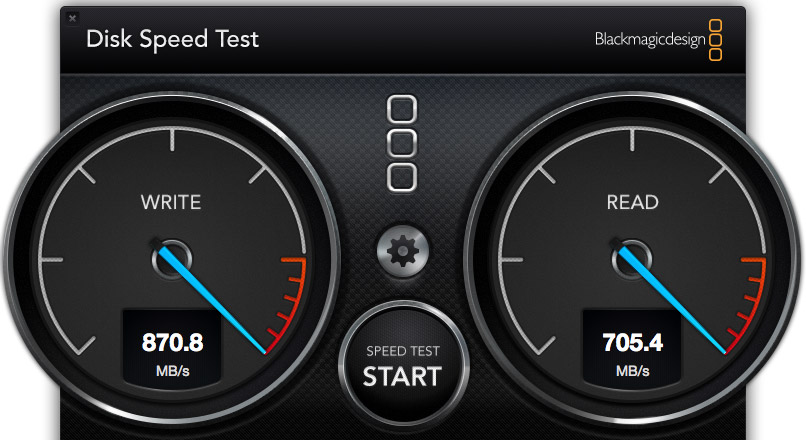
The Pegasus2, when directly attached to the Mac Pro, generated these results. Write speed shows how fast the unit records information (think importing, rendering and exporting), while the Read speed shows how fast it plays back information (think editing).
These speeds are the fastest of any RAID I’ve measured to date.
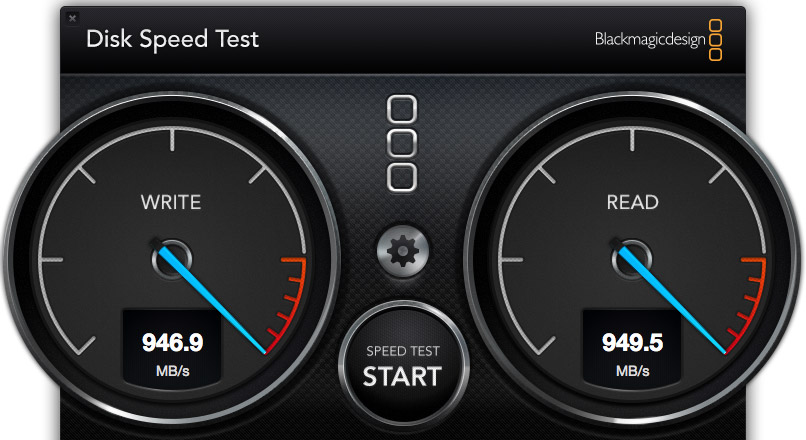
However, compare the speed of the Pegasus to the internal SSD drive of the Mac Pro. WOW! Much faster. Obviously, we should only use the internal Mac Pro drive for all of our editing.
Wrong. Really, really wrong!
First, the internal Mac Pro drive only holds 256 GB of data. Just one season of my 2 Reel Guys web series has more than 2 TB of data, which far exceeds the size of any SSD drive affordable by mere mortals. Or, more recently, my FCP X training created 8 TB of master video files! SSDs can’t handle media files of this size.
Second, as I discovered later in my testing, performance drops when background processes run, in fact, it often fell 30 – 50%. This means that we can’t count on consistent performance from the internal drive, because it is serving the needs of the operating system, all active applications, and all background processes. What may be fast enough one second is too slow a second later because some process is now running in the background.
Third, it is easy to add more external storage. Expanding the internal SSD is not simple.
Fourth, it is easy to move external storage from one computer to the next by simply unplugging the cable.
The internal drive is useful and has some advantages for certain specialized edits, but external media storage is essential for any except the smallest projects.
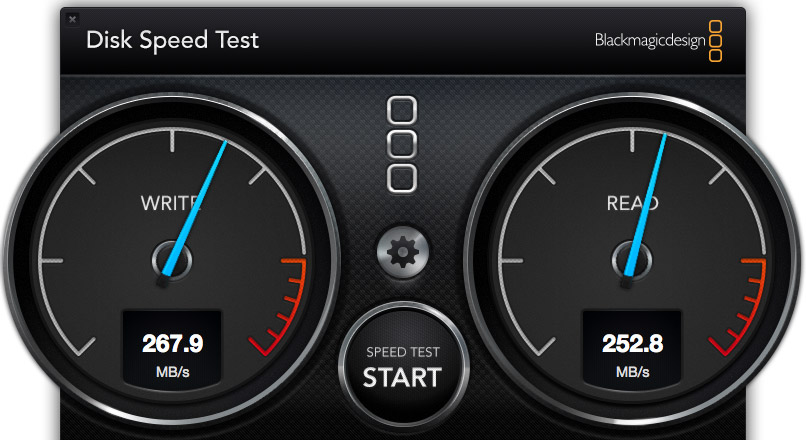
I also wanted to test whether there was any loss in speed when connecting a second RAID to the Promise. These are the results when connecting a G-Technology 2-drive RAID 0 directly to the Mac Pro.
NOTE: The G-Tech, too, is a Thunderbolt device, but its speeds are less because it only contains two drives. Hence my earlier discussion about the protocol not determining the speed of your storage.
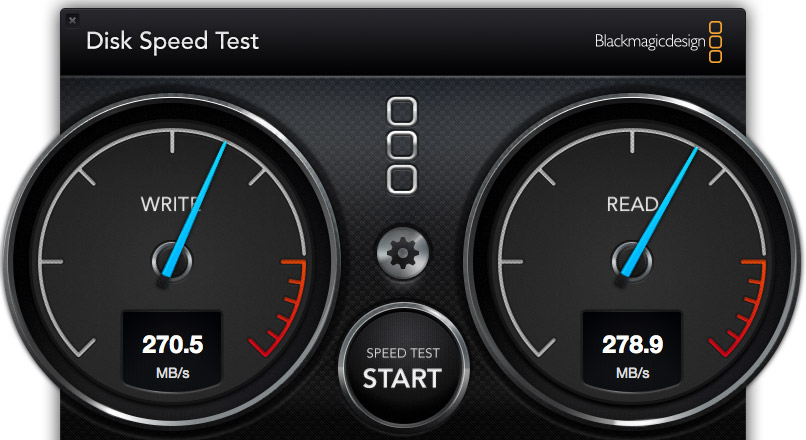
These are the results when connecting the G-Tech RAID as part of a three-drive chain. The RAID was at the end of the chain. It was faster, in fact. So there does not appear to be any significant speed loss when daisy-chaining devices. Essentially, the G-Tech transferred data at the same speed, regardless of whether it was attached directly to the Mac Pro, or as part of a storage chain.
NOTE: Another weird fact is that test results vary. Hard disk speed is a factor of how empty it is – empty is faster, how big the files are – bigger files transfer faster, and the size of the data blocks being transferred at one time – bigger blocks transfer faster.
iMAC PERFORMANCE TESTING
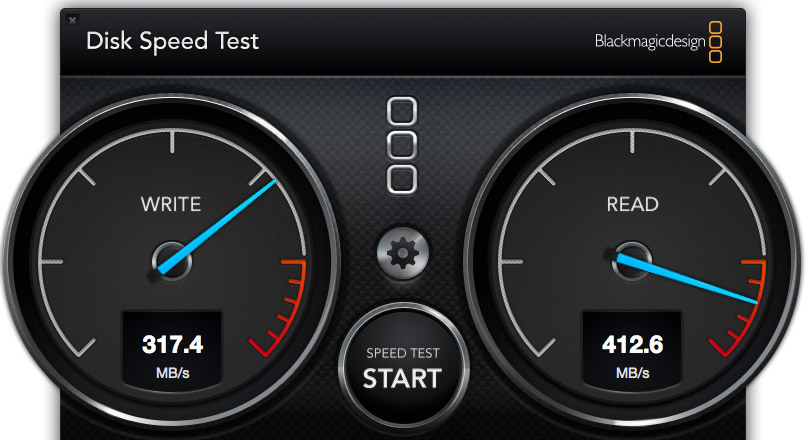
Here’s the speed of the iMac’s internal Fusion drive, running under Mac OS X 10.8.5, in a dual-boot configuration. Notice that it is about 1/3 the speed of the Mac Pro, even though the iMac is accelerated with an internal SSD drive.
NOTE: It was when running this test that I saw the 35% drop in performance when a background process started running.
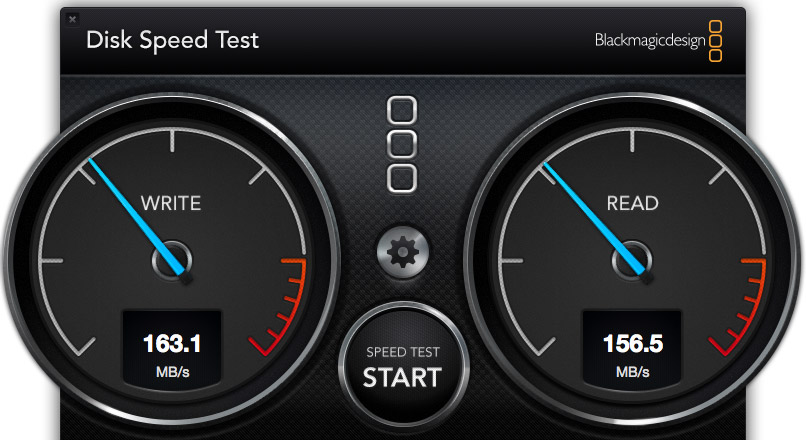
To further complicate matters, this speed test shows the same iMac, running under Mac OS X 10.9.1, and accessing its internal drive. The speeds are 50% slower than when running 10.8.5. This is probably because the dual boot drive doesn’t have enough free space. Using the internal drives is easy, but is no guarantee that we will get consistent performance.
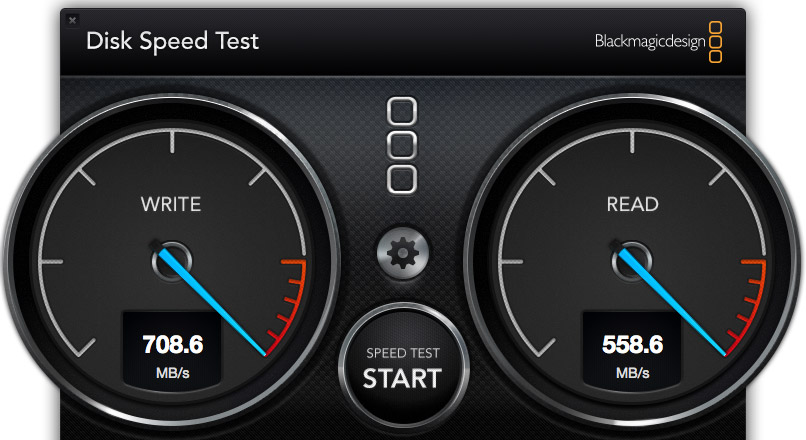
Here’s the speed of the Pegasus direct connected to the iMac running 10.8.5. Not as fast as when connected to the Mac Pro, but still pretty darn quick.
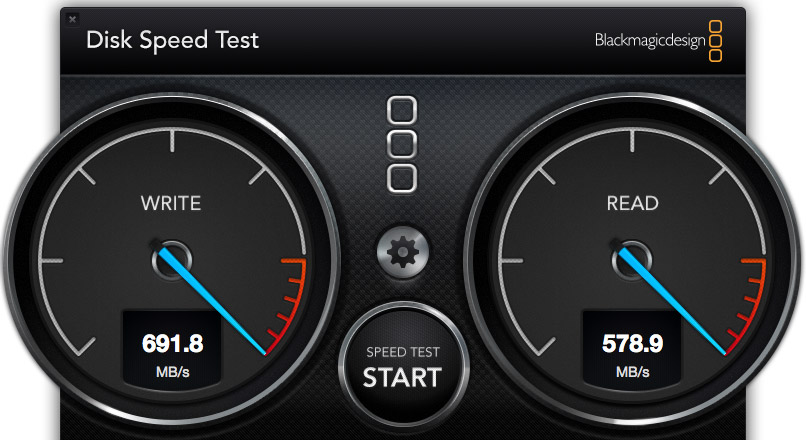
Here’s the speed of the Pegasus direct connected to the iMac, running 10.9.1. Essentially, while the speed of the Pegasus is not as fast as the Mac Pro, the speeds are pretty much the same for both 10.8.x and 10.9.x.
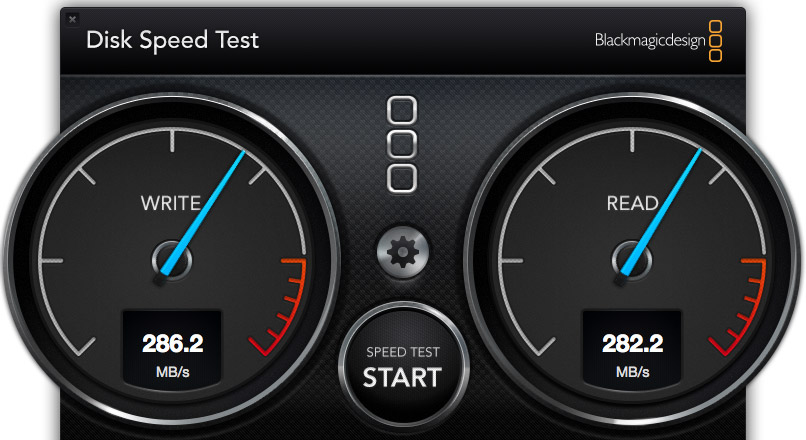
Here’s the speed of the G-Tech when connected to the iMac. In this case, it is about 10% faster on the iMac than on the Mac Pro. (The speeds were the same regardless of operating system, and regardless of whether the unit was directly connected or looped through the Pegasus.)
REAL-WORLD TESTS
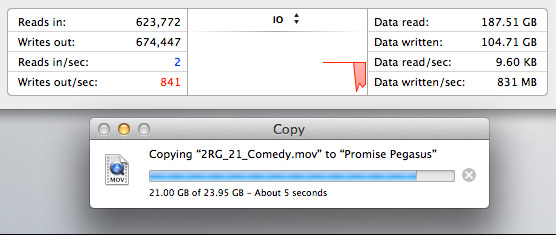
The Pegasus copied a 23 GB file from the Mac Pro’s internal drive to the Pegasus at more than 800 MB/second. I ALWAYS want file transfers to go faster, but these are excellent numbers.
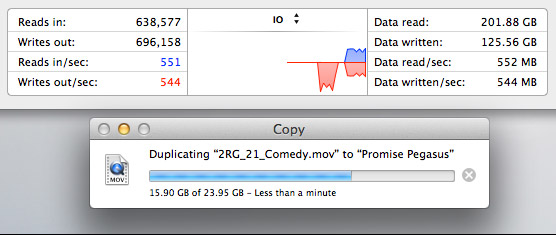
The Pegasus duplicated a 23 GB file stored on the Pegasus back onto the Pegasus at about 550 MB/second. This is slower because the file needs to be read from the RAID, then written back to the RAID all at the same time.
MULTICAM EDITING
Multicam editing taxes your computer and storage systems more than any other form of editing.
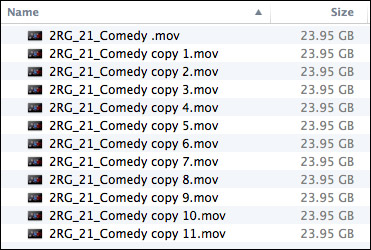
So, to test this, I created 12 versions of a 12 minute 2 Reel Guys episode.
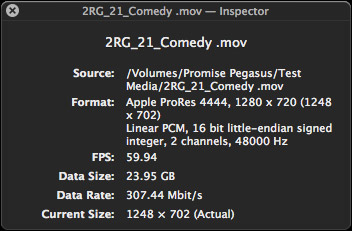
Each movie was 23 GB in size, using the ProRes 4444 codec with a 720p image size and 59.94 frame rate. (ProRes 4444 is both the highest quality and largest file size of all the ProRes codecs.)
Upon importing into Final Cut Pro X v10.1, the software immediately started creating audio waveforms and transcoding the media into proxy files (at my request). Just as a test, I tried doing multicam editing while those background processes were running. Didn’t work, I got dropped frames immediately. It took the system about fifteen minutes to finish all its prep work.
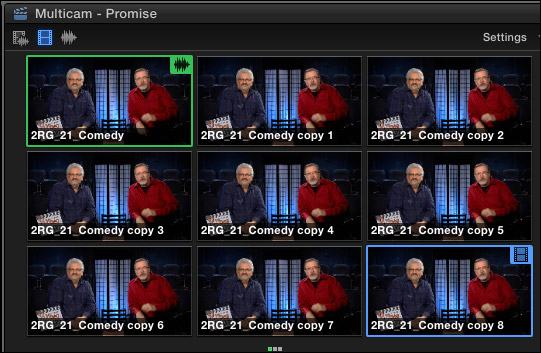
Once the background processing was done, FCP X could play and edit a nine-camera multicam clip with image quality set to Better Quality with no dropped frames. Wow. Just, wow…
NOTE: I did get dropped frames when trying to play 12 clips, however.
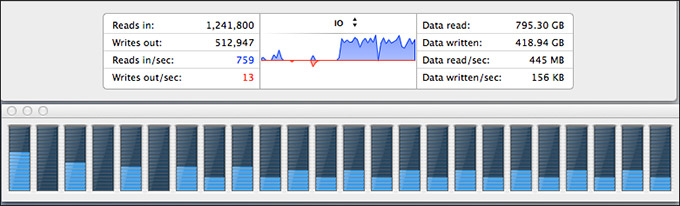
As you can see, playing all nine streams did not tax the storage system….
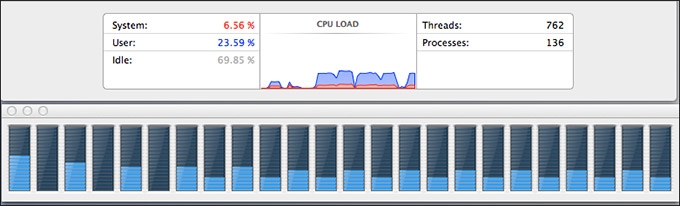
… or the CPUs.
However, my STRONG recommendation for multicam editing is to edit using proxy files. For example, the Mac Pro edited all twelve proxy streams without breaking a sweat. Based on what I saw, I would expect the Mac Pro, combined with a Pegasus RAID to easily, easily edit 24 streams of multicam video with horsepower to spare.
MISC. OPERATIONAL NOTES
The Pegasus follows the computer in terms of sleep. If the computer goes to sleep, so does Pegasus. It can take up to 20 seconds for it to wake back up after going to sleep. It the computer doesn’t go to sleep, the Pegasus stays awake, too.
The Pegasus took longer to mount to the desktop than the G-Technology drives. G-Tech was ready in about five seconds. The Pegasus was ready in about 15.
The RAID management tool shipped with the Pegasus is very nicely done.
CONCLUSIONS
The Pegasus2 is a very fast RAID, easy to setup and as easy to use as any other Macintosh hard disk.
It runs on any Mac that has a Thunderbolt connection, with the added advantage of supporting the new Thunderbolt 2 protocol. It runs the fastest on a Mac Pro, but, for most editing projects, the Promise has speed to burn for any editing project on any Mac.
Apple has long supported these devices for any intensive media application, and, now, after working with one myself, I can agree.
The Promise Pegasus2 Thunderbolt RAID is an amazing tool at a very reasonable price.
Learn more at www.promise.com.

2,000 Video Training Titles
Edit smarter with Larry Jordan. Available in our store.
Access over 2,000 on-demand video editing courses. Become a member of our Video Training Library today!
Subscribe to Larry's FREE weekly newsletter and
save 10%
on your first purchase.

142 Responses to Product Review: Promise Pegasus2 RAID
← Older Comments Newer Comments →-
The Best Thunderbolt Expansion Peripherals for Editors | Jonny Elwyn - Film Editor says:
April 25, 2014 at 3:23 am
-
 Bob Cole says:
April 25, 2014 at 4:09 am
-
Thunderbolt 2 RAIDs for Post Production | Jonny Elwyn - Film Editor says:
April 25, 2014 at 5:10 am
-
 Larry Jordan says:
April 25, 2014 at 8:49 am
-
 Fabrizio Rizzo says:
April 25, 2014 at 9:51 am
-
 Larry Jordan says:
April 25, 2014 at 10:47 am
-
 Michiel says:
April 25, 2014 at 11:11 am
-
 Victor Pacheco says:
April 25, 2014 at 12:44 pm
-
 Boan says:
May 12, 2014 at 9:20 am
-
 Fabrizio says:
May 13, 2014 at 6:15 am
← Older Comments Newer Comments →[…] Larry Jordan and Studio Daily both have reviews of the Pegasus 2 with Larry summing up that “It provides massive storage, excellent speeds, all at a reasonable price. It isn’t as fast as an all-SSD unit, but it costs far less and holds far more.” […]
I’m having an Internet Moment, a lot like when I go online to check out reviews for hotels or restaurants. It’s hard to evaluate the significance of negative comments, perhaps because people who are happy aren’t even on this thread.
Probably like a lot of people, I’ve been reading these posts because I am considering the purchase of a Pegasus2.
Naturally, many of the customers who’ve written in are those who have had some problems. What I can’t tell is whether this represents a tiny majority of customers, or a substantial percentage.
Does anyone have an insight into the Big Picture?
[…] Jordan has written up a very thorough and practical review of the Promise Pegasus 2 with the largest 8-bay […]
Bob:
Good question.
First, no company makes perfect products, nor provides perfect service. There will always be problems, that’s why tech support exists.
Three things to keep in mind:
1. Do your needs match the specs of the product. If you are running a data center and need 100% uptime with complete fail-over with the highest possible performance, you won’t get that from a $2,000 system. That’s why companies like Dot Hill exist with RAID solutions that start at $20,000. In storage, as in life, you generally get what you pay for. However, very few of us can afford to spend $20k and more for a storage system. So we look for tradeoffs. That’s where it is important to balance needs against wants against budget.
2. If Promise did not make good, reliable gear Apple would not sell them in the Mac Store. Apple has been recommending Promise for years. To me, that says a lot. Look at all the hard drive manufacturers that are NOT in Apple’s on-line store.
3. Never buy solely on price. Green drives save energy and cost less, but they are not particularly fast. Enterprise drives are really fast, but cost a lot more. The more you understand about any technology the more informed you are when purchasing.
4. Look to see if there is a pattern to the complaints. Is one person posting lots of comments or is there a large pool of unhappy people? Do the complaints span multiple sites? Remember, no product will get perfect reviews. Especially in storage, different gear is configured to meet different needs. When in doubt, call the company and ask to speak to pre-sales support. Ask questions. Give yourself a chance to learn.
Personally, while I don’t own any Promise gear, I think they are a good company, making good products to serve the middle group of users. Not data centers, but small workgroups that need a good balance between performance and price.
It also says a lot to me that they are the only company who’s products I’ve reviewed, who then dedicated a person to monitor the comments in the review and answer them. I’ve never seen that kind of attention to customers before.
Larry
Hi Bob,
Larry makes some excellent points. I bought the Pegasus2 for this generation of my primary storage needs based on the specs, but also due in no small part to the level of information everyone here provides. That includes Victor especially. Again, thank you Victor!
I’d buy another one if I needed it, and wouldn’t hesitate to recommend the Pegasus2 for the home or low-budget edit bay/recording studio.
Yes, consumer drives are not the most reliable devices… As Larry mentioned, understand the consumer raid product space and decide what you really need. I believe I have made a good choice with the Pegasus2, and the support/RMA process for drive replacement is occurring efficiently and as-advertised. The price/performance/pain ratios are pretty good, much better than what I’ve dealt with from other vendors in the past.
If I was to “start over” with an empty Pegasus2 R8, I would consider some configuration enhancements for additional safety:
1. Reconfigure to have one of the drives as a hot spare, reducing active capacity in favor of fail-safe reliability. There is nothing quite as scary as having one dead drive and a second with non-fatal errors when editing under production deadlines. (Other than losing your array completely and having to explain that…)
2. Order a spare drive as a cold replacement to eliminate the wait and dependency while a dead drive is RMA’d.
Options:
– pay a premium (~$500 USD) for the extra sled and drive via Apple to get Promise-direct support and RMA capability
– buy the correct disk model from Internet ($160 USD), find and flash the correct firmware revision manually (MS Windows required), and have to deal with seagate or HGST directly for failed disk replacement outside of Promise support as well as a screwdriver to swap disks in the sleds.
The Promise support tech only recommend the first option, but did talk me through the effort, risks, and support consequences of the second option quite thoroughly, which was pleasantly surprising.
3. Consider RAID 6 to survive two simultaneous failures – and performance test that option to assure you can edit efficiently/acceptably at that level of performance.
That said, there may be some hyper-strict logic in the controller firmware… The last FW update supposedly fixed an issue where the controller would mark a drive dead due to a transient short drop in voltage, effectively removing a good drive when it shouldn’t. At least that’s how I recall the Promise tech explaining it to me.
Updating the firmware and rebuilding the array without replacing the drive was sufficient to restore redundancy.
That same drive has been marked dead again, so it’s getting RMA’d. I was able to temporarily rebuild the array successfully to continue using that “dead” drive restoring full array redundancy until the RMA shipment arrives. It hasn’t “died” a third time yet…
All said and done, I’d rather have a “paranoid” hyper-strict controller failing a suspect disk and forcing me to deal with it, than risk anything that puts the file system I/O at risk of corruption due to a dodgy failing disk.
More work for me, but ++1 in the safety department.
Fabrizio:
These are some excellent points. Thanks!
Larry
If *i* read all the comments i feel even more relieved that i have received my money back and that i am done with it. My Pegasus 2 disconnected from my desktop and there was no way i was able to make it mount again other than kill all Pegasus Controller processes manually. Rebooting, PRAM reset, erc. All the regular tricks didn’t work. It scared the cr** out of me.
It took me several hours before i was able to access the Pegasus again. I was and still am done with it.
The Customer Service website is a joke and does not even meet the lowest standard of web-hosting. My ticket was time and again closed by Promise without adding comments. It was a ‘warranty-issue’ while i just received it the other day.
No, i am relieved and the chance of trying again are zero.
It’s your money but if you do buy one, buy it in the Apple-store. If you need Customer Service, dont count on Promise. Apple will take care of your issues swiftly and in a professional way.
I’ll stay with LaCie witch wich i haven’t had a single issue in over 15 years and recently released veriy interesting RAID solutions with more bang for your buck.
Cheers,
Michiel
Hi Michiel,
I’m very sorry for your experience, this is not what other thousands of Pegasus2 satisfied customers are seeing but thanks for trying us out. You and anyone else on this forum are welcome to reach out to me directly: victor.p@promise.com
Thanks
Victor Pacheco
What do you recommend the Pegasus 2 or the Drobo 5D?
Promise has not only RMA’d two disks for me, but decided the chassis wasn’t behaving correctly in the process and replaced it. The support website leaves much to be desired, but the support engineers behind it are superb in my experience.