
 [Updated Oct. 29,2020, with a limitation that is bothering me the more I use this device. Updated Jan. 6, 2023 when the device died.]
NOTE: Here’s an article that describes how I converted my entire network to 10G.
I’ve spent the last two weeks upgrading my server, network and Mac to support 10G Ethernet. 10G, which is short for 10 gigabit, is potentially ten times faster than the 1G network that is the default setting on most of our computers.
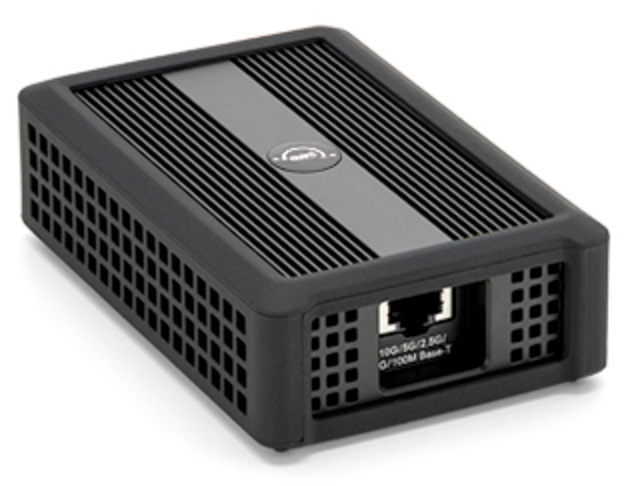
The problem is that all my Macs have only 1G Ethernet ports. While I needed the faster network speed, my Mac’s couldn’t deliver. I needed an adapter. So, I went out and bought this.
UPDATE – Jan. 6, 2023: This unit carries a 3-year warranty. Exactly one month after the warranty expired, this adapter died. When I contacted OWC, they told me it was not repairable. I haven’t used it since.
EXECUTIVE SUMMARY
About the size of two card decks and very solidly built, the OWC Thunderbolt 3 10G Ethernet Adapter is the perfect adapter. You plug it in and it works. Bus-powered, it doesn’t need separate power. It works on Mac and Windows. It supports Ethernet speeds of 100M, 1G, 2.5G, 5G and 10G, automatically.
Wrapped in a rubber bumper to protect it when traveling, the fanless device is silent in operation. It supports data transfer speeds in excess of 900 MB/sec (read) with LEDs to indicate power and link status.
I connected this to my system two weeks ago and configured it in about five minutes. It’s worked invisibly with zero problems ever since.
UPDATE: After using this on two computers for a few weeks, the only limitation is that there is no second Thunderbolt port. On my iMac, I have 2 Thunderbolt ports. One drives an HDMI monitor and the other has a converter from Thunderbolt 3 to Thunderbolt 2 to connect to external storage. This means that to use this device, I either need to disconnect my storage, or my monitor. This may not be a problem for most users, but does restrict its use for me.
Manufacturer: OWC
Device: Thunderbolt 3 10G Ethernet Adapter
Website: https://eshop.macsales.com/item/OWC/TB3ADP10GBE/
Price: $149.00 (US)
OPERATION
To configure this adapter, connect it to any Mac with a Thunderbolt 3 connection. Then, connect a Cat6A cable – necessary for full 10G data transfer speeds – from the adapter to a 10G switch.
NOTE: You can use Cat5E in a pinch, but only for short cable lengths.
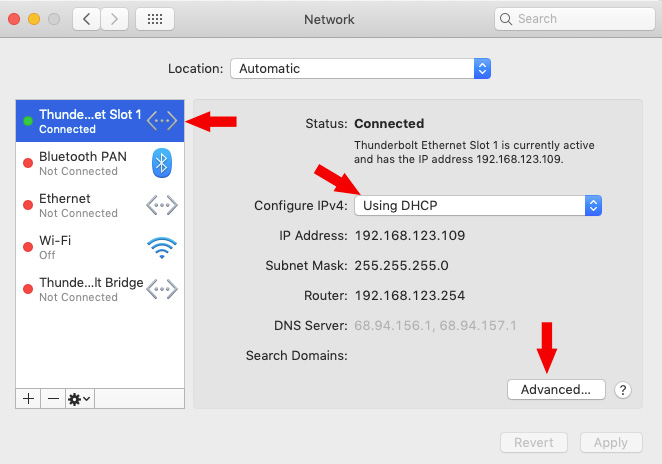
Go to System Preferences > Network and enable the adapter – it’s the Thunderbolt connection displayed in the sidebar on the left.
Be sure to leave the Configure IPv4 to Using DHCP unless your network/IP staff have told you something different.
Click the Advanced button at the bottom right.
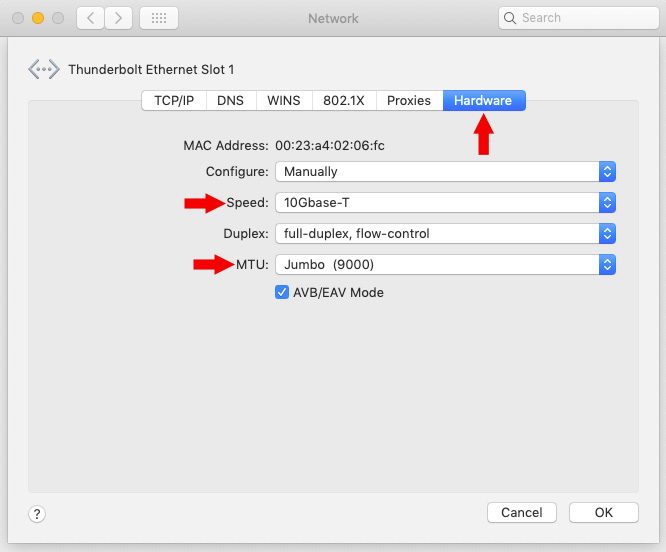
Click the Hardware button at the top right, then make sure the Speed is set to 10Gbase-T
Finally, change the default MTU value to 9000, which is the correct setting for jumbo frames.
NOTE: If Jumbo frames are set to the default of 2,000, the speed of the Ethernet connection is cut by 2/3rds.
WHAT THE LIGHTS MEAN
There is one LED in the front and two in the back:
SPEED TESTS
The reason you upgrade to 10G is speed, pure and simple. Here are the results.
NOTE: Write speeds are always slower than read speeds on a server.
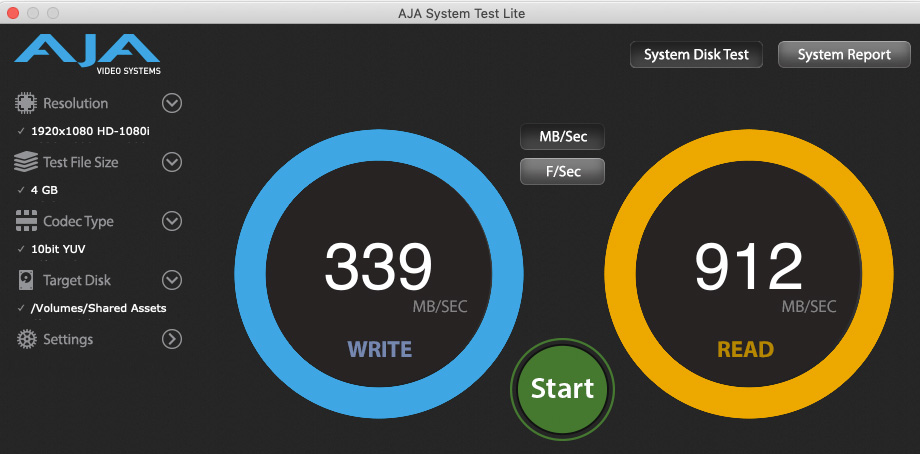
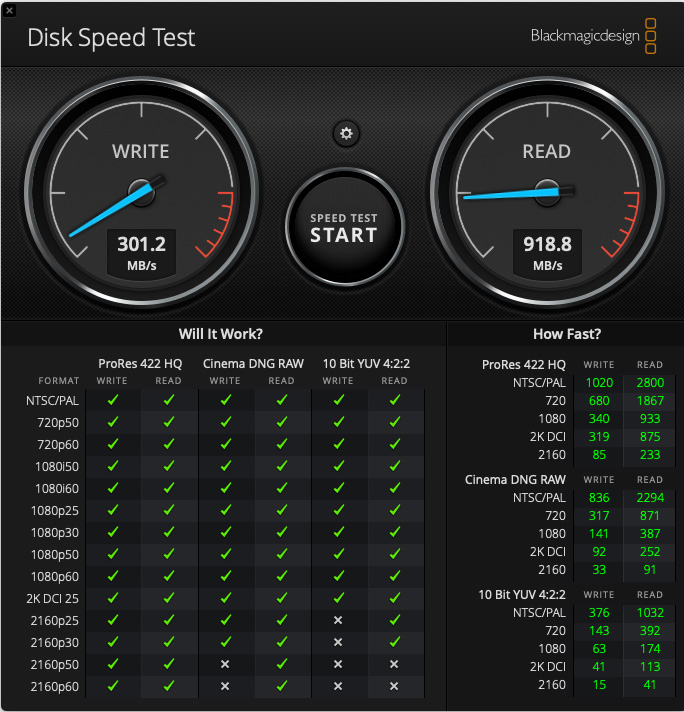
These tests were conducted with only one computer accessing the server through a 10G switch to determine maximum speeds. Your speed will vary depending upon:
SUMMARY
And that’s it.
Easy to connect, easy to use and extremely well-built. The OWC Thunderbolt 3 10G Ethernet Adapter works exactly as you would expect. And what higher praise is there?

2,000 Video Training Titles
Edit smarter with Larry Jordan. Available in our store.
Access over 2,000 on-demand video editing courses. Become a member of our Video Training Library today!
Subscribe to Larry's FREE weekly newsletter and
save 10%
on your first purchase.

11 Responses to Product Review: OWC Thunderbolt 3 10G Ethernet Adapter [u]
← Older Comments-
 Larry says:
May 16, 2021 at 8:39 am
← Older CommentsScott:
I don’t have a solution, but I think I can help you determine where you look. My setup is similar, but with a different switch.
200 MB/sec is what I would expect from a single hard drive. This is double the speed of 1 Gbps Ethernet, so you are getting some advantages already from your new system. This would indicate the settings on your Mac and the OWC unit are OK. As you have Cat 6 cables, that tends to rule out cabling.
With a fully loaded Synology, I would expect it to totally saturate a 10 Gbps connection – about 1,000 MB of data per second. You are getting 1/5 of that. Jumbo frames are correct.
I think the first place to look is the QNAP. My guess is that is where the slowdown is occurring. Contact their tech support.
Second, if the QNAP checks out, contact Synology. It took me a while to find all the settings I needed to change. Contact them second.
Let me know how this turns out.
Larry