
 On Monday, Sept. 25, 2017, Apple is planning to release the latest version of the macOS: High Sierra (10.13). This new version promises lots of goodies for media creators, including support for the new HEVC compression codec and an entirely new file system: APFS.
However, my strong recommendation for media professionals is that you NOT upgrade immediately.
NOTE: I totally support this new version of macOS. I am simply urging caution in deciding when to update.
Specifically, wait at least a month, especially if you are in the middle of a project. This is a big upgrade and, while Apple and its beta testers have put it through its paces, there’s nothing like real-life to find bugs in the operating system.
Over the years, waiting to upgrade the operating system until you are between projects is always wise. If you are never “between projects,” upgrade when you can afford the time to be down for a day; just in case. (Remember, the world will not end if you find yourself running an older OS for a few months.)
DISABLE AUTOMATIC UPDATING
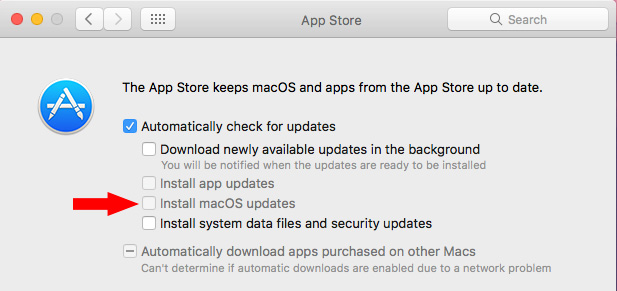
Complicating this update is a default setting in System Preferences > App Store that will automatically install all macOS updates, without first asking your permission, as soon as they are released.
Be sure to UNcheck this option (red arrow in the screen shot above). This disables automatic updating and puts you in charge of when to upgrade.
A NOTE ON APFS
The new Apple File System (APFS) coming in High Sierra promises major speed and stability improvements over HFS+. However, the new file system will ONLY update SSD boot drives. According to Apple, it will not update Fusion drives, spinning media drives, or any external media.
Because this is a MAJOR change to the file system, waiting a month or so for any potential bugs to be found and fixed makes a lot of sense.
Here’s an article I wrote specifically for media folks on the new Apple file system.
A NOTE ON PLUG-INS
It is always wise to assume that plug-ins will NOT work when the new operating system is announced. If there are plug-ins you depend upon for your editing, verify they are compatible before you update.
In general, plug-in developers track the beta process fairly closely to be sure their software will work with the new version. However, no developer is completely confident about compatibility until the actual gold master is released. Apple has been known to make changes at the last minute that breaks stuff.
For this reason, there are often delays between the release of an update from Apple and full support from 3rd-party developers.
This is another great reason to hold off updating until you know that all the software tools you rely on are fully operational under the new OS.
 A NOTE ON FCP 7
Apple has announced that Final Cut Pro 7, and the rest of Final Cut Studio 3 applications, will not work on High Sierra.
If you depend upon FCP 7 for your work, it is critical that you NOT update to High Sierra. If you need both High Sierra and FCP 7, you’ll need to create a dual boot drive. Here’s how.
A NOTE ON HEVC
HEVC, also called H.265, is a new compression standard that is supported natively in macOS High Sierra.
Here’s an article I wrote that explains this in more detail.
SUMMARY
The new macOS upgrade promises lots of new tools and efficiency for media creators. I am looking forward to running it. However, give it time to settle in. The worst thing you can do is upgrade only to discover that your software no longer works.
A little patience now will reap major rewards in the future by assuring your hardware and software and the new OS are ready to work together.
IMPORTANT NOTE: Please share this article with your friends. The automatic upgrade damaged a lot of projects during the last major update. It would be good to prevent this from happening again with this upgrade.

2,000 Video Training Titles
Edit smarter with Larry Jordan. Available in our store.
Access over 2,000 on-demand video editing courses. Become a member of our Video Training Library today!
Subscribe to Larry's FREE weekly newsletter and
save 10%
on your first purchase.

20 Responses to Important Caution About Upgrading to Apple’s High Sierra
← Older Comments-
 Larry says:
November 5, 2017 at 11:02 pm
-
 Seth says:
November 29, 2017 at 12:42 pm
-
 Larry says:
November 29, 2017 at 10:55 pm
-
 seth mellman says:
December 10, 2017 at 9:27 am
-
 John Foundas says:
January 10, 2018 at 7:37 am
-
 Larry says:
January 10, 2018 at 8:39 am
-
 john says:
January 10, 2018 at 2:42 pm
-
 Alexander Liljeqvist says:
June 12, 2018 at 6:07 pm
-
 Larry says:
June 12, 2018 at 6:50 pm
-
 Alex says:
June 12, 2018 at 7:45 pm
← Older CommentsJamie:
Contact CoreMelt and make sure you are running the latest version. I remember seeing a note about this a couple weeks ago.
Larry
Hi Larry-
I wanted to ask you this during your Ask Larry Anything webinar today but unfortunately couldn’t make it. Can you give us the current update on upgrading to High Sierra when using the latest version of FCPX. Thanks for all you do.
Seth:
Final Cut Pro X 10.3.4 is fine and good to upgrade to.
Apple is having problems getting High Sierra to work properly – witness the root bug that was patched today only to break personal file sharing.
If you don’t need to upgrade to High Sierra, hold off for another solid upgrade or two.
Larry
Thanks Larry. I will try and hold off on High Sierra. Much appreciated.
Hey Larry,
Thouhgts on updating to High Sierra as of 1/10/18?
We’re on FCX 10.3.4
TY!
John:
With the new 10.13.2 updates, many of the initial problems seemed to have disappeared.
I no longer have significant reservations about it. Feel free to upgrade if you want. I’ve upgraded 50% of my systems here at the office.
Larry
TY Larry!
I don’t know If you’ll see this Larry, but here we go;
I am currently using a MacBook Pro using the Yosemite OS. I were given this mac after 3 years in college doing video editing in software such as Final Cut Pro 7.0.3 and now got to own it for myself, and would like to continue.
But here’s the kicker; I were recently given a wacom Intuos as a gift, but it requires me to upgrade to OS 10.11. I had in mind to upgrade to Original Sierra, But I’m afraid of losing FCP 7, I am indeed in quite the dilemma, and have snooped around to see what others say since I’m not a particularly tech-savvy guy.
What would you say?, since I have nobody to really ask in my surroundings.
thanks in advance, -Alexander.
Alexander:
I try to read all the comments on my articles.
FCP 7 will work on macOS 10.11, however, you’ll need to go to an Apple Store to get it, it is no longer available through the Mac App store. FCP 7 plugins start to break with macOS 10.12, so I would not go beyond that.
Larry
Thanks a megaton.