
 A question that I get frequently is how to move Events and Projects used by Final Cut Pro X.
There are three options:
USING FINAL CUT PRO X
Press and hold the Command key. Then, in the Event Browser, drag the name of the Event you want to move and drop it on top of the name of the hard disk in the Event Library where you want to move it. (To display the Event Browser, type Shift+Cmd+1)
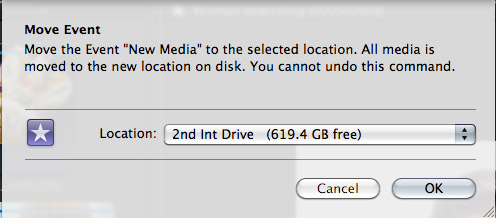
In the dialog that appears, confirm the destination hard disk from the pop-up menu. (The current hard disk will not be listed in this pop-up menu.) Final Cut will move and relink all Event media from the old location to the new. Plus, you can continue editing while this move is taking place. FCP will shift from the old location to the new when the move is complete.
The process is similar when moving projects.
Open the Project Library (Cmd+0). Press and hold the Command key while dragging the project from its current location to the name of the hard disk where you want the project moved.
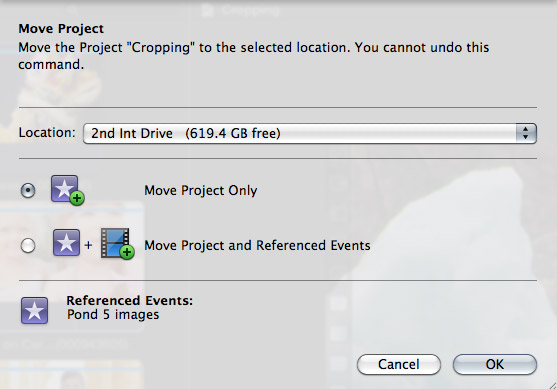
In this dialog, you can select the destination hard disk and whether you want to move just the project files, or both the project and media files.
USING THE FINDER
While Command-dragging makes the process of moving both Events and Project simple inside FCP X, I never use it. Instead, I use the Finder because I find it faster and easier.
Here’s the KEY rule: You MUST quit FCP X before moving anything! Otherwise, everything gets confused.
Once Final Cut is quit, open the hard drive that contains your Event or Project files.
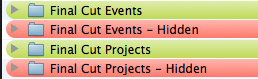
Events are stored in a folder called: Final Cut Events. Projects are stored in a folder called: Final Cut Projects. (Both these folders are highlighted in green in this screen shot.)
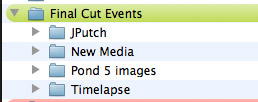
Twirl open the Final Cut Events folder and you’ll see a folder for each Event.
To move an Event, simply drag the ENTIRE event folder (for example: “JPutch”) from its current Final Cut Events folder into another Final Cut Events folder on a different drive.
It is critical that you drag the entire Event folder – i.e. JPutch – and not just some of the contents of the folder.
NOTE: In order for FCP X to “see” an Event, it must be stored in a Final Cut Events folder on a hard disk that is currently displayed on your desktop. Events must be moved from one Final Cut Events folder to another Final Cut Events folder. You can only have one Final Cut Events folder per hard disk.
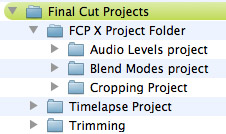
Moving Projects is similar. Open the Final Cut Projects folder. Inside, you’ll see a folder for each FCP X project.
If you are using folders inside FCP X to organize multiple projects, you’ll see those folders inside the Final Cut Projects folder. Projects will be folders stored inside that organizing folder. For instance, in this screen shot, I created a folder in Final Cut called: “FCP X Project Folder,” then, inside it, I stored three separate projects: Audio Levels, Blend Modes, and Cropping.
Find the project you want to move and drag it from one Final Cut Project folder to another. Again, you can only have one Final Cut Project folder per hard disk. However, there is no limit to the number of projects that can be stored inside the Final Cut Projects folder.
USING A UTILITY
While not specifically designed to move media from one drive to another, I am a huge fan of a media management utility made by Intelligent Assistance called “Event Manager X.” This simple utility makes it easy to load, or hide, events and projects for Final Cut Pro X.
While this utility does not move Events or Projects between hard disks, it does allow you to determine what media and projects are loaded into Final Cut Pro X.
I use this utility almost daily. You can learn more about it on their website.
SUMMARY
Whether you use FCP X, or do it yourself in the Finder, moving Events and Projects is easy. Just remember, if you are going to move things yourself, you MUST quit Final Cut first.
Visit our website to see Final Cut Pro Training & more!

2,000 Video Training Titles
Edit smarter with Larry Jordan. Available in our store.
Access over 2,000 on-demand video editing courses. Become a member of our Video Training Library today!
Subscribe to Larry's FREE weekly newsletter and
save 10%
on your first purchase.

30 Responses to FCP X: Move Events or Projects
← Older Comments Newer Comments →-
 Larry Jordan says:
November 20, 2013 at 10:00 am
-
 Egon_Freeman says:
November 25, 2013 at 6:10 am
-
 MDGiamo says:
November 27, 2013 at 9:15 am
-
 MDGiamo says:
November 27, 2013 at 9:49 am
-
 Larry Jordan says:
November 27, 2013 at 10:06 pm
-
 Izabela says:
April 3, 2014 at 4:14 am
-
 Larry Jordan says:
April 3, 2014 at 8:37 am
-
 Rik says:
May 2, 2014 at 1:30 pm
-
 Larry Jordan says:
May 2, 2014 at 1:37 pm
-
 delfina says:
May 16, 2014 at 3:20 pm
← Older Comments Newer Comments →Egon:
I have two folders: Final Cut Events and Final Cut Events (Hidden). Any Events I don’t want to see in FCP X at that moment are in the Hidden folder.
Also, while it saves disk space to link media to an event, it is EASY for those links to break. Whereever possible, always copy media into an event. That way, links don’t break.
larry
Larry:
unless we’re talking about “media” that is already in a “project”, then I don’t have a problem with media disappearing from my Events. I have a problem with Events not being listed in my Project dependencies. The links You speak of link files to Events, not Events to Projects (unless I’m mistaken, of course…). My problem is in the links between a Project and its associated Events. The best example is such: when I load a project up and look at its Referenced Events, the list is empty (not one Event seems to be referenced), and yet – the project shows the familiar “Event missing” graphic. Without this Referenced Events list, I cannot even begin to guess at which Events I need to load up… And while re-linking will do wonders for media files, there is no way to relink Compound Clips, as they don’t exist as rendered files anywhere outside the Event’s database file.
On a side note, I have a similar setup – Final Cut Events and Final Cut Events Disabled (and same for Projects). And I’ve already learned the hard way to not move the Events between hard disks… Also, copying media to Events is, at present, counter-productive for us, as we use multiple workflows and multiple tools – not just FCPX – that consume our media. But as I’ve stated above, this step doesn’t seem to be the problem. Unless, again, I’m mistaken.
Dear Folks:
I REALLY appreciate YOUR advice, tips and so forth from entries, above. I’ve learned some important things over time from some of you.
***
=> I need some serious advice – I’m sure you all get that idea – and why. I certainly am frustrated – and very concerned.
1. Can anyone please tell my why FCPro X creates – and either dupes or moves (?) – already existing EVENTS folders and PROJECT folders into NEW sub-folders called “HIDDEN?”
– If anyone can tell me HOW to PREVENT that from happening -if it can be prevented – I’ll be very grateful.
2. I am ALSO noticing / experiencing, of late, a worse scenario:
– My media , folders and files – now duped in total to 3 new portable HDs; *which can been seen and run/edited OUTSIDE of FCPro X* – CANNOT be fully re-imported; or re-linked – or anything => AT ALL.
– THOSE COUNTLESS, annoying RED alert frames / messages stating,”media not found” or “cannot re-link files” or “cannot open files” or “cannot open project” – or “open projects from within Final Cut” – which then immediately QUITS – makes me wonder what Apple Inc., is thinking and doing about all of these BIG issues.
– I’d be really happy if they’d return SAVE, SAVE AS and REVERT to SAVED in FCPro x. I’ve written letters about that; I’ve told Apple about these issues during phone calls. I’ve found [reproducible] bugs and reported each. So far … after 2 years … no go on most of it.
3. I know of no way to re-connect events vs projects vs media, etc., copied over to external HDs, that never do re-link, no matter what “the instructions” claim: at least not so far. Not when backing-up to an external HD; then to another; and hooking them up to [any one of several new Macs I just purchased] and getting said files to open and RUN properly – without endless frustrations; messages warning missing media; or of un-linkable media / or files “not found” – to be found and reused without starting a project all over from the start. Because they ARE there, on all of these drives!!
– I pointed out to Apple, Inc. last summer that the DUPLICATION process in FCPro X is now unstable: it either works – sometimes – or fails to; or if /when it works – it is soooo very SLOW. A one-by-one process that is Apple’s “gold standard method” of backing-up FCPro X files. I always end up with at least one or two missing events – even when the whole thing just “doesn’t fail or quit.”
– All of this does not seem possible – though I know, based on what I’ve read above – it’s not just me; Apple Store Certified Final Cut Specialists told me when I showed them what was going on – we not surprised – and one person let it slip that, ‘there are a lot of confused and angry FCPro X” users coming in who don’t know what to do ext. – unless I’m missing something so simple – I must be totally dumb as can be, therefore. I don’t think that is quite it, tho.
I AM STUCK.
What might you recommend??
4. I hope for advice on finding ONE SIMPLE WAY to use each MAC:
– EACH with ONE it’s own external working /slave drive containing THE SAME PROJECTS and MEDIA files /event files – Used only as work drives /emergency back-up drives if a MAc or a drive suddenly fails;
– Yet STILL keeping the events, projects, etc. on them somehow INTACT: permitting any of them to be re-usable on another Mac; and /or RE-EDITABLE /re-LINKABLE / both FAST and EASILY.
Thank you in advance.
MDGiamo
An addendum: OSX / FINDER is also a no-longer-reliable method of copying entire – or not entire- FCPX projects, etc. Apple denied it to me on the phone; they are wrong; and I would know – having worked with their stuff for 30+ years – mostly in the media /interactive media and video /streaming video /Web production and design areas.
I ALSO demonstrated to Apple, Inc. the failure of FINDER to do this (something it always did – until FCPX v10.0.9 came out) – then that option disintegrated. Apple’s only advice was: use DUPLICATE PROJECT. Sure; except that is flawed terribly, too!
As for Mavericks – I have NO idea – yet -what we’re in for – as I’ve had no time to try out my FCPX -built films, etc. on my only Mavericks iMac – because Mavericks itself is a mess; and so are some of the updates /total top-down re-issues (think GARAGEBAND X- now known as vX.1, which fixed serious install problems, among other big problems).
A new (new…? Really? All NEW?…LOL) version of FCPX is supposed to be released next month. I don’t know what it will FIX; what it will RUIN; what it MAY NOT “DO” EVER AGAIN; and how it might (read: will) change our [already-changed video /media production lives] ; nor do I know if Apple is going to “give it for free” to owners of the current version(s) out there of FCPX- but which have bugs and flaws, in case you folks don’t know about some of them yet!
MDGiamo:
Hmm… Lots of questions, I’ll see if I can help.
1. FCP X does not create the HIDDEN folder you mention. Those are created by a separate application called Event Manager X. FCP X ONLY stores media in Final Cut Events and projects in Final Cut Projects.
The rule FCP X follows is that it stores media and projects on the hard disk that you have selected at the time you created the new event or new project.
2. If you are getting media or projects copied between hard disks, it means that when you create the event or project, you had selected that hard disk at the time of creation. To keep all media or projects on a single hard drive, you need to be very careful to select the right drive before creating the event or project.
3. I suspect that the errors you are getting are caused by not giving FCP time to process the files – either for importing or optimizing – before quitting the application. Since importing and transcoding run in the background, it is VERY easy to think FCP is done, when in fact it is still working. To see the status of all background tasks, open the background tasks window – click the small clock icon immediately to the left of the timecode display in the Toolbar.
4. Again, without a clearer description of the problem, I suspect that you are not allowing sufficient time for FCP X to copy media between folders before quitting the application, which causes media to become unlinked because the copy operation was not complete. Again, check the background task window to be sure it is safe to quit the app.
5. No, I don’t think you are dumb. But you may be impatient. The problems you describe, at first blush, sound like background operations that we canceled before they were complete by quitting the application. There could be other causes, but that is the one that comes first to mind.
6. You should be able to take a hard disk containing an event, or multiple events, plus a project and easily move it from one system to another. I do this all the time. As long as all the media and all the project data is stored on the one hard disk, and not scattered among many hard disks, this works fine. In all the versions of FCP X that I’ve run — which is all of them – I’ve not seen this fail.
However, I HAVE had problems when project and event media is spread across multiple hard drives. In those situations, you need to consolidate the event to one drive for your system to work.
Hope this helps,
Larry
I have a problem, I couldnt create my project , so i started deleting some files photos music etc. and i got scared I might have deleted some final cut pro stuff so i opened my trash and I typed : final , and there were some projects and events so i move them to desktop but than I realized I werent moving them from trash , but from : on this mac , and when I opened final cut pro everything was empty, no projects, no events , so on the internet I found out that I have to move it again to final cut projects and final cut events to open it but it didnt work I just have information :The document “20140403-021944-GMT+02/00.fcpevent” could not be opened.Open documents from within Final Cut Pro. you mentioned : You MUST quit FCP X before moving anything! Otherwise, everything gets confused. What If I didint and what If I was drgging it onto the desktop on by one not all of them together. Did I lose my projects forever , Ive been working on my project for a couple of months , I tried to create it but i couldnt cause OTHER in my storage is taking all the place , and I couldnt share it on youtube because my mac would froze and everything would stop working, Please help me
Izabela:
Sigh… Moving files without understanding what and where you are moving them is almost always going to cause problems, because FCP uses a database to track files, not simply whether the files are in a particular folder or not.
I suspect your project is permanently damaged. However, as a last resort, call Apple Support and see if they can help you.
Larry
I might be confused, but the instructions on top (i.e. Cmd+0) don’t seem to work in my Final Cut Pro X. Has it been changed?
Rik:
You are not confused. Apple changed the behavior of both Events and Projects with the 10.1 update to Final Cut Pro X. (The update was released six months after this article was written.)
This article applies to the earlier 10.0.x version of FCP X.
Larry
Hi Larry, thanks for your post.
I have a question about the function “Duplicate Project”.
Do you know why there is a limited amount of times you can use that function? After two or three times pressing the Duplicate Project option it turns gray and I cannot use it again. As you may know, when you are editing a feature film you create several versions of one project after each correction, so this option is crucial.
Copying and pasting the media in a new project is not an option because, for some reason, all the media that it isn’t in the Primary Storyline moves when you paste it. (Thats a big and annoying issue too). Furthermore, there´s the risk of your project changing settings, such as framerate (if the first piece of media you have is in a different one than the project you set), generating serious problems with your exports.
So, if you have answers about this, please enlighten me, cause it´s driving me mad.
Thanks a lot!