
 [Note: A tip of the hat to Steve Martin, who first pointed this out to me.]
Final Cut Pro X changed how it manages render files compared to FCP 7. In FCP 7, render files either existed, or they didn’t. There wasn’t anything to manage until a project was over and you went into Render Manager to delete any unwanted render files to free up disk space.
Final Cut Pro X adds a few shades of gray to managing render files which you should know about.
Let me illustrate.

Here, I’ve applied a Line Screen effect to a clip; which means the clip needs to render.

As you would expect, the orange render bar appears above the clip in the Timeline.

After a few seconds, the render bar is gone as FCP has rendered the effect. Now, here’s where it gets interesting. The duration of the clip is six seconds. (There’s no magic to this six-second duration, you just need to know what the duration is.)

If I make the clip shorter, no problem. All the render files are retained.

If I return the clip to its original six-second duration, it remains rendered. In other words, FCP X did not delete render files when I trimmed the clip! While you may feel this behavior makes sense, it is not how FCP 7 worked.

However, if I make the clip longer than the original six seconds, a render bar appears only for that part of the clip that has not yet been rendered.
In other words, FCP X is retaining render files, so that if you change the duration of a clip through trimming, you don’t need to re-render that which has already been rendered.
While this is a big time-saver, even if you haven’t noticed it before, this does mean that render files are stored on your hard disk that are not used in your project. And that is new behavior.
REMOVING RENDER FILES
To remove the render files that you are not using, switch out to the Project Library (Cmd+0) and select the project with the render files you want to delete.
With the project name selected, go to File > Delete Project Render Files. (You can only access this menu from the Project Library.)
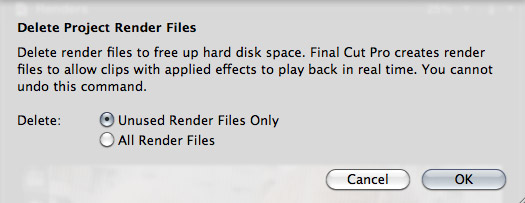
You have two choices:
If you simply want to recover disk space, select “Delete unused render files.”
If you are done with that project and want to regain the maximum disk space, select “Delete all render files.”

When you return to the project, all the render files are gone and you need to render again. The good news is that if you delete render files that you actually need, Final Cut will quickly render them again.
SUMMARY
While it would be nice for FCP X to allow us to see all render files associated with multiple projects at one time, as well as display how much hard disk space is involved, similar to the Render Manager in FCP 7; knowing that we need to manage render files throughout a project can keep us from wasting hard disk space on render files that you will never need again.
Visit our website to see Final Cut Pro Training & more!

2,000 Video Training Titles
Edit smarter with Larry Jordan. Available in our store.
Access over 2,000 on-demand video editing courses. Become a member of our Video Training Library today!
Subscribe to Larry's FREE weekly newsletter and
save 10%
on your first purchase.

35 Responses to FCP X: Delete Render Files
← Older Comments Newer Comments →-
 Larry Jordan says:
January 6, 2014 at 4:07 pm
-
 John G says:
January 7, 2014 at 5:52 am
-
 Larry Jordan says:
January 7, 2014 at 11:22 am
-
 Larry Jordan says:
January 7, 2014 at 11:24 am
-
 Bas P says:
March 19, 2014 at 5:30 am
-
 Larry Jordan says:
March 19, 2014 at 7:36 am
-
 David says:
April 29, 2014 at 3:10 pm
-
 Larry Jordan says:
April 29, 2014 at 7:19 pm
-
 David says:
April 29, 2014 at 9:46 pm
-
 AARON says:
July 17, 2014 at 3:10 pm
← Older Comments Newer Comments →Mitchell:
An easier way to do this is to go to Final Cut Pro > Preferences and turn off background rendering.
Then, when you open a project, render it manually.
Larry
Great article!
I have 2 questions:
– Will it effect the export speed of a movie file if I delete “unused rendering files” first?
I have a two hours clip and got “error 50” in export – and after researching the error I ended up here.
(I have plenty of space on driver and 8gb, but the actual export of a 2 hour clip takes a lot of time and mac-work resources)
– What are the difference between removing “unused files only” and “all files”? Can I go back working on a project if I remove “all files” for instance?
Thank you.
Bill:
If you are working with GOP-based camera native files, like H.264 or AVCHD, you’ll need to re-render the entire clip due to how that compression scheme works.
Optimized files, such as ProRes, should not require this.
Larry
John:
Deleting unused render files will have not affect on final export. Generally, errors on export reflect bad media files – either bad render files or bad source media.
If you delete all render files, FCP X will need to re-render the files it needs — all your transitions and effects – during the export process. This isn’t necessarily bad, but it will take a longer amount of time for the export to complete.
Larry
Larry,
Is there a short cut to delete render files? Or a way to mass-remove render flles? I need to do about 500 projects…Thanks!
Bas:
Provided you have FCP X 10.1, this is an excellent utility: http://www.arcticwhiteness.com/finalcutlibrarymanager/
Here’s my review: http://www.larryjordan.biz/product-review-final-cut-library-manager/
Larry
My project media (a bunch of stills and audio) is only 1 GB, but the render files total about 37 GB. Wow! So deleted unused, but it only reduced that folder slightly. Instead, I deleted all and then let it recreate all the render files. Now the folder is only 9 GB instead of 37 GB. It seems that this is a good maintenance trick to clear out junk that’s taking up space, but not sure why clearing unused doesn’t do this. Any thoughts, Larry? Do you agree that it’s good to periodically delete all render files from a project?
David:
First, still images take up a fraction of the space of moving images. So I’m not surprised at the differences in file size.
Second, I tend not to recommend trashing and rebuilding render files during a project simply because recalculating the render files takes a lot of time.
However, trashing render files doesn’t hurt anything, so there’s nothing inherently “wrong” about doing so.
Larry
True, I was just surprised that the render files were so huge. Anyway, it seems that deleting them all and recreating them reduced the size of the folder considerably. On my new iMac, it actually rendered really quickly as well. Good to know that trashing the files actually is not a bad thing in any way, since doing so seems a little scary with that warning that it cannot be undone.
THANK THATNK THANK S THANK YOU THANK YOU THANK YOU!!!!!!! THIS IS MAGIC!!!!!