
 Final Cut Pro X handles render files and other generated media differently than Final Cut Pro 7. Let me explain.
Definition: Generated Media. Media created by Final Cut. This includes render files, optimized media and proxy media.
FINAL CUT PRO 7
FCP 7 did not have the concept of optimized or proxy media. Yes, AVCHD files would be converted using Log and Transfer to ProRes 422, but, in general, you edited what you shot.
When it comes to render files, Final Cut 7 and Final Cut X both create render files for transitions, titles and effects, including color correction. However, once those files are created, the differences begin.
In Final Cut Pro 7, when you deleted or trimmed a clip to which render files were attached, those render files were immediately deleted. The advantage to this was that you never had render files hanging around not being used, but taking up storage.
While this saves a storage space, it also meant that you were often re-rendering clips that had already been rendered.
FINAL CUT PRO X
FCP X allows creating both optimized and proxy media for a wide variety of reasons, but, in general, they boil down to two:
As a fast estimate, assume that one minute of optimized media takes 1 GB to store, while one minute of proxy media takes about 250 MB to store.
However, FCP X significantly differs from from FCP 7 when it comes to render files.
In FCP X, render files are not deleted when you decide to remove a clip from the Timeline, or trim a portion of a clip, that has already been rendered. Instead, Final Cut Pro X hangs on to render files so that if you add that clip back to the timeline, or readjust the trim to a clip, it instantly reattaches the render files, so that no new rendering needs to be done; assuming there were no changes to the clip since the last time it was used.
NOTE: If Final Cut needs to re-render a clip, any existing render files for the frames being re-rendered are deleted.
WHAT TO DO
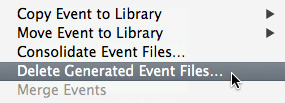
Apple made it easy for us to manage generated media using File > Delete Generated Library/Event/Project Files. Final Cut determines which menu to display based upon what you have selected before going to the File menu.
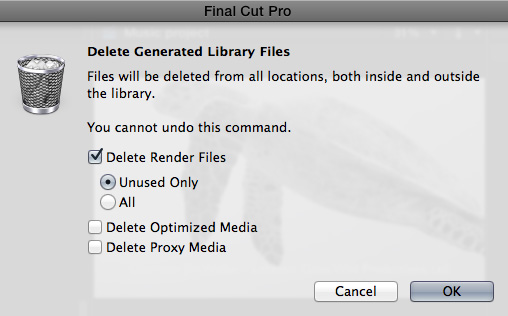
In all three cases, this dialog appears.
If you realize, too late, that you should not have deleted either the optimized or proxy files, re-create them by selecting the clips you want to use in the Browser and choose File > Transcode Media. Again, all you lose is time.
SUMMARY
Give the amount of storage media often required, deleting generated files sounds like a good idea. In general, though, I don’t worry about this, unless I’m desperately short on storage space.
However, I DO delete generated media when archiving a project. There’s no reason to archive files that Final Cut can easily recreate when it needs them in the future.

2,000 Video Training Titles
Edit smarter with Larry Jordan. Available in our store.
Access over 2,000 on-demand video editing courses. Become a member of our Video Training Library today!
Subscribe to Larry's FREE weekly newsletter and
save 10%
on your first purchase.

33 Responses to FCP X: Delete Generated Media
Newer Comments →-
 Richard says:
April 6, 2015 at 8:29 pm
-
 Joe Burford says:
October 11, 2015 at 12:41 pm
-
 Larry says:
October 11, 2015 at 2:24 pm
-
 Jim says:
October 15, 2016 at 12:49 pm
-
 Larry says:
October 15, 2016 at 3:43 pm
-
 Marc says:
April 29, 2018 at 11:35 am
-
 Larry says:
April 29, 2018 at 11:53 am
-
 Marc says:
May 3, 2018 at 6:27 am
-
 Larry says:
May 3, 2018 at 8:06 am
-
 Marc says:
May 3, 2018 at 8:10 am
Newer Comments →In FCPX 10.14. When animating still photos for example, (ken burns or keyframes), when I change a transition between 2 clips and re-render, there is always a jump cut so to speak because some frames are re-rendered and some are not. How do I re-render the entire clip when FCPX does not want to.
Thanks
Richard
I’m encountering exactly the same problem. I edit wedding photographs in slideshow films and frequently encounter rendering problems with FCPX. Very frustrating when i’ve left it rendering overnight!
Many thanks in anticipation,
Joe Burford
Joe & Richard:
My guess, as I can’t see your systems, is that your still images are too big. Try to keep them below 5,000 pixels on a side. Also, be sure they are RGB and not some other color space. Finally, DPI is not relevant, it is the total number of pixels that matters.
Larry
Realizing these comments are a year old…I just ran into this with a series of stills, but also generated titles and lower thirds. It’s not related to image size. I found that when using the video animation transparency handles to generate clip fades, then making any sort of duration change in the timeline upstream of those clips, but for a duration change less than the length of the clips, triggers only a partial re-render, corrupting the total clip. My fades either didn’t work or were doubled. Doing something in video animations that triggered a complete re-render of the clip solved the problem, but is impractical. I reported the issue to Apple, their Pro App guys replicated the problem on their computers in two different OS versions. They acknowledged this as a bug, and turned it over to engineering. The work-around is to ditch your render files then re-render everything. Not spiffy, but gets it done.
Jim:
Thanks for letting us know.
Larry
Hi, Larry, I recently updated FCP to 10.4.1. Now, every time I try to Delete Generated Event Files (no matter whet Library I’m using), FCP crashes. I don’t know if this is related to the the update or if something has gone wrong of got corrupted. I have reset the FCP Preferences but that has no effect. Got any ideas on this?
Marc:
Hmmm…. While I haven’t seen this personally, I am getting other reports of strange behavior in the 10.4.1 update. Whenever you get crashes, I always recommend contacting Apple Support. Apple can’t fix a problem if they don’t know about it.
Larry
Just updated to 10.4.2 hoping this would fix it. No go. I did send several reports to Apple. No big hurry for a fix, just hoping one arrives before I run out of disk space. 🙂
Btw, I thought I’d get an email that you responded. Am I correct, or did it go to my junk box? Thanks for responding anyway. Love the work you do. Saved me many times.
Marc:
Take a look at the trouble-shooting options in this article:
https://larryjordan.com/articles/trouble-shoot-your-apple-final-cut-pro-x-system/
I haven’t had other reports of this, which may mean that it is isolated to your system, which means that it can hopefully be fixed.
Larry
Thanks, will let you know results.