
 The “poster frame” is the small, thumbnail image that is displayed by the Finder for most movies. Most of the time, we don’t care what the poster frame is. But, sometimes, we care a lot.
The problem is that when you export files from Final Cut Pro X or Premiere Pro CC, the poster frame is assigned automatically. Unlike YouTube, you can’t pick the poster frame you want displayed.
However, there is a simple fix using Apple Compressor. Better, you can do so without re-encoding or compressing the file. Here’s how:
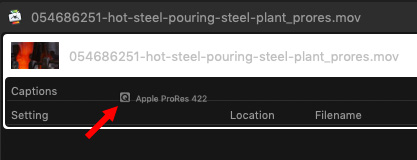
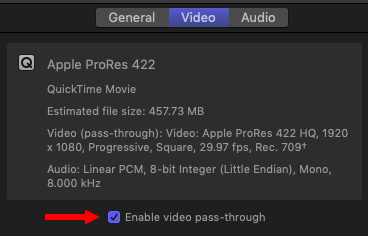
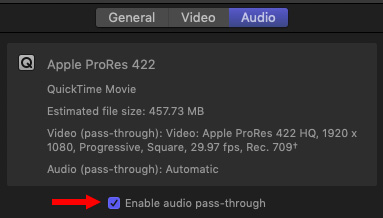
These two steps make sure that your file is only copied and not compressed.
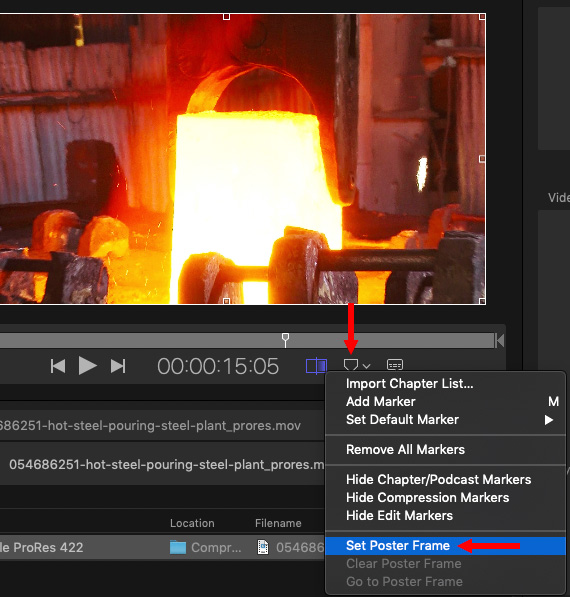
NOTE: As you can see, you can also use this menu for other marker tasks as well.
The secret to this technique is the Pass-Through settings. These override the compression settings – which is why you don’t care which compression setting you initially pick – and allow you to make a copy of the master file using Compressor without altering the source video or audio.
EXTRA CREDIT
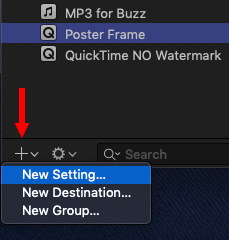
You could also create a new compression setting as a custom preset – call it, say, “Poster Frame.” This allows you to create these settings once, then apply them to as many files as you need. Keep in mind that you can’t save this as a droplet, though, because that wouldn’t allow you to set the poster frame.

2,000 Video Training Titles
Edit smarter with Larry Jordan. Available in our store.
Access over 2,000 on-demand video editing courses. Become a member of our Video Training Library today!
Subscribe to Larry's FREE weekly newsletter and
save 10%
on your first purchase.

21 Responses to Change Your Movie’s Poster Frame
← Older Comments-
 John says:
February 11, 2022 at 4:29 pm
← Older CommentsJust came across this. Thanks as always for the fantastic help. All other info I found was changing poster frame via finder with an image and not a true poster frame. This is exactly what I was looking for.