
 Over the last several weeks, I’ve been testing Apple Compressor 4.2 (the current version) for video compression speed. During this time, I’ve learned:
However, there’s a feature in Compressor that I haven’t tested: running multiple instances of the software. This allows Compressor to “clone” itself to, theoretically, process files faster. The iMac supports one additional instance, while the Mac Pro supports up to three instances. That’s what I decided to test this week.
To help you catch up, here are other recent articles I’ve written on video compression:
EXECUTIVE SUMMARY
Using four of the default YouTube compression settings included with Compressor 4.2 for this test, I learned several things:
The latest version of Compressor (4.2) hooks into the hardware-acceleration offered by both iMac and MacBook Pro computers to accelerate H.264 compression. (H.264 is the current standard delivery codec for all web-based video files.) The MacPro does not currently support hardware-accelerated video compression; a fact made very clear by these tests.
(Click here to download a PDF with details of all my test findings.)
TEST SYSTEMS
Late 2013 Mac Pro
Yosemite 10.10.3
3.0 GHz, 8-core Xeon processor
32 GB RAM
AMD D700 GPU
Late 2013 21″ iMac
Yosemite 10.10.3
3.1 GHz Intel Core i7
16 GB RAM
NVIDA GeForce GT750M GPU with 1024 VRAM
NOTES
ANALYSIS: CREATING THE BATCH
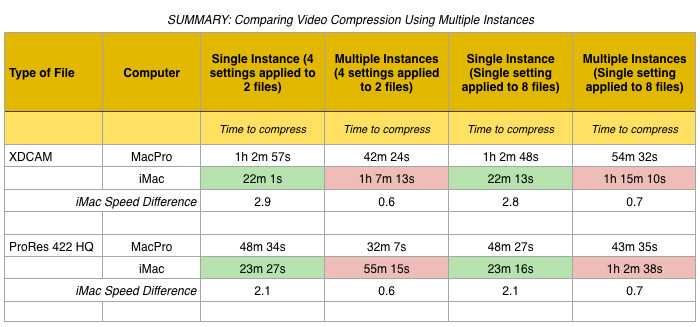
For this test, I compared the compression speed of two different movies, each using a different codec. What I did was apply four different default YouTube settings to each of two different videos (the same four settings were used for all tests), then timed how long each set of videos took to compress. (Timings were reported by the application and by reading Compressor’s log files.)
I tested this four different ways:
I wanted to see if the number of files in the batch changed the speed of compression when multiple instances were enabled.
The short answer is that it didn’t make any difference to an iMac whether this was a single clip with multiple settings or a multiple clips with one setting; compression times were within a few seconds of each other. However, applying multiple settings to a single clip made the Mac Pro compress files about 25% faster. As the table above illustrates, the way you apply compression settings to clips significantly altered the compression speed.
ANALYSIS: MULTIPLE INSTANCES
The MacPro does not support hardware acceleration for video compression. So, while it has massive horsepower, it compresses video totally in software. When it comes to video compression speed, this is a serious liability.
Using all default YouTube compression settings:
COMPRESSION OVERLAP
In the PDF, you’ll see a line titled: “Overlapping Compression Savings.” This is the amount of time saved by having the computer compress multiple files at the same time (which is what multiple instances does).
I’m not yet sure how meaningful this number is. For example, on the iMac, overall performance was so slow that any time savings caused by compressing multiple files at once were completely lost by the overall slowness of the system caused by compressing multiple files at once.
On the Mac Pro, however, overall compression speed was faster due to the multiple iterations, with a few additional minutes saved due to having multiple files compress simultaneously.
NOTE: I am somewhat suspicious of the 26 minute time saving in the last column of the Mac Pro. I think I messed up a calculation. The rest of the numbers are log readings. Whether or not this number is in error, it doesn’t change any of my conclusions.
SUMMARY
This has been an interesting series of tests and I’ve learned a lot. As with all things, your specific situation may yield different results. Always test your workflow to see what works best for you.
(Click here to download a PDF with details of all my test findings.)

2,000 Video Training Titles
Edit smarter with Larry Jordan. Available in our store.
Access over 2,000 on-demand video editing courses. Become a member of our Video Training Library today!
Subscribe to Larry's FREE weekly newsletter and
save 10%
on your first purchase.

13 Responses to Apple Compressor: Faster Video Compression
← Older Comments-
 Pete says:
October 15, 2015 at 12:12 pm
-
 Michael says:
December 20, 2016 at 3:33 pm
-
 Larry Jordan says:
December 20, 2016 at 4:11 pm
← Older CommentsGreat! Thank you.
Are there external, hardware based compressors? I seem to remember Matrox having something, that accelerates Compressor but I cant find anything.
Thanks
Michael:
None that I know of. Hardware acceleration – at least for H.264 – is now built into the chips of the computer, rather than external cards.
Larry