
[jwplayer api_key="kbBMBJTjKc9WLL2/3VpmkSznwdzzqjAKHc08xw==" file="https://d900066ubkwab.cloudfront.net/Webinar206_Tips.mp4?Expires=1786697233&Key-Pair-Id=APKAIKDB332HYGG7URHA&Signature=Ie66QzsCIHtlON8zDN5e6Y6GYXBVohezyaVCv~H5o0irOsFQZczBrFW9IezMZuY-8Zj5iOX3sny1YPTBN3f0pcJKepYzD2kUU01q5e9LAV9hykXjlyOygNn7P0-s~ZFoh4O42vEL8IT~GQ8hkr2JbrhyzwbijWfaphm-Z4e-KL8_" tracks='{ "file": "https://dev.larryjordan.com/videos_subtitle/", "label": "English", "kind": "captions", "default": true }' height="360" width="640" controls="true" playbackratecontrols="true"]
COURSE DESCRIPTION
This session presents a variety of little-known Final Cut Pro X tips and techniques that showcase new ideas, new ways to work faster, and new ways to add some fun to your editing.
During this session, Larry will cover more than a dozen specific techniques, including:
This session is all about: “How Do I Do This?”
AUDIENCE LEVEL
This intermediate-level course is designed for editors with a basic knowledge of Final Cut Pro X. (This session is presented as a QuickTime movie, no other software is required for viewing.)
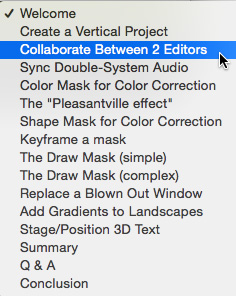
CHAPTER MARKERS
To help you quickly find the information you need, we included chapter markers in the downloaded QuickTime movie for easy navigation. Click here to learn how to display them in your download.
CONTENT OUTLINE


