
 [ Updated with new info regarding FCP X 10.3.]
Final Cut Pro X provides the ability to save text formats and styles. (Though this option tends to be “hidden in plain sight.”)
While we can’t remove styles supplied by Apple, we can remove custom settings, as this article explains.
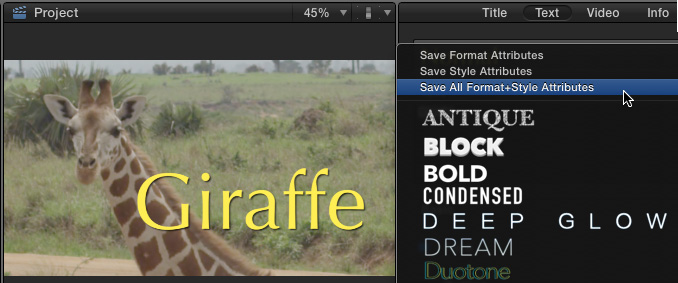
Here, for example, I’ve created a title for my latest documentary on Giraffe’s. (OK, so my project only has one shot, but it makes a great-looking title.)
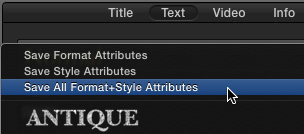
Because I want to reuse this text style multiple times in my project, I’m saving both Format and Style attributes.
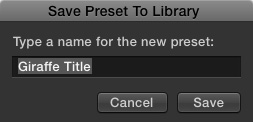
In this dialog, give the Style a name so you know what it is. I’m picking something obvious.
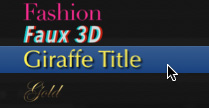
Final Cut saves the setting, then displays it, in alphabetical order, in the Styles list.
REMOVING THE STYLE
Quit Final Cut.
NOTE: Deleting items that appear in Final Cut menus is always done most reliably by first quitting Final Cut.
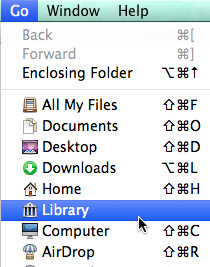
Make the Finder active. Then, press the Option key when opening the Go menu. Select Library.
NOTE: The Library option only appears when the Option key is pressed while accessing the Go menu.
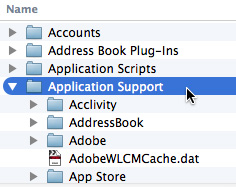
In the Library, twirl open Application Support.
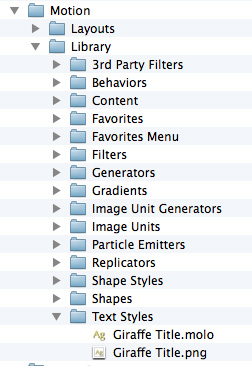
Scroll down till you find the Motion folder. Then, open Motion > Library > Text Styles.
Delete both the .molo and .png files of the text style you want to remove.
When you restart Final Cut, the option will be removed from the Style menu.
UPDATE – Nov. 15, 2016
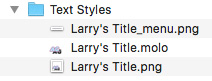
With the release of FCP X 10.3, creating text styles now creates three files, rather than two, in the Motion > Library > Text Styles folder. Also, with the initial release of 10.3, as a reader points out below, deleting these styles does not remove the Style name from the Style menu.
EXTRA CREDIT
Deleting a style from the style menu does not delete any styles applied to clips in the Timeline. Styles are presets, once applied, they are disconnected from the text.

2,000 Video Training Titles
Edit smarter with Larry Jordan. Available in our store.
Access over 2,000 on-demand video editing courses. Become a member of our Video Training Library today!
Subscribe to Larry's FREE weekly newsletter and
save 10%
on your first purchase.

15 Responses to FCP X: Remove Saved Custom Text Styles and Formats
← Older Comments-
 tiffy says:
August 28, 2019 at 6:27 pm
-
 Larry says:
August 28, 2019 at 6:51 pm
-
 SD Yoon says:
May 27, 2020 at 6:14 pm
-
 CaglarE says:
March 26, 2021 at 6:43 pm
-
 Larry says:
March 27, 2021 at 9:22 am
← Older CommentsI like that font. What is it?
Tiffy:
Which font are you looking at?
Larry
it is very useful!! Thanks
Thank you very much Larry.
CaglarE:
Happy to help.
Larry