
[jwplayer api_key="kbBMBJTjKc9WLL2/3VpmkSznwdzzqjAKHc08xw==" file="https://d900066ubkwab.cloudfront.net/Webinar226_Storage.mp4?Expires=1788978312&Key-Pair-Id=APKAIKDB332HYGG7URHA&Signature=YcMdkv2-pH2Ahmhn-p9hF63AMxkKEk26pLcbbrR0XGzTDtW8o0wrqv8S8G8GFONuejUukn7YZTLkksK9uw41Ia64Sw-WEVPO1Q65xc0LC0skzD8L1gcJfz6uCD22V8cC4S7yxC~niUuQcVqddJM8juLHgyyDsBInmxgZzqI94wo_" tracks='{ "file": "https://dev.larryjordan.com/videos_subtitle/", "label": "English", "kind": "captions", "default": true }' height="360" width="640" controls="true" playbackratecontrols="true"]
Presented: June 14, 2017
COURSE DESCRIPTION
Storage is at the heart of all media editing. Yes, all software requires us to save our files someplace, but no other software demands high-capacity, high-performance storage fast enough to work in real-time. Media editors are unique in their storage needs.
In fact, storage is far more important to the performance of our editing system than the computer itself. Except, understanding storage seems to require a degree in rocket-science. All too often, talking about storage seems both boring and incomprehensible.
This week, host Larry Jordan, demystifies storage and explains what you need to know to make the most of the storage you have. Yes, this is a technical subject, but Larry shows how it all makes sense.
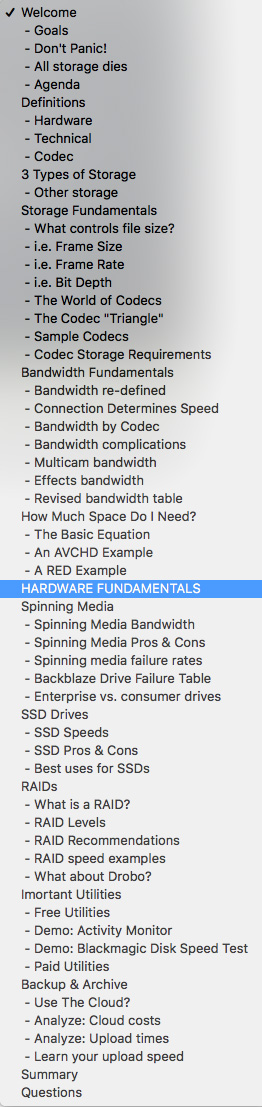
Subjects covered include:
AUDIENCE LEVEL
This session assumes an interest in video or audio editing, but does not require to you be an engineer. The material covered here applies to all media editing software. This session is delivered as a QuickTime movie, so you don’t need to own the software to watch this.
CHAPTER MARKERS
To help you quickly find the information you need, we include chapter markers in the QuickTime download to simplify navigation. Click here to learn how to display them in your download.
CONTENT OUTLINE


