
[jwplayer api_key="kbBMBJTjKc9WLL2/3VpmkSznwdzzqjAKHc08xw==" file="https://d900066ubkwab.cloudfront.net/Webinar213_Premiere_Tips.mp4?Expires=1786682843&Key-Pair-Id=APKAIKDB332HYGG7URHA&Signature=IcRTcZNm2UlksJ-bDELnM5ziuSGdnsj~s3z9mbM8QiBhyTSoSOfXbS3u0MNO4vrheDarH696tkH6EL3q6gBQ1b9D324yNWtkL1~E-9XugIVGvUGLpOIWmgwe~EKhOkn9NCciPqk4eb-~iwpcP8XeKf2uDeb-v2xMHDdMsRAHfuQ_" tracks='{ "file": "https://dev.larryjordan.com/videos_subtitle/", "label": "English", "kind": "captions", "default": true }' height="360" width="640" controls="true" playbackratecontrols="true"]
Presented: Feb. 8, 2017
COURSE DESCRIPTION
It is easy to get caught up in all the amazing technology contained inside Adobe Premiere Pro CC. But, sometimes, its worth taking a step back to look at how to accomplish those simple tasks that we know are there – somewhere – if only we knew where to look.
That’s what this session is about. Areas we cover include:
AUDIENCE LEVEL
This intermediate webinar is designed for any Premiere editor looking to improve their speed and knowledge of the software. Even experienced Premiere editors will pick up a trick or two.
CHAPTER MARKERS
To help you quickly find the information you need, we include chapter markers in the QuickTime download to simplify navigation. Click here to learn how to display them in your download.
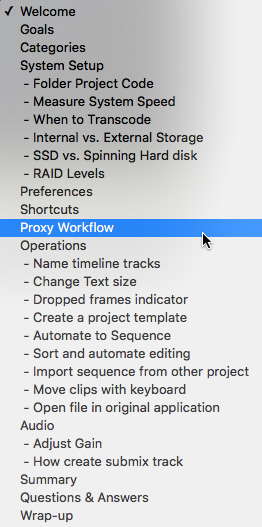
CONTENT OUTLINE


