
[jwplayer api_key="kbBMBJTjKc9WLL2/3VpmkSznwdzzqjAKHc08xw==" file="https://d900066ubkwab.cloudfront.net/Webinar209_Compare.mp4?Expires=1786682676&Key-Pair-Id=APKAIKDB332HYGG7URHA&Signature=T~7TchB3g1AiWWYzUBP8rVWqPyLODTtA0WPHMmqeyLoS4q-8AxK-4M5CgayMUoEUQV~XLx97aIASpOrq0ZdoevrvASPetR2u-Xf~EJML2nt0C3PYf1CqLnSJtfrepymoICmr5hgo3ZMf1EfKBsQRXOsJij4uFjNdF~aVJlAqEQw_" tracks='{ "file": "https://dev.larryjordan.com/videos_subtitle/", "label": "English", "kind": "captions", "default": true }' height="360" width="640" controls="true" playbackratecontrols="true"]
Presented: Nov. 30, 2016
COURSE DESCRIPTION
Both Adobe Media Encoder (AME) and Apple Compressor recently underwent upgrades. In this week’s webinar, we compare the two software to see what’s new; along with a look at some advanced features that we have not covered in the past.
Join host, Larry Jordan, as he showcases:
AUDIENCE LEVEL
This is an intermediate-to-advanced-level session. Some knowledge of Compressor or AME will be helpful. (This session is presented as a QuickTime movie, no other software is required for viewing.)
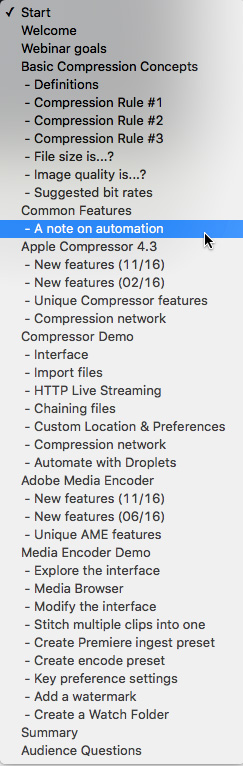
CHAPTER MARKERS
To help you quickly find the information you need, we include chapter markers in the QuickTime download to simplify navigation. Click here to learn how to display them in your download.
CONTENT OUTLINE
Apple Compressor
Apple Compressor Demo
Adobe Media Encoder
Adobe Media Encoder Demo


