
[jwplayer api_key="kbBMBJTjKc9WLL2/3VpmkSznwdzzqjAKHc08xw==" file="https://d900066ubkwab.cloudfront.net/Webinar207_New_FCPX.mp4?Expires=1786682893&Key-Pair-Id=APKAIKDB332HYGG7URHA&Signature=VD-nITjuXQXkAJsA1zdCB66liyYy8eFTywxknGfFcHBHN7zRz2jcwbR-6GHhr4lVAJT73PblsoD4IUU2Z6AjjHe~XVnkuLiRRlTVUqzogT5ucCwvROmam7DqLX-t5xegty-ZUZzxyRv4i4dvw2dsfD~P-tyzXONjv6Xg7tfjzsg_" tracks='{ "file": "https://dev.larryjordan.com/videos_subtitle/", "label": "English", "kind": "captions", "default": true }' height="360" width="640" controls="true" playbackratecontrols="true"]
Presented: Nov. 3, 2016
COURSE DESCRIPTION
Apple released the latest version of Final Cut Pro X just a few days ago. So, this week, Larry Jordan, presents a webinar devoted to highlighting all the new features.
This session covers:
AUDIENCE LEVEL
This intermediate-level course is designed for editors with a basic knowledge of Final Cut Pro X. (This session is presented as a QuickTime movie, no other software is required for viewing.)
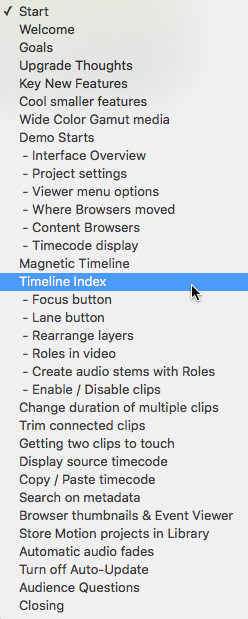
CHAPTER MARKERS
To help you quickly find the information you need, we include chapter markers in the QuickTime download to simplify navigation. Click here to learn how to display them in your download.
CONTENT OUTLINE


