
[jwplayer api_key="kbBMBJTjKc9WLL2/3VpmkSznwdzzqjAKHc08xw==" file="https://d900066ubkwab.cloudfront.net/Webinar204_Addons.mp4?Expires=1786693789&Key-Pair-Id=APKAIKDB332HYGG7URHA&Signature=DBTqCIkFAsOT2hppew9LM-vTDxpP8qr2pL4ZQ6faNcaAH5hWBcGg6L9JycieOj~nYGFpdJj8EtMDrBxs~pCqeIV0RXexAzh7VVzwRBs-bxomBzgRxPImeTLeuvjvRFjTpzbBWHsj4OtJtl2-RA4g3TmShivfqh4INQXnnUrbx58_" tracks='{ "file": "https://dev.larryjordan.com/videos_subtitle/", "label": "English", "kind": "captions", "default": true }' height="360" width="640" controls="true" playbackratecontrols="true"]
COURSE DESCRIPTION
Adobe Premiere Pro CC can do amazing things. However, when you combine Premiere with some of the powerful third-party tools that a worldwide community of developers has created for Premiere – Premiere’s power is magnified.
This week’s webinar concentrates on sophisticated tools that enable us to do even more with Premiere, rather than specific transitions or effects. These tools create entire panels inside Premiere, not just add a line item in Effects panel. Join host, Larry Jordan, as he showcases three new or significantly revised panels from:
If you use Premiere, this is a great session to learn how to extend your software and discover how these tools work.
AUDIENCE LEVEL
This intermediate-level session assumes basic familiarity with Adobe Premiere Pro, but does not assume any specific knowledge. This training is delivered as a QuickTime movie, so you don’t need any additional software to watch this training.
SPECIAL FEATURE
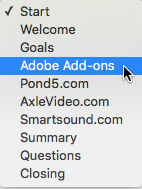
To help you quickly find the information you need, we included chapter markers in the downloaded QuickTime movie for easy navigation. Click here to learn how to display them in your download.
CONTENT OUTLINE


