
[jwplayer api_key="kbBMBJTjKc9WLL2/3VpmkSznwdzzqjAKHc08xw==" file="https://d900066ubkwab.cloudfront.net/Webinar202_Titles.mp4?Expires=1786693790&Key-Pair-Id=APKAIKDB332HYGG7URHA&Signature=Epq~HMbCv6TkImlLYAqPaxOyPZl-v2PZojEovJk8h2r9ejZgvpEQBZchEWkCwMW9GJ1lvj8V3ib96O7VoFq7QvMvHEkKOm4UyAtZbFA~jYE2sJe6zAdF77flf~oRO-0QheFqLYOdBiCjWGQ-8QqzxzK2N4YbxUTdqTenyHXVUSE_" tracks='{ "file": "https://dev.larryjordan.com/videos_subtitle/", "label": "English", "kind": "captions", "default": true }' height="360" width="640" controls="true" playbackratecontrols="true"]
COURSE DESCRIPTION
The best way to learn something is to get started. And, if Apple Motion is something you want to learn, this webinar is a great way to start.
Join host Larry Jordan for this introductory webinar on using Motion 5 to create custom animated lower-thirds for Final Cut Pro X projects. We start at the beginning by modifying an existing Final Cut Pro X template in Motion then sending it back to Final Cut; from there we animate text using behaviors, add backgrounds and, in general, discover a variety of ways to create eye-catching titles.
Along the way, we’ll:
If you want to learn Motion, but haven’t been able to learn it on your own, this is the perfect session to get you started.
AUDIENCE LEVEL
This is a beginning-level session, designed to introduce Motion to Final Cut Pro X editors. You don’t need to own Motion to watch this training.
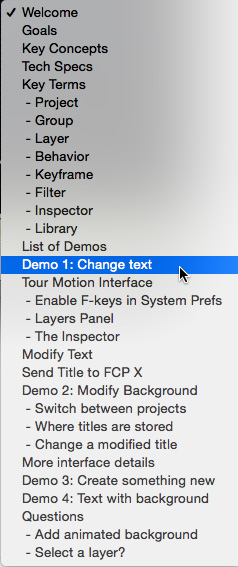
SPECIAL FEATURE
To help you quickly find the information you need, we included chapter markers in the downloaded QuickTime movie for easy navigation. Click here to learn how to display them in your download.
CONTENT OUTLINE


