
[jwplayer api_key="kbBMBJTjKc9WLL2/3VpmkSznwdzzqjAKHc08xw==" file="https://d900066ubkwab.cloudfront.net/Webinar199_Reactions.mp4?Expires=1786693788&Key-Pair-Id=APKAIKDB332HYGG7URHA&Signature=aUXIOmc0feqLvQMPy6O4PyQIqsTVLfgVa-CTEIeiLTjZjJ90GNs8bxoVW3yYrN8LSVhh7JeoGkIh6eI0d8eTrr0K9~utXw57pwLy~CHAKT89qbY4H-K8yGEJ~Zi9UR0JglXg14Mm34Ox9o8rFeQYhCv-gGrLw8y9jkkvKgEWyvA_" tracks='{ "file": "https://dev.larryjordan.com/videos_subtitle/", "label": "English", "kind": "captions", "default": true }' height="360" width="640" controls="true" playbackratecontrols="true"]
DESCRIPTION
Dialog conveys information, while reaction shots convey emotion. Reaction shots reinforce or destroy what the speaker is talking about. They are an emotional fulcrum. A reaction shot tells the audience what to think, or feel, about the person currently speaking on the screen.
In this webinar focused on creativity, Larry Jordan illustrates the power of reaction shots. First, by showing how they are used in a variety of popular films, then showing how adding a reaction shot, then modifying its timing in your editing, significantly changes the emotional content of a scene.
As part of this webinar, Larry will review short scenes and illustrate reaction shot usage from:
This session is designed to illustrate what reaction shots are, why they are important and how to use them. Whether you use Adobe, Apple, Avid or any other video editing applications, this webinar is for you.
AUDIENCE LEVEL
This webinar requires no knowledge of video editing software, simply a willingness to learn how to tell better stories. This webinar is delivered as a QuickTime movie.
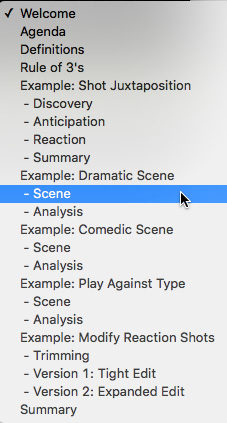 SPECIAL FEATURE
To help you quickly find the information you need, we included chapter markers in the QuickTime movie for easy navigation. Click here to learn how to display them in your download.
CONTENT OUTLINE


