
[jwplayer api_key="kbBMBJTjKc9WLL2/3VpmkSznwdzzqjAKHc08xw==" file="https://d900066ubkwab.cloudfront.net/Webinar198_Adobe_New.mp4?Expires=1786693775&Key-Pair-Id=APKAIKDB332HYGG7URHA&Signature=VZ-KgidA-semULZDY2Jk5CBABZHDP8nVJFHXKn1CS~PaeyzEYmK9PIpKk2n303dZY4IjhjQcRmM1SIEBfJuY~Y8u94a6LepfrXQ6-DXBuoMQnYGxEZg85qyYJVC-W6ZcK~26avF~3pJXGhKcfWGpkqFUXMwj7RPwdgzVPcMKzxQ_" tracks='{ "file": "https://dev.larryjordan.com/videos_subtitle/", "label": "English", "kind": "captions", "default": true }' height="360" width="640" controls="true" playbackratecontrols="true"]
COURSE DESCRIPTION
Last week, Adobe released updates to all their audio and video software. In this week’s session, host Larry Jordan illustrates the principle new features and shows how to put them to work in your projects.
This session covers new features in:
This is a great opportunity to elevate your skills – and discover the latest tools from Adobe.
AUDIENCE LEVEL
This is an intermediate-level session, designed for editors who are familiar with Adobe software. This training is delivered as a QuickTime movie, you don’t need any additional software to watch this training.
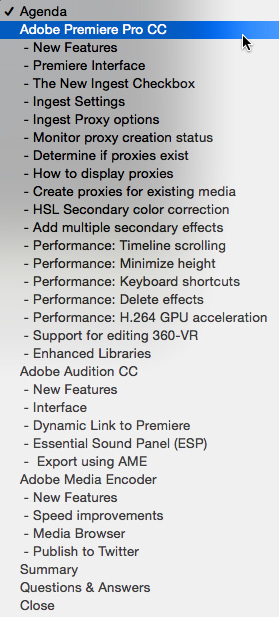
SPECIAL FEATURE
To help you quickly find the information you need, we included chapter markers in the downloaded QuickTime movie for easy navigation. Click here to learn how to display them in your download.
CONTENT OUTLINE
Adobe Premiere Pro CC
Adobe Audition CC
Adobe Media Encoder CC
Audience Questions & Answers
Summary


