
[jwplayer api_key="kbBMBJTjKc9WLL2/3VpmkSznwdzzqjAKHc08xw==" file="https://d900066ubkwab.cloudfront.net/Webinar227_Media_Mgmt.mp4?Expires=1788981178&Key-Pair-Id=APKAIKDB332HYGG7URHA&Signature=EstJUc0-yLitobQdt1-J18OMpPglmUtOiYcpzI3ReH5yk5tgJTTuoJpN9utYCTr8Ocl3eTfg6kF5WkRvz5WvpAo-HFuzKzW~9BXl1D252C4ldH6NECITWl4VL0osS~~fDFBvu8AliyIMLL5Q3OnUmIcnUP~4~cuURS23VT1Lf0g_" tracks='{ "file": "https://dev.larryjordan.com/videos_subtitle/", "label": "English", "kind": "captions", "default": true }' height="360" width="640" controls="true" playbackratecontrols="true"]
Presented: July 5, 2017
COURSE DESCRIPTION
Media management is the focus this week. Here, we look at three new software tools that can help you keep track of all the elements that go into a project. Whether you edit using Adobe Premiere Pro CC or Apple Final Cut X, you’ll find tools here that can make you more efficient.
Join host, Larry Jordan, in this extended tour of these three applications and discover how they integrate with your favorite NLE:
Projects are exploding in size, now extending into thousands of clips and hundreds of hours of material. In this session, you’ll discover new tools for collaboration, transcoding, logging and media management for both Premiere and Final Cut Pro X.
AUDIENCE LEVEL
This is an introductory session, in that you don’t need to know any of these software packages. However a basic understanding of video editing in either Final Cut Pro X or Premiere Pro CC will be helpful. This video training is a QuickTime movie. You don’t need to own any other software to watch this movie.
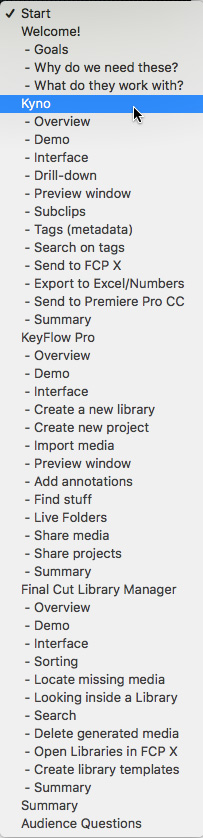
CONTENT OUTLINE


