[jwplayer api_key="kbBMBJTjKc9WLL2/3VpmkSznwdzzqjAKHc08xw==" file="https://d900066ubkwab.cloudfront.net/Webinar222_Stills.mp4?Expires=1786686562&Key-Pair-Id=APKAIKDB332HYGG7URHA&Signature=bnaS40b4RMr41NAASLBUo6E9qKwTJQQ97AQ-qkkww6E4Zn84wqxE4inM5iOLKWZ2bqczfx-sNNnNh7otJgPlNFchJmB8-vPSV6xIyJITqLdSthCetWu6kdLbhJD2cTsyM-YZNXkXGybk3bhyec2xcAMnt-ks3Ce~Owu5hXGMZVE_" tracks='{ "file": "https://dev.larryjordan.com/videos_subtitle/", "label": "English", "kind": "captions", "default": true }' height="360" width="640" controls="true" playbackratecontrols="true"]
Presented: May 17, 2017
COURSE DESCRIPTION
This webinar was suggested by a newsletter reader, Coleen, who asked:
I would love to learn tips or tricks for efficient ways to work with lots of photos in a project. I produce a lot of docs and videos with a historical perspective so photographs and other images end up being important (as well as archival video when its available).
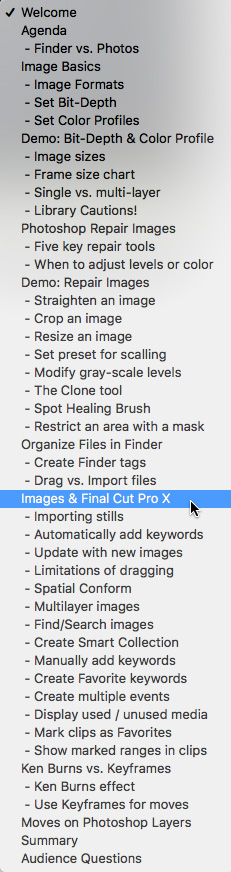
So, this week, we take a detailed look at working with stills inside Apple Final Cut Pro X. What you’ll discover is that the challenge with stills is not the editing, but the preparation and organization. This webinar covers:
AUDIENCE LEVEL
This intermediate session is designed for editors with some Final Cut Pro X experience that want to learn how to edit faster, solve problems and keep their gear running smoothly. This session is delivered as a QuickTime movie, no other software is required to watch this session.
CHAPTER MARKERS
To help you quickly find the information you need, we included chapter markers in the downloaded QuickTime movie for easy navigation. Click here to learn how to display them in your download.
CONTENT OUTLINE