
[jwplayer api_key="kbBMBJTjKc9WLL2/3VpmkSznwdzzqjAKHc08xw==" file="https://d900066ubkwab.cloudfront.net/Webinar221_Adobe.mp4?Expires=1786686539&Key-Pair-Id=APKAIKDB332HYGG7URHA&Signature=FFf1kXPXrzw03l3HzhRxwaTH8Yvd665v6EgmvB07exL~dOcbwbKoH~qduHrQSNdWSFvfAY9ITWJuii8PSHyp2vBGng77ZeeeP0gYLJqNca2qwhC2JBAVhUZ4x67q7sGP98ym1rhT0Pu4CvR7PS0PozsPk~6f9u01NR-IJ5D573M_" tracks='{ "file": "https://dev.larryjordan.com/videos_subtitle/", "label": "English", "kind": "captions", "default": true }' height="360" width="640" controls="true" playbackratecontrols="true"]
Presented: April 19, 2017
COURSE DESCRIPTION
This morning – April 19, 2017 – Adobe announced and released their latest upgrades to the Creative Cloud suite of media software. Upgraded applications include:
In this webinar, join host, Larry Jordan as he details the highlights of each upgrade, then runs each to show you exactly how the new features work.
This webinar is the fastest and best way to get up to speed quickly on all the major new features.
AUDIENCE LEVEL
This introductory webinar is designed for any Premiere editor looking to learn the latest features in Adobe’s upgrades.
CHAPTER MARKERS
To help you quickly find the information you need, we include chapter markers in the QuickTime download to simplify navigation. Click here to learn how to display them in your download.
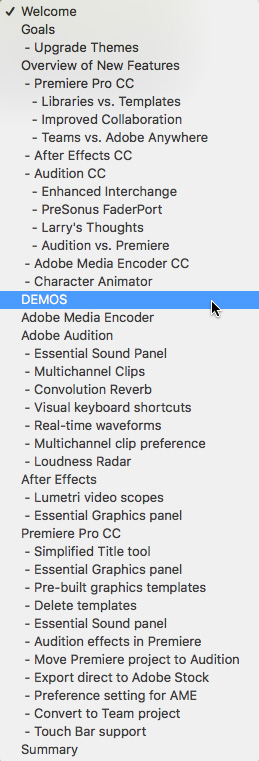
CONTENT OUTLINE


