
[jwplayer api_key="kbBMBJTjKc9WLL2/3VpmkSznwdzzqjAKHc08xw==" file="https://d900066ubkwab.cloudfront.net/Webinar220_Motion_06.mp4?Expires=1786686560&Key-Pair-Id=APKAIKDB332HYGG7URHA&Signature=Z76sT7MUkJ0iuDxQJMra~~mjZRU19Rsv1Ov9qmH-QScphjTuT27PYEU1PzffI1qhyYAU78wPiyewJ3CDWahPcf1SVA5HSkDH6grFQVAcamKqORW9zGuCZHW0sckyAe-EgD6VK9Mv7cMpuOqmgMsbd0OVhvYo5Y-NB8clBzWiC1k_" tracks='{ "file": "https://dev.larryjordan.com/videos_subtitle/", "label": "English", "kind": "captions", "default": true }' height="360" width="640" controls="true" playbackratecontrols="true"]
Presented: April 5, 2017
COURSE DESCRIPTION
This session includes Practice Files!
Here’s the link to our 6-part Motion Bundle that contains this episode.
This session concludes our 6-part series on using Apple Motion 5.3.x. This week, we explore 3D space. 3D is complex and can get pretty murky pretty quickly. Not to worry. This session will get you started in the right direction so you can explore 3D further on your own.
Whether you are new to Motion or want to make the most of this application, this series is for you. Here’s what cover this week:
AUDIENCE LEVEL
This intermediate-to-advanced session is designed for new and existing users of Apple Motion. New users will benefit from an in-depth understanding of the software. Existing users will benefit from learning how the interface has changed and new techniques to create motion graphics.
If you are new to Motion, it will be helpful to watch Webinar 215 to understand the basic operation of the software before watching this session.
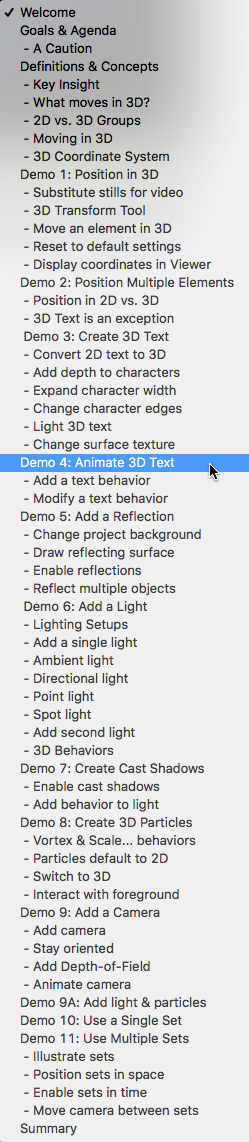
CHAPTER MARKERS
To help you quickly find the information you need, we included chapter markers in the download version for easy navigation. Click here to learn how to display them in your download.
CONTENT OUTLINE


