
[This article was first published in the July, 2011, issue of
Larry’s Final Cut Pro Newsletter. Click here to subscribe.]
(For my policy on product reviews, please read this disclosure statement.)

One of the limitations of Final Cut Pro X is that all Events and Projects must be open at all times. There is no way, within the program, to turn some of them off.
Nor, if you use multiple hard disks to store Events or Projects, can you see which Events or Projects are off-line, stored on a hard disk that you’ve either disconnected or turned off.
Into this breach leaps Event Manager X, from Intelligent Assistance ($4.99 available directly from their website). This is a stand-alone utility that does all the file management for you. They sent me a copy to review.
Installation is simple – download it from their website, enter a serial number and you’re done. Total time spent installing is about 90 seconds.
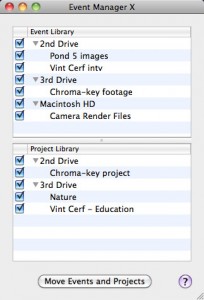
When you first start Event Manager X, it displays a simple table that lists all Events on all hard drives connected to your system and turned on in the top half and all Projects on all hard drives in the lower half.
Check boxes indicate which Events and Projects are active.
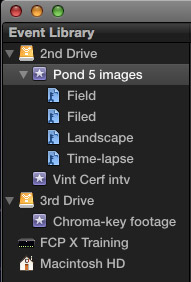
As you can see, all the Events displayed in Event Manager X are also displayed inside FCP X.
But here is where Event Manager X shines. Let’s say you don’t want the client for the Pond5 clips seeing the Vint Cerf footage.
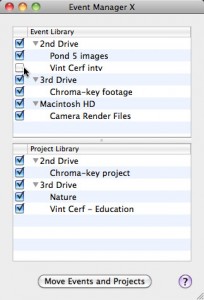
Simply switch back to Event Manager and uncheck all the Events or Projects you want to hide.
Click the Move Events and Projects button and, quickly, behind the scenes, Event Manager X moves all those files into a different folder, thereby hiding it from FCP X. Files are NOT deleted, only moved.
The only annoying part of this process is that in order for FCP X to learn that media has been moved is to restart the application. Event Manager X handles this restart for you automatically.
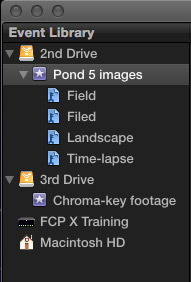
For instance, notice that in the screen shot above the Vint Cerf event is no longer listed in the Event Library of the 2nd Drive.
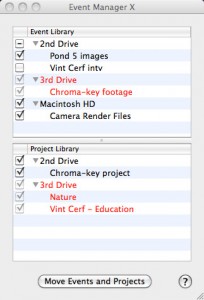
What’s even more helpful is that when you move a hard disk off-line, Event Manager X instantly displays all off-line hard disks, Events, and Projects in red. This allows you to store Events and Projects on multiple drives, yet keep track of where everything is.
It could be argued that Apple should have made it easy to manage media and projects inside Final Cut Pro X. While true, Event Manager X handles media management for Final Cut Pro X simply and elegantly.
I can’t imagine editing in Final Cut Pro X without it.

2,000 Video Training Titles
Edit smarter with Larry Jordan. Available in our store.
Access over 2,000 on-demand video editing courses. Become a member of our Video Training Library today!
Subscribe to Larry's FREE weekly newsletter and
save 10%
on your first purchase.

16 Responses to Software Review: Intelligent Assistance Event Manager X
← Older Comments-
 Twila says:
March 26, 2013 at 6:12 pm
-
 Steve says:
April 13, 2013 at 3:42 am
-
 brian says:
May 3, 2013 at 11:06 am
-
 brian says:
May 3, 2013 at 11:07 am
-
 brian says:
May 3, 2013 at 11:10 am
-
 iamasaint says:
May 14, 2013 at 4:27 pm
← Older CommentsEvent Manager is such a help! I had several issues with FCPX crashing. This solved my problem and made it so much easier to narrow down which event had a corrupt file. Very happy with this program!
Downloaded, unzipped and installed, Program opens and then closes again without an option to enter the serial number.
Any suggestions? (have tried a number of times, even rebooted)
where is the serial
i have bought event manager x but i dont see a serial…where is it?
sry found it
Happened to me when I was first trying to enter my serial number. The trick is to scroll down the window and click the “agree button” then click the “OK button”. It will then give you a place to put your serial number.