
[jwplayer api_key="kbBMBJTjKc9WLL2/3VpmkSznwdzzqjAKHc08xw==" file="https://d900066ubkwab.cloudfront.net/Webinar203_UpRes.mp4?Expires=1786698646&Key-Pair-Id=APKAIKDB332HYGG7URHA&Signature=AWczdUs0Sd4nNf1xX6-Z1aqS4IAm2lYNmsZLyVyEp~EQn9uA8052eCAMFoDumIaryeTjNz7fy4RESCOOm0qy6Mezmgse4xZ~F5ETT3cEy6VK-2YYpL7UOOvKuHanwAJbFWzO9B2cQwI3OUTsjE6J5kCeOt5AYSPsFUGgDq7Xb0Y_" tracks='{ "file": "https://dev.larryjordan.com/videos_subtitle/", "label": "English", "kind": "captions", "default": true }' height="360" width="640" controls="true" playbackratecontrols="true"]
COURSE DESCRIPTION
Up-resing is the process of converting lower resolution video into higher resolution. For example, converting SD video into HD or HD into 4K.
While there is no single, perfect way to convert SD to HD – and nothing you can do will make low-res footage look as good as if it were shot in high-res – there are techniques you can use to make your conversion look as good as it can; provided you understand what is going on “under the hood.”
In this webinar, host, Larry Jordan, explains the challenges of up-resing, both in terms of resolution and interlacing. He then shows a variety of different ways to integrate or convert low-resolution footage into something better using a variety of software.
During this session you will explore:
AUDIENCE LEVEL
This intermediate-level session requires a familiarity with video terminology, but does not require any specific software skills. All you need to watch this webinar is a web browser.
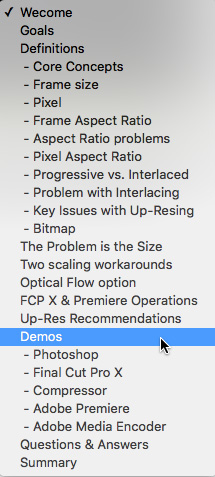
SPECIAL FEATURE
To help you quickly find the information you need, we included chapter markers in the downloaded QuickTime movie for easy navigation. Click here to learn how to display them in your download.
CONTENT OUTLINE


