
[jwplayer api_key="kbBMBJTjKc9WLL2/3VpmkSznwdzzqjAKHc08xw==" file="https://d900066ubkwab.cloudfront.net/Webinar201_Captions.mp4?Expires=1786698672&Key-Pair-Id=APKAIKDB332HYGG7URHA&Signature=ltll9bE7-N08Db4BQ3w3zkd6Vf9yCMCBrh9BanTVTXKoiLslAVUeN2hBlQmqI6630YMpqSiA97PQcIDz7JZqGfoA0kFAs1oC2KV3bCmhF5DdxMKBs7vpPhsgzuH-S0I1yoZNJZlzNMYjYcoqyKI2nRSmdRhh7F5SzWaiQK2aBMA_" tracks='{ "file": "https://dev.larryjordan.com/videos_subtitle/", "label": "English", "kind": "captions", "default": true }' height="360" width="640" controls="true" playbackratecontrols="true"]
COURSE DESCRIPTION
Closed captions are intimidating! But, closed captions are also vital to understanding a movie for anyone who has trouble hearing or speaks a different language. The problem is that creating closed captions is not easy, even though captions are required for more and more media projects today.
In this session, join host, Larry Jordan, as he demystifies working with closed captions inside Adobe Premiere Pro CC and:
There’s no reason to let captions intimidate you. After this session, you’ll be able to add, modify, edit and export captions easily using Adobe Premiere Pro CC.
AUDIENCE LEVEL
This advanced-level session assumes basic familiarity with Adobe Premiere Pro, but does not assume any knowledge of captions. This training is delivered as a QuickTime movie, so you don’t need any additional software to watch this training.
SPECIAL FEATURE
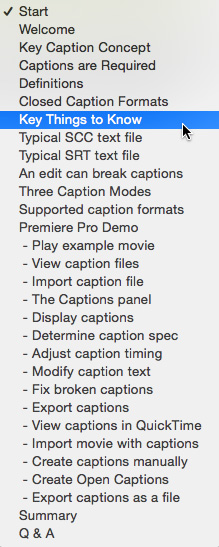
To help you quickly find the information you need, we included chapter markers in the downloaded QuickTime movie for easy navigation. Click here to learn how to display them in your download.
CONTENT OUTLINE


