
[jwplayer api_key="kbBMBJTjKc9WLL2/3VpmkSznwdzzqjAKHc08xw==" file="https://d900066ubkwab.cloudfront.net/Webinar200_Audition.mp4?Expires=1786698672&Key-Pair-Id=APKAIKDB332HYGG7URHA&Signature=cU~crXauei4CwLuvNJ89PMsAlEwtF9VaLB2Ks0Oo5WqKjfzv9sxdmfWRkgMYFNuwJcS7ZsIRN7HcENaPxbT-HdQYHFx2jR2Hkb9ZM8daYCtvsuGv2eP-g5uz~y3YJ2Wlx1BgG~xA52mKhHNhV8hHjw7CdxXZbTGSy6pjy3A0Qlc_" tracks='{ "file": "https://dev.larryjordan.com/videos_subtitle/", "label": "English", "kind": "captions", "default": true }' height="360" width="640" controls="true" playbackratecontrols="true"]
COURSE DESCRIPTION
Just about every video editor wants to know more about audio, and just about every one of them doesn’t have the time to study audio repair and mixing as much as they would like.
With the June, 2016, update to Adobe Audition CC, Adobe added the “Essential Sound Panel,” powerful new audio tools that are easy for video editors to learn and apply that can simplify audio mixing tasks for even the most time-challenged video editor.
Join host, Larry Jordan, as he shows how to use the new ESP to mix a typical documentary containing talking heads, sound effects, music and ambience. In this session, he will cover:
Whether you need to repair a single clip, or mix an entire project, the new links and tools in Audition make this process better than ever. If you are interested in improving the quality of your sound, you need to watch – and listen – to this webinar.
AUDIENCE LEVEL
This is an intermediate-level session, designed for editors who are familiar with Adobe Premiere but need not know anything about Adobe Audition. This training is delivered as a QuickTime movie, so you don’t need any additional software to watch this training.
SPECIAL FEATURE
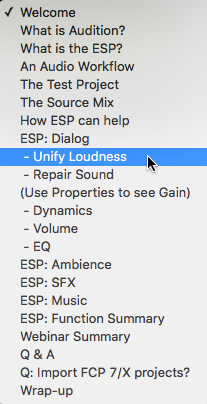
To help you quickly find the information you need, we included chapter markers in the downloaded QuickTime movie for easy navigation. Click here to learn how to display them in your download.
CONTENT OUTLINE


