
[jwplayer api_key="kbBMBJTjKc9WLL2/3VpmkSznwdzzqjAKHc08xw==" file="https://d900066ubkwab.cloudfront.net/Webinar195b_Masks_Premiere.mp4?Expires=1788981450&Key-Pair-Id=APKAIKDB332HYGG7URHA&Signature=XifLV8nOD9ZKv76L6M6G08GRuLB38OeWYHIHrQ2CWbuCaQJOlV-DLrd6N7tcYHlVL3WDC~RneCSS5~zQW2vxs~UsrGf8mHb9SSUQKhRfRRjL9vicQ3ncPW52yLLP-sJSJHXQSi3605Qh5nrYU-8Vig8NSnonl1GeJFSGWw1nnnI_" tracks='{ "file": "https://dev.larryjordan.com/videos_subtitle/", "label": "English", "kind": "captions", "default": true }' height="360" width="640" controls="true" playbackratecontrols="true"]
COURSE DESCRIPTION
Masks allow us to modify or hide portions of an image. While most often used in chroma (or green-screen) keys, masks have a wide variety of uses.
In this two-part webinar, join host, Larry Jordan, as he illustrates how to create, modify and use masks in Adobe Premiere Pro CC. During this webinar you will learn how to:
Masks have a wide variety of uses, both to fix problems and create effects. Once you learn how to use them, you’ll never stop.
NOTE: Click here to view a companion title on masks in Final Cut Pro X.
AUDIENCE LEVEL
This intermediate-level session assumes familiarity with Adobe Premiere Pro and how to create effects. (This session is delivered as a QuickTime movie.)
SPECIAL FEATURE
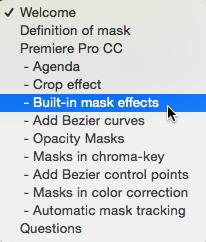
To help you quickly find the information you need, we included chapter markers in the downloaded QuickTime movie for easy navigation. Click here to learn how to display them in your download.
CONTENT OUTLINE
Masks are highly-versatile tools in Premiere Pro and the new auto-tracking tools make them almost indispensable.


