[jwplayer api_key="kbBMBJTjKc9WLL2/3VpmkSznwdzzqjAKHc08xw==" file="https://d900066ubkwab.cloudfront.net/Webinar309_Adobe_New.mp4?Expires=1787144743&Key-Pair-Id=APKAIKDB332HYGG7URHA&Signature=ZcZ8wIO3YV-FK~iXB5jCrYLCoVKSEsy-wlphRCOQ4dzyZBI0LxeHdxly3z9dlO-56Zqjl1nfZ~BxpVLzyHcYIwd1OT2Y4I-e8XOpyndivhoHBS2QWLGEEL-gmweLORfEKJAbL-Tc9UK1U7irENHX5rKrv7YjZEQtjma0Q9H1EoY_" tracks='{ "file": "https://dev.larryjordan.com/videos_subtitle/", "label": "English", "kind": "captions", "default": true }' height="360" width="640" controls="true" playbackratecontrols="true"]
Presented: March 17, 2021
SESSION DESCRIPTION
Last week, Adobe released the new 2021 versions of Premiere Pro, After Effects, Audition, Media Encoder, and the rest of their audio and video applications. In this session, host Larry Jordan takes a look at some of the key features in this release.
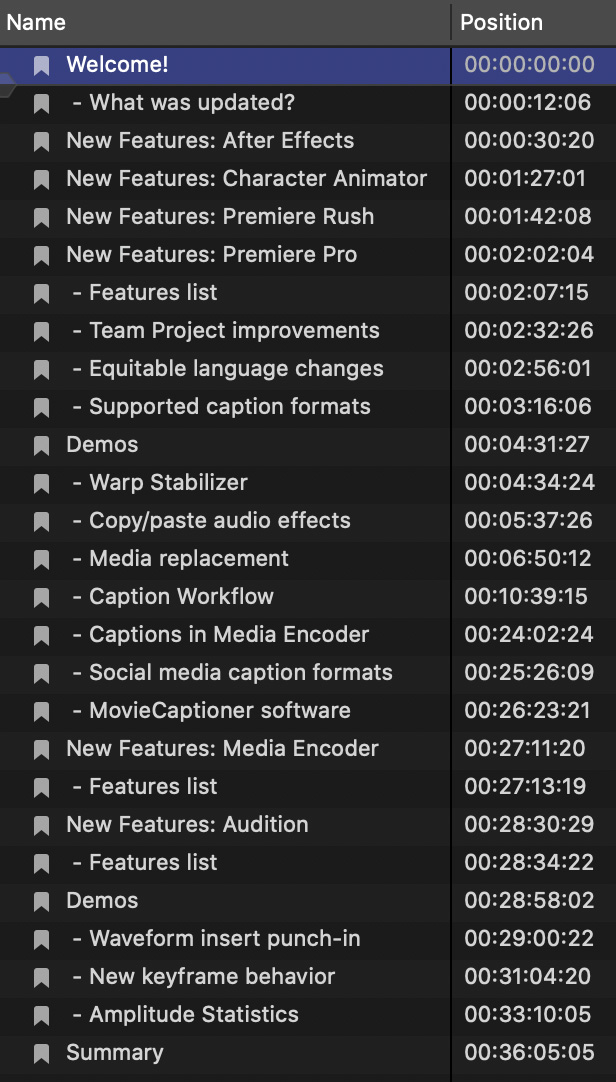
This session demos:
As well, it discusses new features in After Effects, Character Animator and Premiere Rush.
This session is a good way to catch up on what’s new and how it works.
AUDIENCE LEVEL
This intermediate-level session assumes a basic familiarity with Adobe Premiere Pro.
CHAPTER MARKERS
To help you quickly find the information you need, we include chapter markers in the QuickTime download to simplify navigation. Click here to learn how to display them in your download.