
Sometimes there just isn’t enough time….
Looking for a faster way to trim clips in Final Cut Pro X? Here are three keyboard shortcuts that will make your editing MUCH faster!
IF SKIMMING IS TURNED ON
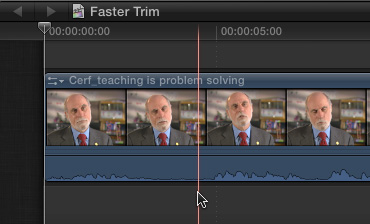
Position the skimmer at the point of the trim.
To trim from the beginning of a clip to the position of the skimmer, type Option+[
To trim from the end of a clip to the position of the skimmer, type Option+]
This trim is blindingly quick – position the skimmer, press the keys, done. No razor blade. No removing clips. Simple. And the magnetic timeline automatically removes the gap.
IF SKIMMING IS TURNED OFF
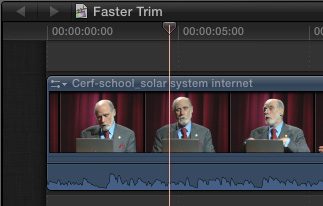
If the skimmer drives you nuts in the Timeline, this trick works equally well, if not quite as fast. The keyboard shortcuts are the same.
Position the playhead at the point of the trim.
To trim from the beginning of a clip to the position of the playhead, type Option+[
To trim from the end of a clip to the position of the playhead, type Option+]
If the skimmer is active and in the Timeline, the skimmer determines the point of the trim. If the skimmer is not active, or not in the Timeline, the playhead determines the point of the trim.
TRIMMING A SELECTION
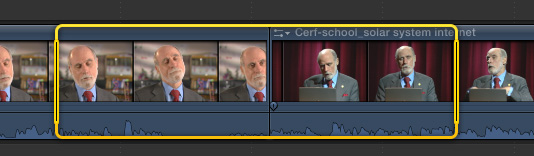
Whether skimming is turned on or off makes no difference for this next tip.
To trim to a selection, use the Range tool (R) to select a range within A clip, or across MULTIPLE clips on the same layer, and press Option+
The cool thing about this tip is that you can select more than one clip on the same layer and trim them all at once.
Notice that these three shortcuts work with three keys that are grouped together on the keyboard: [ – ] –
NOTE: You can also access these three options from the Edit menu, but that isn’t nearly as much fun.
Very cool.

2,000 Video Training Titles
Edit smarter with Larry Jordan. Available in our store.
Access over 2,000 on-demand video editing courses. Become a member of our Video Training Library today!
Subscribe to Larry's FREE weekly newsletter and
save 10%
on your first purchase.

11 Responses to FCP X: A Faster Way to Trim
← Older Comments-
 jivan says:
November 16, 2016 at 4:57 am
← Older CommentsGood trick, just what I was looking for! last 2 years
Thanks very much!