
[ Updated Dec. 3, 2018, with a caution from Apple about using ffMPEG. ]
 The holidays gave me some extra time to explore testing the speed of the new Mac mini against a high-performance iMac for video compression. The results surprised me so much that I’ve created two articles with my results.
This article covers the differences in hardware, while this article compares Apple Compressor, Adobe Media Encoder and ffWorks/ffMPEG running on both systems.
EXECUTIVE SUMMARY
THE GEAR
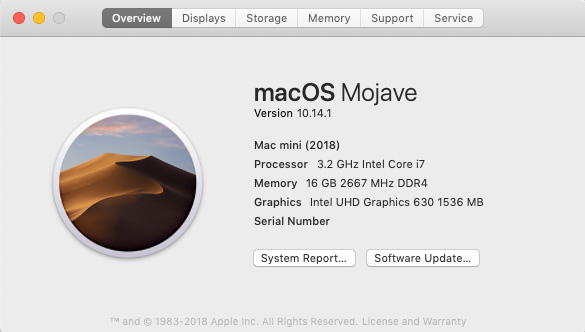
This is the Mac mini I used for testing. It’s the high-end 6-core Intel i7. It has a 1 TB internal SSD. The i7 is multi-threaded, which yields faster results than an i3 or i5 Mac mini at the same clock speed. This Mac mini is also running the latest version of macOS.
NOTE: Here’s an article that explains the differences between an i3, i5 and i7 CPU.
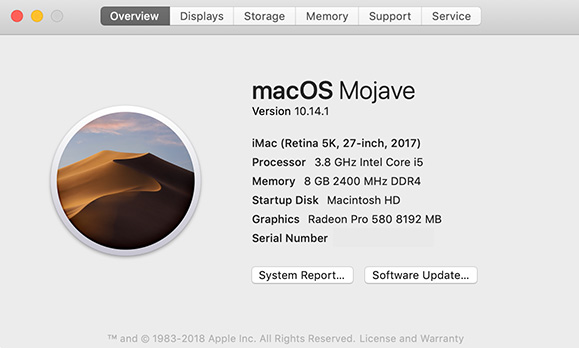
This is the 27″ iMac I used for testing. It is 4-core Intel i5. While it has a faster clock speed, the i5 is not multithreaded. This will prove to be significant in the tests. It, too, is running the latest version of macOS.
THE TESTS
There are so many potential variations of codecs, frame sizes and content that it is impossible to test all the permutations. So, I chose to create 78 different tests using three different source file codecs – XDCAM, ProRes 422 HQ, ProRes 4444 – then compress them into five different codecs – ProRes 422, H.264, HEVC 8-bit, HEVC 10-bit and MXF OP1a.
NOTE: I didn’t see any benefit to testing against older gear. Older computers would only be slower. Computers older than 2015 don’t support hardware acceleration, which makes them far slower for H.264 compression. Also, HEVC is only supported in High Sierra or later.
ffWorks is a front-end to ffMPEG, which is open-source and popular media compression software. ffMPEG, itself, can only be run from the command line of Terminal. ffWorks greatly simplifies using ffMPEG. (Website: ffworks.net)
To keep things as fair as possible:
If you are running an older computer, and doing a lot of video compression, the Mac mini will save you time. Depending on the computer and compression software you are using, it can save you a LOT of time.
NOTE: Every computer configuration and movie will yield different timings. My goal here is to help you compare systems, not predict how long any specific compression will take.
UPDATE: APPLE CAUTIONS ABOUT FFMPEG
Apple has published a caution about using ffMPEG with ProRes:
ProRes is a codec technology developed by Apple for high-quality, high-performance editing in Final Cut Pro X. …Apple also licenses and certifies ProRes for specific third-party products and workflows.
In some instances, unauthorized codec implementations have been used in third-party software and hardware products. Using any unauthorized implementation (such as the FFmpeg and derivative implementations) might lead to decoding errors, performance degradation, incompatibility, and instability.
Here’s a link to the entire tech note: support.apple.com/en-us/HT200321
I use ffMPEG to create H.264 files from ProRes masters. I have found its image quality and file size to be superior to that created by either Apple Compressor or Adobe Media Encoder. I have not had any of my compressed files rejected for technical reasons. This is why I included ffMPEG in my tests.
However, it concerns me that ffMPEG is using unlicensed ProRes code. This is inappropriate and potentially dangerous. While my test results stand for comparison purposes, I will start looking for other compression software to use in the future.
NOTE: The KnowledgeBase article from Apple, above, lists all licensed implementations of ProRes. There are a lot to choose from.
THE RESULTS
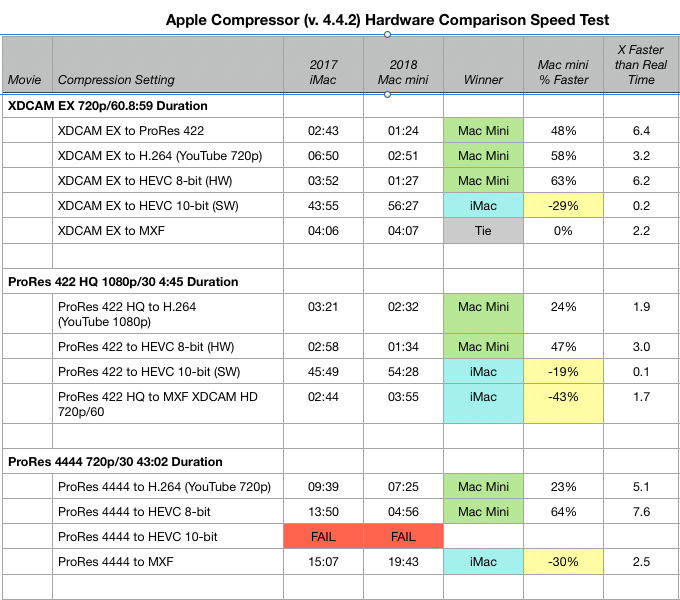
Yellow bars indicate where the Mac mini was not as fast as the iMac. The “X Faster than Real Time” column describes compression speed in terms of how much faster than real time the process will take.
If you tend to use Apple Compressor, this table shows where the Mac mini will be faster and by how much.
NOTE: Apple Compressor failed consistently on both computers to compress a 10-bit HEVC file. I tried two separate files, two times each. It failed each time. It was the only software to fail in any of these tests. Failure occurred after 2.5 hours of processing.
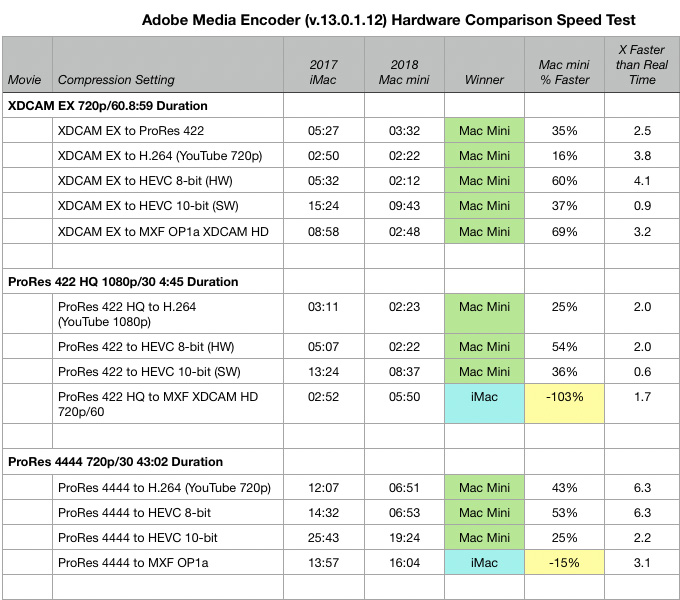
If you tend to use Adobe Media Encoder, this table shows where the Mac mini will be faster and by how much.
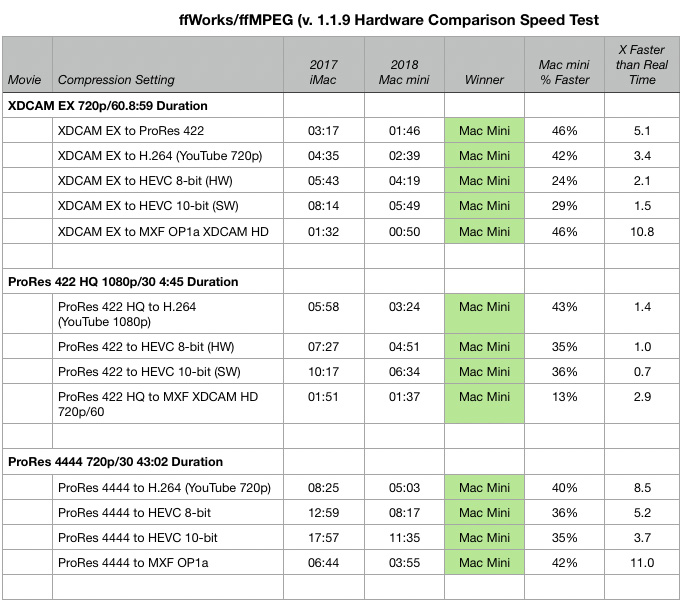
My current favorite compression software, ffWorks/ffMPEG, is illustrated in this table.
SUMMARY
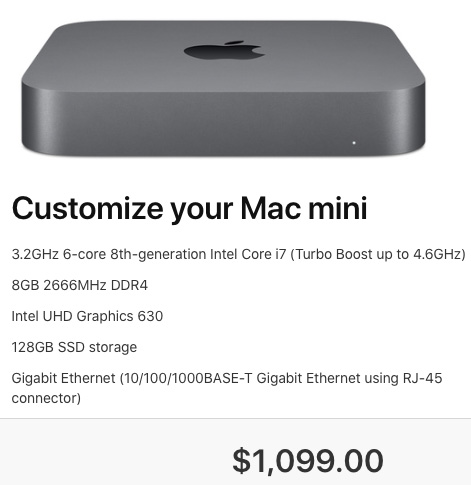
While hardware tells only part of the story, the limitations of the GPU for the Mac mini do not hamper it from becoming an inexpensive video compression powerhouse.
If your goal is improved video compression, you only need to upgrade the CPU to the 6-core i7. Additional RAM, SSD storage capacity and 10 Gb Ethernet, while nice, won’t improve compression speeds.
In general, the more cores in the CPU, the faster it will encode media. So, an iMac Pro would probably be faster than the Mac mini for some tasks. However, as I understand it, the iMac Pro does not support hardware acceleration for H.264 or HEVC compression. For those codecs, the Mac mini would be faster.
NOTE: Remember that the Mac mini can run “headless,” that is, without a keyboard, mouse or monitor if you control it remotely from another computer. This further decreases the cost of adding a computer. Apple Remote Desktop or VNC Remote Desktop are two applications you can use to control a Mac remotely.
EXTRA CREDIT
Here’s a PDF of all my findings and notes (64 KB).
Be sure to read this article to learn more about the significant differences in compression software that I used for this test.

2,000 Video Training Titles
Edit smarter with Larry Jordan. Available in our store.
Access over 2,000 on-demand video editing courses. Become a member of our Video Training Library today!
Subscribe to Larry's FREE weekly newsletter and
save 10%
on your first purchase.

16 Responses to Video Compression Speed Test: iMac vs. Mac Mini [u]
← Older Comments-
 Erasmus says:
July 9, 2019 at 12:23 am
-
 Larry says:
July 9, 2019 at 9:10 am
-
 Erasmus says:
July 9, 2019 at 2:31 pm
-
 Larry says:
July 9, 2019 at 2:36 pm
-
 Charles Wood says:
August 17, 2019 at 9:33 am
-
 Larry says:
August 17, 2019 at 9:42 am
← Older CommentsHi Larry,
I am curious to know if the Mac mini beats also the iMac Pro in encoding H.264 videos (1080p).
I have lot’s of videos with little effects to render and wonder which Mac would do better than the Mac mini i7.
Thank you for your help.
Erasus:
H.264 is, essentially, single core. It benefits mainly from increasing CPU speed.
HEVC is multi-core aware. It will benefit from more cores.
So, the Mac Mini and iMac Pro will be comparable for H.264 – using i7 chips. i3 chips will always lose to the iMac Pro.
HEVC will be encoded and decoded much faster on the iMac Pro.
Larry
Hello Larry,
Thank you for your reply. Would that mean that the new (normal) iMac i9 would beat both of them in encoding H.264? Or is there a limit with Quick Sync?
Or does it simply mean that currently no Mac would do better than the Mac mini i7 for that task?
Thank you in advance for your help.
Erasmus:
It is difficult to answer who beats whom with certainty. It varies by a variety of factors. However, an i7 or i9 with reasonably equal clock speed on an iMac or Mac mini should do an excellent job of compressing video. If ALL you need is compression, the Mac mini is an excellent choice simply due to its price.
Larry
Have you tested 2019 iMac with i9 processor against the MacMini?
Charles:
Nope. However, I would expect the i9 to be significantly faster than the i7.
Larry