[jwplayer api_key="kbBMBJTjKc9WLL2/3VpmkSznwdzzqjAKHc08xw==" file="https://d900066ubkwab.cloudfront.net/Wewbianr323_New_FCP.mp4?Expires=1787139641&Key-Pair-Id=APKAIKDB332HYGG7URHA&Signature=WstBIVZSeV6AXgebPawu8ZRR6JqxF~kphIYAo59LcEOInW1narHJFDyhj9RVBpxZoHEwRFybF4MI2eOC31f5B0Wrsse30ncXbGYJqTHs7L~LnoUQtpreU5xYXh4sFzPUNZm7zXlX9erzWkFvs2tXs5-h2wBiEpezgluAbWxkUqU_" tracks='{ "file": "https://dev.larryjordan.com/videos_subtitle/", "label": "English", "kind": "captions", "default": true }' height="360" width="640" controls="true" playbackratecontrols="true"]
Presented: October 27, 2021
SESSION DESCRIPTION
Apple updated Final Cut Pro, Motion and Compressor last week with significant new features. In this session, Larry Jordan illustrates some of the more interesting – and important – ones.
This session covers:
Discover how these features work, and how to use them in your next project.
AUDIENCE LEVEL
This intermediate-level session is designed for editors with some experience with Apple Final Cut Pro, Motion and/or Compressor.
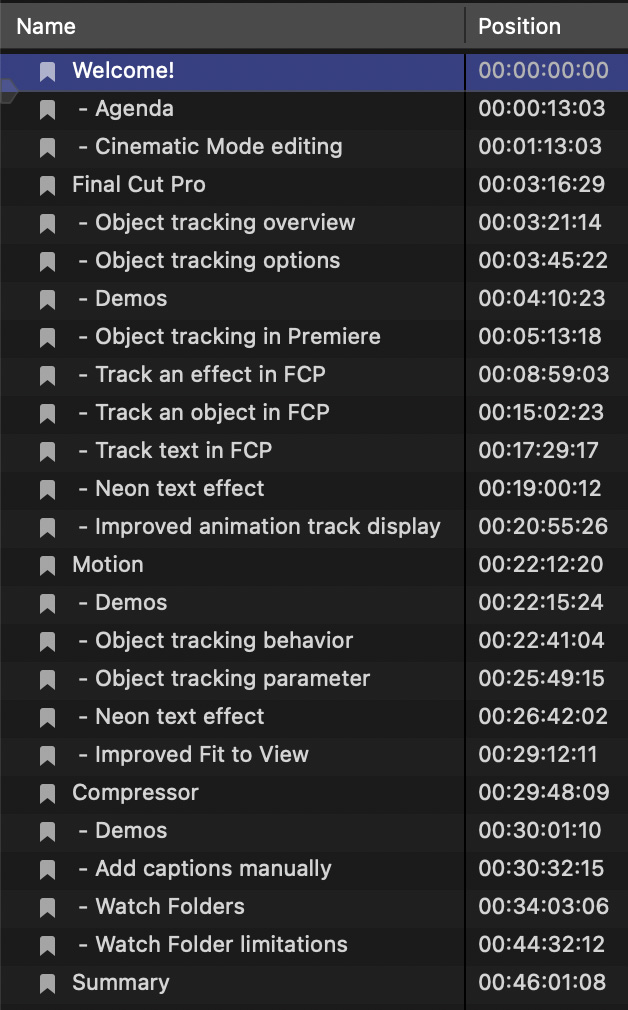
CHAPTER MARKERS
To help you quickly find the information you need, we include chapter markers in the QuickTime download to simplify navigation. Click here to learn how to display them in your download.