
[jwplayer api_key="kbBMBJTjKc9WLL2/3VpmkSznwdzzqjAKHc08xw==" file="https://d900066ubkwab.cloudfront.net/Webinar224_Premiere_FX.mp4?Expires=1786682741&Key-Pair-Id=APKAIKDB332HYGG7URHA&Signature=XW1yZslLBBRDTjwuFLzcR6uld8wnAgvHIYp2tP4i13HxitdHFcv~BEC6zulM-Q8R6r~sg6PT3~llOW-NyRvhgX4KIygzKyAiQFI-xXaNDjBqJquqgXBzehPKO0XRCATCndoGY0-pxApW2VJ7n8A10V472zB3LTc~tv1O3KfjjAc_" tracks='{ "file": "https://dev.larryjordan.com/videos_subtitle/", "label": "English", "kind": "captions", "default": true }' height="360" width="640" controls="true" playbackratecontrols="true"]
Presented: May 31, 2017
COURSE DESCRIPTION
It’s time to shift our focus back to Adobe, especially with its latest release. So, this week we created a webinar designed for new or self-taught editors of Adobe Premiere Pro CC illustrating how to create simple effects.
There are five major effects categories in Premiere:
This webinar starts at the beginning and illustrates how to create all of these. Along the way, we also cover:
This is a great way to get started learning effects, or a solid refresher course if you want to make sure you understand the basics.
AUDIENCE LEVEL
This is a beginning-level webinar. While some knowledge of Adobe Premiere will be helpful, my intent is to start so even new editors can keep up. This session is delivered as a QuickTime movie, so you don’t need to own the software to watch this.
CHAPTER MARKERS
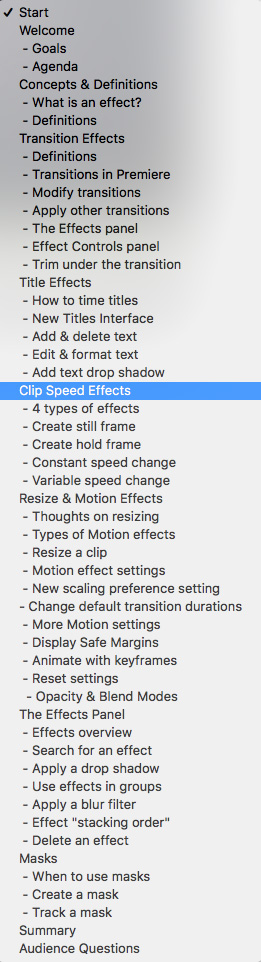
To help you quickly find the information you need, we include chapter markers in the QuickTime download to simplify navigation. Click here to learn how to display them in your download.
CONTENT OUTLINE


