
[jwplayer api_key="kbBMBJTjKc9WLL2/3VpmkSznwdzzqjAKHc08xw==" file="https://d900066ubkwab.cloudfront.net/Webinar219_Motion_05.mp4?Expires=1786682880&Key-Pair-Id=APKAIKDB332HYGG7URHA&Signature=QiB415Dqr~XfFOVn2xKyZVKDjp65mMAWhlKlnPFE2VskP5xcMH0NQFUbShiesUYOSlWvcWa-k~9AY8x~b4ghVxHpOyr28xnJ5d9TTWCno6ulKTo5Om2h0tZqS1kH9l9Mp-QOLNdoxiCbZx0vFbbKwNTGMyGsqilAHHpVMTP0AKA_" tracks='{ "file": "https://dev.larryjordan.com/videos_subtitle/", "label": "English", "kind": "captions", "default": true }' height="360" width="640" controls="true" playbackratecontrols="true"]
Presented: Mar. 29, 2017
COURSE DESCRIPTION
This is the fifth in a 6-part series examining Apple Motion 5.3.x.
Here’s the link to our 6-part Motion Bundle that contains this episode.
This session continues our 6-part series on using the 5.3.x version of Apple Motion. This week, we look at how to create effects in Motion 5.3 that can be used and controlled by Apple Final Cut Pro X.
Whether you are new to Motion or want to get deeper and more fluid with the application, this series is designed for you. Here’s what this covers
AUDIENCE LEVEL
This intermediate session is designed for new and existing users of Apple Motion. New users will benefit from an in-depth understanding of the software. Existing users will benefit from learning how the interface has changed and new techniques to create motion graphics.
If you are new to Motion, it will be helpful to watch Webinar 215 to understand the basic operation of the software before watching this session.
CHAPTER MARKERS
To help you quickly find the information you need, we included chapter markers in the download version for easy navigation. Click here to learn how to display them in your download.
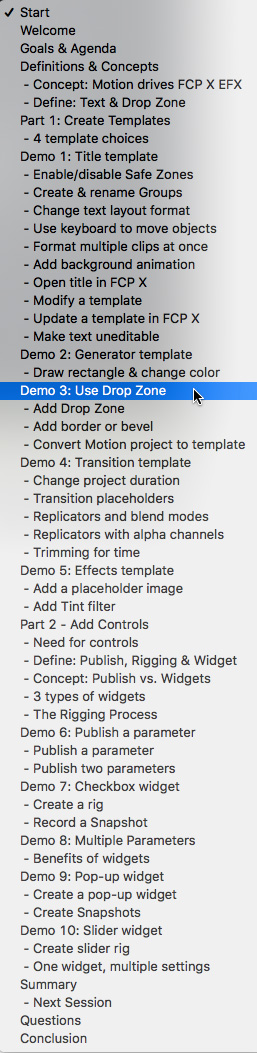
CONTENT OUTLINE
CREATING TEMPLATES
ADD CONTROLS


